A good social media post and a handful of hashtags used to be all it took to execute a digital marketing strategy. Today, amid the noise, it requires a lot more planning.
Social media management is a key part of raising brand awareness on the internet now. By paying attention to key metrics and using comprehensive social media management tools, you'll craft content your specific audience loves.
What is social media management?
Social media management is the process of guiding a brand's presence across social media channels. It covers crafting engaging content, interacting with the audience, and tracking digital marketing metrics over time to find out what that audience wants to see.
Effective social media management creates a cohesive brand image that makes a business instantly recognizable. We've already mentioned the "noise" of social media, and building a community of long-term followers requires carefully crafting a stand-out brand image that people want to get involved with.
In short, it's a thoughtful, comprehensive strategy that improves over time.
Evolution of social media platforms
This isn't 2007 anymore, and social media has evolved. That evolution has transformed the way businesses interact with what's now a global consumer base. In the beginning, these platforms focused on personal connections between individuals, but now they serve as vital tools for social media marketing and community building, not just between people but between people and brands.
One look at how Instagram has gone from pictures of our meals to one of the biggest online shopping platforms tells us how much social media management needs to keep up. In many cases, a strong presence is non-negotiable to maintain a competitive advantage.
How does social media management work?
Social media management is a cohesive, replicable process for creating social media posts on any platform where your company has a presence. It ensures that all content aligns with broader business goals and provides a framework for both organic social media and paid social ads. From there, companies monitor engagement by responding to comments, mentions, and messages and ultimately optimize and refine campaigns by tracking key performance metrics.
The process follows a post from the very first idea to the results.
Content creation management
It's not enough to simply create eye-catching graphics. Each piece of content should encourage ongoing interaction by maintaining a consistent voice and style, reinforcing brand identity, and giving the people what they want. That varies based on the audience and the platform. Companies that understand this can build compelling marketing campaigns on social media that demonstrate growth not just in follower numbers but when it comes to the bottom line.
Scheduling and publishing management
Timing is an important part of making sure a particular post is successful. You may have great images and thoughtful captions but if your audience isn't online to see, none of that will matter. However, if you schedule your posts when your audience is most active, you'll have a much better chance of them seeing and then interacting with them.
Paid advertising
Paid advertising helps brands leverage social platforms to target specific audiences. For example, a fitness company might use paid ads to help with the launch of their new fitness app. They can target users aged 18-35 who have shown an interest in fitness in the past and may have purchased similar products before. They continue to show their usual range of tutorials and health-related live videos, and they target any users that interact with those posts for their paid ads as well. The result gives them increased visibility for their app launch by reaching customers who are more likely to be looking for the solution the fitness brand offers.
Brand reputation and crisis management
You aren't always going to get it right. One of your posts may cause unintended controversy, or a customer could post negative reviews. Complaints happen. Brand reputation and crisis management help you be proactive about negative feedback before it becomes a huge problem.
When you actively monitor conversations through social media listening, you can identify shifts in public perception and take appropriate action. You'll have time to respond and mitigate negative sentiment to help stop any escalation. More importantly, you'll demonstrate that your brand actually values your customers and all their feedback, positive or otherwise.
Engagement and community building
Customers want to belong to a community and buy from a brand that reflects their values and beliefs. Keeping customers engaged can foster that feeling of community. Being in an active conversation with your customers through social media content not only strengthens relationships but also fosters a vibrant community around your business.
Analytics and insights management
Metrics like engagement rate, reach, and audience demographics help you make logical, informed decisions about the direction of your social media so you're posting what your followers find most impactful. It also helps you fine tune the language and targeting used to reach customers through paid social media ads.
For example, if a brand selling organic skincare notices their audience really loves user-generated content on TikTok, they can adjust their strategy to include more user videos on that platform.
Why social media management is important for businesses
Forrester's August 2023 Consumer Pulse survey found that over half of respondents purchased products from social media. Gen Z also cited online influencers and creatives as the primary way they discover new products. Companies that build a strong social media presence can reach these customers more easily and take advantage of their willingness to make purchases directly from those sites.
Let's explore the advantages of effective social media management.
Boosting brand recognition and visibility
Successful social media management can help make brands instantly recognizable online. Think Apple's sleek visuals on Instagram or Wendy's witty interactions with followers on X.
Around 83% of marketers worldwide identified increased exposure as a benefit of effective social media marketing. More visibility attracts new customers and makes your brand identity more recognizable.
Strengthening customer engagement and communication
The "social" part of social media is really important. Once you've posted content, you have to actually engage customers in conversations online to see higher levels of engagement.
A ceramics company might post a poll for followers to choose the next style of serving set for a limited edition drop. When followers vote, they're drawn into the creation process and might be more likely to set an alarm for the release and purchase their favorite style (that they voted for). The creator may also answer questions in comments about using the new sets, such as how to clean them safely after use.
Advanced target audience analysis
Advanced target audience analysis is an aspect of effective social media management that can benefit businesses in more ways than one. This data gives you a foundation for creating content your audience finds valuable.
On a basic level, for instance, you could look at how your audience is broken out by country. This data can inform social media advertising strategies, ensuring you create social media posts for the right audience on the right platform.
Beyond demographics, analyzing what your audience talks about on social media can help you find new avenues to connect with them.
Fostering customer trust and loyalty
Successful social media management helps to build and maintain customer trust by ensuring brand transparency and responsiveness. This can explain why 62% of marketers report that social media marketing efforts develop loyal fans, generating long-term customer relationships and brand advocates.
For example, an independent hobby farm might post about their latest skincare line made from plants that they grow. They might also share user testimonials and behind-the-scenes videos to demonstrate how their products are made and where ingredients come from that aren't from the farm itself.
Increasing website traffic and conversion rates
A 2024 survey revealed that 73% of marketers noted increased traffic as a benefit of social media marketing management, while 65% highlighted lead generation. By sharing engaging content and strategic links through your posts, you can transform casual viewers into potential customers.
For example, a shoe brand might post a "get ready with me" video to show how their shoes look with different types of outfits. A gym could share videos for their latest fitness classes, encouraging people to sign up for a free trial. In both cases, these companies use social media as a call to action to send customers from their posts to their websites.
Highlighting products and services
Highlighting products and services is another powerful aspect of social media management — 52% of global marketers reported improved sales as a benefit of social media marketing. Social media allows your business to showcase products and services directly to your audience, making it easy and tempting to click "purchase."
Staying updated with industry trends
With hundreds of thousands of brands on social media, staying updated with industry trends is key for keeping your content relevant to customers.
Some emerging trends in digital marketing and how they might be leveraged:
- The rise of short-form video content has made quick, attention-getting clips really effective in keeping customers interested and moving them to a website or other part of a customer journey. A fitness brand might use a 30-second tutorial video to encourage app downloads, for example.
- Increased focus on authenticity and transparency has led brands to prioritize posts that demonstrate genuine interactions with customers and open communication. For example, a skincare brand can share behind the scenes footage of their sustainable sourcing practices.
- The growth of social commerce has allowed customers to shop directly from their favorite brands on their favorite social media platform. A fashion retailer might add their entire holiday collection to the app just in time for people looking for New Year's outfits.
The role of a social media manager
A dedicated social media manager can help bring all this together. Social media requires a lot of time and effort in both the creation process and measuring outcomes. Having a dedicated social media team focusing on this aspect of your marketing can help make sure things run smoothly, and everything is tied back to a greater business goal.
A social media manager will oversee content creation, take an active role in engagement, and use analytics to determine how successful each organic and paid social media campaign is. Plus, they can continuously monitor trends so your content is timely instead of outdated and respond quickly to any negative feedback.
Who is a social media manager?
A social media manager is a marketing professional responsible for managing social media content and strategy for a brand. They play a crucial role in building a brand's online presence, managing crises, and engaging with their audience:
- They create and curate relevant content that matches brand mission, message, and goals.
- They engage actively with followers and build a community by replying to comments, answering questions, and handling direct messages.
- They have a deep understanding of the company's audience and what they want.
- After content is published, they analyze performance metrics to create new goals and refine strategy further.
- They seek out social media trends and find opportunities within them.
- They monitor any negative feedback, moderate comments, and work to create a welcoming environment.
Companies need someone who is the expert at social media tools, and usually that'll sit with a dedicated social media manager as opposed to a generalist.
Social media managers ensure that a brand's voice is consistent and that campaigns resonate with their target audience. While you can go so far with their expertise alone, a social media management tool like Brandwatch will supercharge your social media manager's abilities.
Importance of a social media manager in business
We sometimes joke online about company CEOs hiring their teenage nieces and nephews to handle massive campaigns, but this isn't typically what happens. Social media managers possess specialized knowledge not only about social media platforms but also how to craft, refine, and apply metrics to social media campaigns.
They typically have expertise in community management, which nurtures relationships with followers, and are on the front lines when a crisis or negative feedback happens. They help shape successful brand identities even among thousands of other brands operating online.
At Brandwatch we've seen the field of social media management mature massively over time.
Developing a social media strategy
Here's what it's going to take.
Setting goals and objectives
Begin your strategy with a social media audit to assess your current performance and identify areas for improvement. Some areas to examine include content variety, posting frequency, and response times. Once you have a clearer idea of your strengths and weaknesses, you can begin filling in gaps.
Next, align your strategy with broader business objectives to ensure that it contributes to overall company growth. A clear, measurable goal ensures you're able to fine-tune your social media efforts and that you know what works and, crucially, what doesn't.
Understanding your target audience
The next step is understanding your target audience. You cannot move forward before taking this step. Your content must resonate with your ideal customer to generate new leads, and you can't know that without having a deep level of understanding of what your target audience wants.
Reliable social media management tools like Brandwatch enable you to easily gather insights about your audience, what they're saying online, and what they're interested in. You can use that data to inform your social media planning, ensuring your efforts align with audience preferences and behaviors and encouraging higher engagement levels.
Choosing the right platforms
Once you've identified your target audience, you can begin selecting the right platforms for your social media marketing strategy.
You don't have to have a presence on every platform. To identify the best fit, consider where your target audience spends their time. For instance, Meta Platforms owns four major social media platforms — Facebook, WhatsApp, Facebook Messenger, and Instagram — each boasting over one billion monthly active users across demographics. Platforms like TikTok and Instagram typically skew younger compared to social channels like LinkedIn. If your audience is largely on TikTok and Instagram, you may not need a Facebook Messenger or LinkedIn strategy.
Don't guess. Look closely at the data to make your decision.
Content planning and creation
Content planning and creation is the step most people think of when they imagine a social media strategy. To create impactful social media posts, you can:
- Tailor your content to what interests your audience most, such as tutorials or product reviews.
- Use a mix of visual content, like video reels and stories, to engage users on different social platforms.
- Post regularly — for instance, brands often average 4.7 posts weekly on channels like Instagram, a cadence that seems to improve overall engagement. Look closely at your customer data to determine what works.
By focusing on these aspects, you can turbocharge engagement and build stronger connections with your audience.
Social media engagement and community management
Social media engagement and community management are must-haves for forging lasting connections with your audience. Instead of a stagnant social media profile, engagement turns it into an interactive marketing platform. Managing a community well also ensures it's a safe, pleasant experience for your audience.
Importance of engagement
Social media engagement is crucial for a successful social media. Engaging with your audience humanizes your brand and encourages conversations that can lead to valuable insights. For example, customers might reveal preferences or problems they'd like your brand to solve.
Nurturing engagement is so important, and many marketers believe an active online community is critical for success.
That doesn't just mean encouraging comments on your latest post – generating reviews are also important. 43% of consumers regularly read online reviews of local businesses, with 34% stating they always do.
Engagement shapes consumer perceptions and drives purchase decisions – it's not just 'hype'.
Strategies for increasing engagement
Here's how to develop a quality, engaging social media presence that encourages existing and potential customers to keep your social profile at the top of their list:
- Interactive, visual content like polls, quizzes, and attention-grabbing photos or graphics engage your existing customers and invite new followers to share their opinions. An interactive approach makes your posts more appealing and creates a strong brand presence.
- Directly respond to comments and messages to foster community and encourage followers to share their own content related to your brand. Reposting this user-generated content builds authenticity and makes followers feel valued.
- You might consider collaboration with social media influencers. Partnering with influencers can amplify your reach and advance your credibility. Nearly 50% of millennials find influencer recommendations more engaging than standard ads, and 36% deem them more trustworthy.
Building and managing an online community
Effective community management is essential for fostering long-lasting connections. Engage your loyal customers by responding to their comments or messages and encouraging ongoing dialogue. You can also utilize customer relationship management tools to gain insights and tailor your approach.
Active community moderation not only helps you catch negative sentiment before it escalates, but it also helps make your social media a welcoming place for all your followers – something not every company succeeds at.
Social media analytics and measuring success
We've mentioned data multiple times now, but here's how to use it effectively to inform your social media strategy without becoming overwhelmed.
Importance of analytics in social media management
Analytics are the absolute foundation for successful social media management. By leveraging social media analytics like audience research, engagement metrics, and conversion rates, you can identify patterns in user behavior and adjust your strategies accordingly.
These insights also help you better understand what your followers want or need. This drives positive engagement by resonating strongly with the community you've built and tells social media algorithms that you've got something valuable new followers need to see.
Key performance indicators (KPIs)
Key performance indicators are clear, actionable metrics that tell you how a post is performing and help you track progress in your social media management. Here are a few important metrics:
- Engagement rate indicates how well your content connects with your audience – how much they share, comment on, or like a post.
- Click-through rate (CTR) shows how effectively your content drives website traffic to your product or landing pages for lead generation. Divide the number of clicks a post or link has by the number of people who saw it (also known as "impressions").
- Conversion rate measures the success of your social media efforts in driving desired actions. For example, look at the total number of times someone completed a purchase versus how many people visited or interacted with the post.
- Follower growth rate monitors the expansion of your community. It can give you an idea of your brand's reach and how recognizable it is.
- Social share of voice is the number of times your brand is mentioned on social media versus your competitors.
KPIs help you make informed decisions about your content and ensure alignment with broader business goals like customer retention, lead generation, or brand/product awareness.
Tools for social media analytics
Several options exist for performing audience research, understanding user behavior, and benchmarking campaign performance.
Nearly all social media platforms offer native analytics tools. Some examples include Facebook Audience Insights, Instagram Insights, TikTok Analytics, X Premium Analytics, and Google Analytics.
Keep in mind that these might be limited in terms of your specific KPIs. Many companies need more in-depth analytics and dashboard customization than native analytics tools offer.
A comprehensive social media management platform, like Brandwatch, offers a feature suite that includes social listening, brand development monitoring, and competitor analysis.
Challenges in social media management
If you struggle with your social media account management, you aren't alone. Rules change quickly, trends pass, and algorithms shift with little warning. But success isn't random. There are several crucial strategies to getting posting right.
Common challenges faced by social media managers
Let's take a look at some things that can go wrong:
- Managing multiple accounts: Planning and scheduling content across multiple social media channels can be time-consuming, and it's easy to let certain things fall through the cracks.
- The demand for real-time interaction: Social media users expect brands to respond quickly and appropriately to feedback or direct messages, regardless of time zones, number of comments and direct messages, or the size of the social media team.
- Getting to a trend too late: Rapidly changing trends require constant attention for posts to remain relevant and engaging.
- Measuring return on investment (ROI): Determining the effectiveness of campaigns across multiple platforms requires knowledge of social media tools and data integration. It can be difficult to demonstrate direct links between certain social media strategies and things leadership cares about like making sales.
- Not having internal buy-in: Getting the green light from senior leaders can be difficult without evidence of tangible social media benefits.
How to overcome these challenges
Social media management can be a bit of a juggling act. Here's how to address those challenges to create a working social media plan that doesn't overwork your team and keeps everything in place.
- A social media scheduling tool can streamline content posting, especially across multiple accounts, to save time and reduce stress. Your team can batch create content that is consistent and follows the plan, and then schedule posts to align with when customers are most likely to be online.
- Create a consistent content plan with protocols for responding to comments to maintain a positive brand image. These clear guidelines ensure everyone at the company is on the same page, and the brand's voice is easily recognizable in both content and replies.
- Follow industry news regularly and deploy social listening tools to keep your content relevant and engaging. This also catches any negative feedback early so you can address it before it escalates.
- Track performance metrics to measure ROI effectively and iterate on your social media management strategy. These metrics should guide decision making and help create a cohesive, consistent, and engaging social media presence.
- Speak the language of leadership. Demonstrate KPIs that reflect how your brand can grow with investments in your social media initiatives. It can be difficult to show a direct link between certain social media posts and things leadership cares about—conversions, retention rates, and growth. However, with actionable metrics, it's easier to get buy-in.
Future of social media management
Social media connects a worldwide audience who are online at different times, interested in different things, and scrolling through a deluge of content from competing companies. It's more than one person or even a team can handle alone.
Emerging trends and technologies
AI tools are simplifying content creation by giving companies a faster way to create captions, edit images, and manage all the tasks that go into a post. AI is also enabling automation so teams can batch-create content and then schedule posts based on when a particular audience is most active.
The popularity of platforms like TikTok has made short-form videos a critical component of digital marketing strategies. These snappy, engaging formats are reshaping social media management by encouraging creativity and quick communication, which are essential for capturing user interest.
Customers expect higher levels of personalization across channels and want to feel like their chosen brands really understand them. Social media management tools facilitate this personalization, allowing brands to deliver relevant content that resonates with specific demographics and improves their overall experience.
The changing landscape of social media
Social media trends shift constantly, so companies need to be agile. Understanding these changes helps refine your social media management strategy, ensuring your content — and the online community you build with it — is relevant to your target audience.
Companies will have to keep up with new technologies and continue to look at what the data says about their specific audiences. What works today may not work tomorrow, and that's ok. With the right tools, actionable data, and an open mind, you can build a strategy that works.
Simplify your social media management with Brandwatch
Brandwatch is your go-to social media management software, designed to streamline social activity across platforms like Facebook, Instagram, X, and TikTok. With our all-in-one solution, you can maximize your time, reach, and impact more easily than ever before.
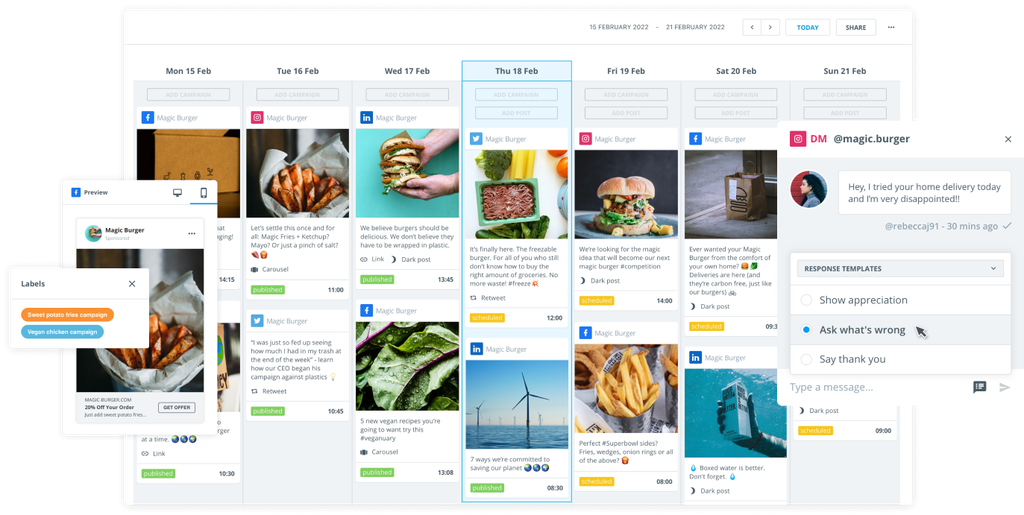
We give you a unified social media calendar that lets you collaborate, schedule, edit, preview, and publish all your organic and paid content in one place. Plus, you can benefit from AI innovations to help you scale your operation and community faster.
Stay ahead of the competition with industry-leading social listening tools, and easily measure your performance with customizable dashboards that benchmark against those same competitors. Brandwatch makes social media management not just easier but more effective.
Master the art of social media
This is a digital-first world, and consumers increasingly rely on social media to help them find brands they love. But good social media doesn't happen by accident. It's a carefully crafted strategy backed by actionable data and excellent social media management tools. Mastering your social media content creation will help you reach and engage your audience, respond to customers in real-time, and generate leads.
Explore how Brandwatch solutions can help you build an effective social media strategy.
Frequently asked questions
What are the business functions of social media management?
Social media management helps businesses engage customers, build a loyal community, and strengthen their online presence to increase website traffic and, ultimately, drive sales.
How do you manage multiple social media accounts?
The best way to manage social media accounts is to use a combination of coordinated content plans and social media management tools.
What are the benefits of using a social media scheduling tool?
A social media scheduling tool reduces the amount of labor required of your social media team. It takes a lot of time and effort to keep up with posting and moderating comments, but a scheduling tool makes it easier to be consistent in posting. It'll also free up time for your team to work on engaging with your followers.
Is there a free social media scheduling tool?
Nearly all social media platforms offer their own native tools. Several companies also offer free scheduling tools to help you manage posting for different time zones or keeping up with fast-paced platforms like X. However, just note that free tools can be extremely limited and may not give you the information you need to properly manage a business's social media profile.
How can businesses measure the success of their social media efforts?
It depends on what a business's goals are for a particular social media post or strategy. For some, success might look like more downloads of an app. For others, it might be gaining new followers. A comprehensive social media management tool such as the one offered by Brandwatch provides deep insight into the particular KPI you're measuring.
How often should a business post on social media?
Each platform is different, and each brand's audience is different too. Experiment with posting cadence in terms of volume and timing to understand what works best.