In the early days of Instagram, posting was a largely manual process, but things have changed.
Back in the day, you opened the app, picked a photo and caption, hit publish, and hoped your followers were online. Your success was hugely dependent on the timeline.
Now the situation looks very different. Most social media managers now schedule Instagram posts using clever Instagram scheduling apps to free up time and make their lives easier.
Algorithm changes mean you’re also more likely to achieve engagement because of your content’s quality, rather than when you publish.
Instagram has more than 2 billion monthly active users and continues to expand its user base. Competition for attention is fierce: about half of Instagram’s users are in the Asia‑Pacific region, with Europe and Latin America also supplying hundreds of millions of users. Stories have 500 million daily active users, so brands that want to stay visible must keep up with the pace.
For marketers juggling multiple social media accounts, manually posting every photo, carousel, Reel, and Story at the perfect time is neither sustainable nor strategic. That’s why Instagram scheduling tools are now essential. These apps let you prepare content ahead of time, set the date and time of publication, and have the system post it for you, reducing mistakes and stress.
Modern schedulers go further. They include content calendars, visual previews, saved caption templates, automated Instagram comment options, and built‑in analytics. Some focus on individual creators, while others offer team collaboration and approval workflows. In short, they help you save time, maintain consistency, and make data‑driven decisions.
This guide showcases the best Instagram scheduling tools on the market right now. We'll look at key features and ideal use cases, so you're better equipped to choose the one that best suits your needs.
In this guide:
Why Instagram scheduling tools matter
Those who schedule Instagram posts tend to see lots of benefits.
Let's have a look at a few reasons why an Instagram scheduler is worth using.
A fast‑moving platform needs structured planning
Instagram’s feed is a busy place. Posts and Stories disappear quickly, and attention shifts fast, so staying visible requires consistent content.
Manual posting can lead to missed posts, poor timing, or rushed captions. Schedulers like Brandwatch Publish let you create posts ahead of time, set the exact publication moment, and hand off the publishing to the software, reducing errors and stress.
Evolved from simple queues to sophisticated suites
Early schedulers did little more than queue posts. Today, the best Instagram scheduling tools offer drag‑and‑drop content calendars, visual feed previews, saved caption templates, hashtag suggestions, and the option to add a first comment automatically.
Tools like Brandwatch go further and provide team approval systems and performance tracking, making them suitable for agencies and large organizations. Then there’s content creation, grid planning, and multi‑platform publishing beyond Instagram to platforms like TikTok, X, Pinterest, LinkedIn, and Facebook.
Some sophisticated tools even include image editing features so you can crop and adjust media before scheduling.
Benefits beyond posting
The best schedulers improve efficiency and collaboration. A unified calendar helps everyone see what’s scheduled, while bulk uploading and queue management reduce manual work.
Built-in analytics provide insight into which posts, Stories, or Reels perform best. Many platforms also offer multi‑platform analytics across Facebook, X, LinkedIn, Pinterest, and TikTok from a single dashboard.
So, you can repurpose your scheduled Instagram content on other platforms and gauge success.
For growing brands, advanced tools can scale with you by supporting more accounts, users, and content formats.
Top Instagram scheduling tools for 2026
With all those benefits in mind, let’s now explore the top Instagram scheduling tools on the market. Naturally, we’ll start with Brandwatch.
1. Brandwatch
Brandwatch’s Social Media Management suite is a popular choice for Instagram scheduling and other social media management needs, since it sits at the intersection of publishing, customer engagement, and analytics.
Within the suite, the Publish module lets you edit, schedule, and publish Instagram posts alongside content for Facebook, TikTok, LinkedIn, and other networks. Users can also upload images, plan carousel posts and reels, convert high‑performing organic posts into ads with a single click, and add product tags or link‑in‑bio integrations to drive sales.
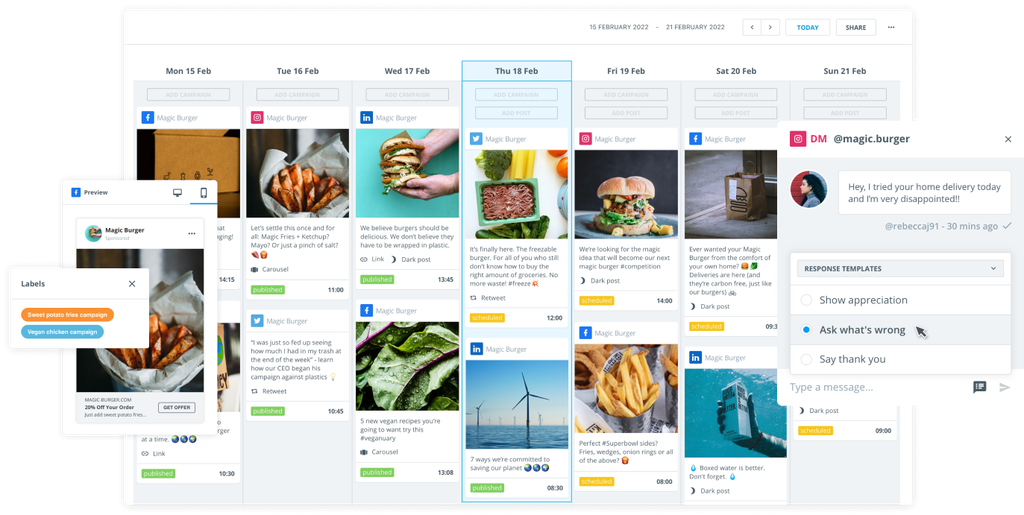
A unified content calendar displays all scheduled organic and paid posts in one intuitive interface, giving teams visibility over upcoming campaigns.
Brandwatch key features and benefits:
- Instagram‑specific capabilities: Instagram is covered extensively within Brandwatch’s data network. Beyond scheduling, you can monitor historical data for both owned and non‑owned business accounts, track posts, comments, likes, and Reels, and collect additional public data by tracking relevant hashtags. You can also schedule and publish content to Instagram, manage direct messages (DMs) and comments via Engage, and convert top posts to ads using Advertise.
- Complete content calendar: Brandwatch’s collaborative calendar brings together organic and paid content across networks. You can drag and drop posts, filter by channel or campaign, and schedule content for Instagram or other social platforms from one place.
- Approval workflows and user roles: This tool gives you the power to define who can draft, approve, or publish content on Instagram. Approval flows ensure that brand guidelines and legal requirements are met, while user roles provide control over team responsibilities.
- Shared content library: Instagram is a content-heavy platform, so it's important to have a central digital asset library to store images, videos, and templates, making it easier for teams to quickly reuse on‑brand assets.
- Smart social inbox: Beyond scheduling, Brandwatch offers a cross‑channel inbox covering Facebook, X, TikTok, Instagram, LinkedIn, WhatsApp, YouTube, and even the Google Business Profile. Automated rules and customizable feeds help you manage messages, mentions, and comments efficiently. Audience profile cards show who you’re speaking to and their past interactions.
- Actionable insights: The platform includes social listening, benchmarking, and analytics that can greatly inform your Instagram scheduling process. You can monitor your brand across 100 million+ sources, access months of consumer data and years of competitive channel analytics, and build customizable dashboards to measure Instagram performance. The Benchmark module compares your metrics to competitors’ campaigns, hashtags, and content, while Measure tracks likes, reactions, shares, comments, link clicks, video plays, and engagement rates for posts and Reels.
Reasons to choose this tool
The Brandwatch suite is perfect for enterprise teams and agencies that need a single platform to handle publishing, engagement, listening, and analytics across Instagram and other networks.
You'll get a real depth of data and benchmarking, which makes it ideal for organizations that want to understand their competitive position and optimize campaigns.
2. Later
Later started as an Instagram planner and continues to focus on visual scheduling.
Its feed preview helps users align their grid with brand aesthetics, while drag‑and‑drop scheduling supports posts, Stories, and Reels.
The built‑in media library lets you store and reuse content, save captions and hashtags, and post first comments to streamline posting.
Later Instagram scheduling features:
- Visual feed planner: A drag‑and‑drop calendar and grid preview allow you to see how future posts will look together. You can rearrange posts to maintain a cohesive aesthetic.
- Best time suggestions: Based on past performance, Later suggests optimal posting times to maximize engagement.
Who uses Later?
Brands that value visual planning and want an easy‑to‑use Instagram scheduler with basic analytics.
3. Buffer
Buffer is known for its simplicity and provides direct scheduling for Instagram posts, carousels, and videos.
Content can be drafted and arranged easily on a calendar. As well as an Instagram scheduler, the platform includes built‑in analytics to track likes, comments, reach, and impressions.
Buffer Instagram scheduling features:
- Direct scheduling: Schedule single posts, multi‑image carousels, and videos from one dashboard. For Stories and Reels, Buffer provides mobile reminders so you can post manually at the right time.
- Content plan across channels: Buffer also supports scheduling for Facebook, X, LinkedIn, and Pinterest, allowing you to coordinate posts across platforms from one tool.
Who uses Buffer?
Brands that need straightforward scheduling on Instagram and basic analytics without additional features.
4. Hootsuite
Hootsuite is one of the original social media management tools. For Instagram, it supports scheduling of posts, Stories, and Reels across multiple accounts.
Teams can assign tasks, preview posts, and manage publishing timelines within a shared dashboard, with access to approval workflows and collaboration features.
Hootsuite Instagram scheduling features:
- Multi‑account scheduling: Manage multiple Instagram accounts as well as Facebook, TikTok, LinkedIn, and others from a single dashboard.
- Team collaboration: Assign roles and tasks, create approval workflows, and share post previews. This helps ensure that content meets brand standards before it goes live.
Who uses Hootsuite?
Agencies that are struggling to manage multiple accounts or have clients who require workflow coordination and cross‑platform scheduling.
5. SocialPilot
SocialPilot targets small businesses and agencies that manage more than one account. It allows bulk uploading of Instagram posts and supports direct publishing of Reels.
The platform’s client access system lets you assign roles and manage approvals without losing visibility, while analytics provide clear reports on content performance.
SocialPilot Instagram scheduling features:
- Bulk scheduling: Upload and schedule hundreds of posts at once, making it easy to maintain a consistent posting schedule.
- Reel support: SocialPilot offers direct publishing of Reels, a feature not all schedulers provide.
Who uses SocialPilot?
Agencies and social media teams managing multiple client accounts that need bulk scheduling and client approval workflows.
6. Planable
Planable is built for teams. It features a collaborative content editor where you can draft posts, leave comments, and iterate together before scheduling.
The tool includes visual feed previews where you can see all your Instagram posts, and supports scheduling across multiple networks. Approval workflows ensure that every post gets a sign‑off before going live.
Planable Instagram scheduling features:
- Multi‑platform scheduling: Schedule posts for Instagram as well as Facebook, X, LinkedIn, and other platforms.
- Visual calendar and feed preview: See how posts will look in the Instagram grid and rearrange them for better aesthetics.
Who uses Planable?
Brands and individuals who prioritize collaboration and want an all‑in‑one tool for drafting, approval, and scheduling.
7. Agorapulse
Agorapulse offers comprehensive Instagram scheduling capabilities, allowing you to schedule and publish posts, Reels, Stories, and carousels.
It's also got an intuitive calendar, which makes planning across multiple accounts easy. Beyond scheduling, Agorapulse provides features like product tagging and detailed analytics. Role‑based access and approval workflows support efficient team collaboration.
Agorapulse Instagram scheduling features:
- Complete format coverage: Schedule posts, Reels, Stories, and carousels directly.
- Team collaboration: Role‑based permissions and approval workflows make it easier for teams to work together.
Who uses Agorapulse?
Brands and e-commerce companies requiring product tagging and robust reporting, as well as teams prioritizing granular permission controls, may find value in this tool.
8. Sendible
Sendible is a versatile platform designed to streamline content creation and scheduling across multiple networks, including Instagram.
It supports direct scheduling of single images, carousels, Reels, and Stories for Creator and Business profiles. A built‑in image editor, content library, and AI‑powered caption generator help refine posts.
Users can preview their Instagram grid to maintain a cohesive feed. Analytics help measure post performance and refine strategies.
Sendible Instagram scheduling features:
- Direct scheduling for all formats: Publish images, carousels, Reels, and Stories without leaving the platform.
- AI‑powered caption generation: Built‑in AI suggests captions and optimizes content.
- Grid preview: Visualize how your feed will look and adjust posts for aesthetic consistency.
Who uses Sendible?
Brands looking for a flexible tool with AI assistance and direct publishing for all Instagram formats.
9. Sprout Social
Sprout Social provides scheduling for Instagram posts, Stories, and Reels across multiple accounts, while a calendar view allows teams to plan and organize content easily.
Approval workflows and task assignments ensure smooth collaboration, and integrations with other tools enhance its functionality.
Sprout Instagram scheduling features:
- Multi‑account scheduling: Plan and schedule posts, Stories, and Reels across multiple Instagram accounts.
- Collaboration tools: Approval workflows, task assignments, and team inboxes streamline workflows.
Who uses Sprout?
This platform is known for its deep analytics and collaboration tools, so it can be useful if you have a team that works across multiple social channels.
10. Metricool
Metricool offers simplicity without losing functionality. It supports Instagram post scheduling for business profiles and includes performance analytics, hashtag tracking, and competitor comparisons. Manage Reels and Stories via notification‑based workflows.
Metricool’s content calendar integrates with other platforms like Facebook, LinkedIn, and YouTube, providing a unified planning view. A planning dashboard helps align campaigns across channels.
Metricool Instagram scheduling features:
- Cross‑platform calendar: Schedule Instagram posts alongside Facebook, LinkedIn, YouTube, and X from one calendar.
- Notification‑based Reels and Stories: Receive reminders to manually post Stories and Reels at the scheduled time, ensuring compliance with Instagram’s API limitations.
Who uses Metricool?
Individuals, small teams, and growing brands might consider Metricool for its simple coverage of cross‑platform planning, analytics, and competitor insights.
Honorable mentions
The list above covers 10 popular tools, but we thought we'd mention a few other platforms that merit consideration depending on your specific needs.
- Sked Social: A dedicated Instagram scheduling tool that offers a visual planner, bulk uploading, hashtag suggestions, image editing, and analytics. It supports posts, Stories, and Reels, and includes team collaboration features.
- Iconosquare: Combines scheduling with in‑depth analytics and competitor benchmarking. It can auto‑publish posts and carousels to Instagram business accounts. Stories and Reels are scheduled as reminders.
- ContentStudio: A multi‑platform tool with Instagram scheduling, team collaboration, saved hashtag sets, and performance analytics.
- Loomly: Offers a clean calendar interface, built‑in content ideas and optimization tips, and asset management.
- Zoho Social: Provides a content calendar, post and carousel scheduling, and collaboration tools with client portals and approval flows.
If your organization has very specific needs, such as heavy e-commerce integration, deep analytics, or extremely visual planning, these tools may be worth testing alongside the top 10 list.
How to choose the right Instagram scheduling tool
Selecting the best tool means thinking about how you'll use it. With that in mind, it's worth thinking about the following factors.
Platform coverage
Do you need a tool for Instagram only, or should it handle other social media platforms too? A multi‑platform tool like Brandwatch Social Media Management consolidates your workflow, while specialist tools like Later focus on Instagram aesthetics.
Content formats
Ensure the scheduler can auto-post in all the formats you plan to use – single images, carousel posts, Stories, and Reels. Some tools auto‑publish only posts and carousels, sending reminders for Stories and Reels.
Collaboration and approval
Teams need workflows for drafting, commenting, and approval. Tools like Planable and Brandwatch offer multi‑step approvals and user roles. Of course, not everyone will need this complexity.
Analytics depth
Basic metrics are usually enough for individuals with personal Instagram accounts, but businesses may require detailed reporting, competitor benchmarking, or AI‑powered insights.
Brandwatch, Agorapulse, and Metricool all provide robust analytics and benchmarking.
Ease of use and support
An easy-to-use interface just makes everything more user-friendly. Look for tools with intuitive calendars and visual previews.
Frequently asked questions
Let's answer all your burning questions before we wrap up this guide on the best Instagram scheduling apps.
Are there free Instagram scheduling tools available?
Yes. Several tools offer free tiers with limited features or a restricted number of scheduled posts, though these often tend to have limited posting volumes.
Free plans can help individuals or small businesses who are just starting and need basic functionality to aid their social media efforts.
However, advanced features like multi‑account management, bulk uploading, and in‑depth analytics will be needed if you want to access more than the basics, and usually require a paid subscription.
Can I schedule Instagram Stories and Reels?
This all depends on the tool and its API access to Instagram. Platforms like Brandwatch, Later, SocialPilot, and Agorapulse support direct scheduling of Stories and Reels.
Others provide push notifications that won't post automatically, but will prompt you to post manually at the scheduled time.
When choosing any social media tool, check whether direct publishing or reminder‑based workflows are offered for the formats you use most.
Is there an official Instagram scheduler?
Instagram allows users to schedule posts through its own Meta Business Suite and Creator Studio interfaces. These native tools let you schedule single images, carousels, and, more recently, Reels and Stories for business accounts.
While this might be enough for personal accounts, those with a business Instagram account might find the functionality lacking. You won't get access to unified cross‑platform calendars, collaborative workflows, bulk uploading, advanced analytics, or competitor benchmarking. Third‑party schedulers fill these gaps by providing more flexibility and deeper insights.
Final thoughts on Instagram scheduling tools
With Instagram’s explosive growth and tricky algorithm, marketers can no longer rely on sporadic, manual posting. Posting consistently will vastly improve your chances of success.
A well‑chosen scheduling tool saves time, maintains consistency, and provides the insights needed to refine your Instagram content strategy. Whether you're an agency juggling multiple Instagram accounts or a small team just looking to make day-to-day life less demanding, taking advantage of one of these streamlined platforms will make a difference.
Features such as drag‑and‑drop calendars, visual previews, AI‑powered captions and post ideas, product tagging, and robust reporting will allow you to plan content thoughtfully, engage audiences across formats, and measure what matters.
Whether you’re a solo creator or part of a global marketing team, scheduling Instagram posts will free up time for creative work, give your content a better chance of cutting through the noise, and ultimately drive better results across your social channels. So, go ahead and start using one today.