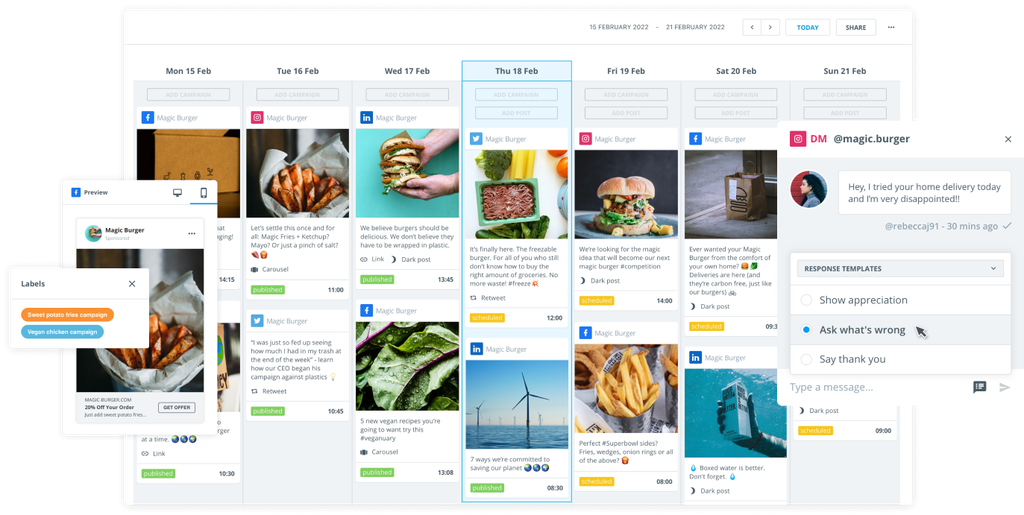
Nobody wants to be chained to a publish button when they have other tasks to do.
That's why scheduling has revolutionized social media marketing efforts. Consistently sharing quality content has never been easier — and it's the quickest route to increased engagement.
This is just as true on LinkedIn as it is on other social media channels. The indispensable platform for professionals now boasts over 900 million users worldwide, making it an excellent venue for B2B content distribution.
Auto-publish content to boost your LinkedIn profile
Maintaining a steady drumbeat of content at optimal times is challenging without help. This is where LinkedIn scheduling tools come in. They allow marketing teams to plan, automate, and optimize posts in advance, ensuring you never miss the moments when your audience is most active.
In this article, we’ll explore the best LinkedIn scheduling tools on the market right now and look at how they empower marketers and boost your LinkedIn presence.
From saving time through automation to providing deep analytics, these tools help you maximize LinkedIn’s potential.
Benefits of using LinkedIn scheduling tools
Using a LinkedIn scheduling tool can transform your workflow and results. Let's look at all the advantages.
Time savings and efficiency
With content scheduling and automatic publishing, you can batch-schedule your LinkedIn updates in advance, freeing up time during the week for strategy and engagement (or other important tasks) instead of manual posting.
Optimal post timing
You can schedule posts to go live at peak times (even outside business hours or across time zones) to maximize visibility and reach when your audience is most active — even if it's when you're asleep.
Consistency
When you schedule posts, it's easy to keep up a regular posting cadence. Consistency is vital for building an audience on LinkedIn, and scheduling tools ensure you won’t miss posting on busy days.
Engagement
The best LinkedIn scheduling tools also come with social inboxes that pull direct messages and comments into a single, manageable dashboard. You can schedule automatic replies to specific queries and maintain a high level of engagement even outside of working hours.
Team collaboration
Many scheduling tools enable you to collaborate with colleagues through shared calendars and approval workflows. This typically means multiple team members can draft or review posts before they’re scheduled, improving quality and brand alignment.
Analytics and improvement
Scheduling tools typically include LinkedIn performance analytics as part of their package. While you don't necessarily need this for scheduling, it can be really helpful to see how posts perform depending on when they were published — and apply these learnings to schedule future posts.
Top 7 LinkedIn scheduling tools for 2026
Marketers have a range of excellent LinkedIn scheduling tools to choose from. Below we highlight seven of the best platforms (in no particular order), focusing on their LinkedIn scheduling capabilities and what makes each one stand out.
1. Brandwatch
Brandwatch Social Media Management is an all-in-one platform that offers LinkedIn scheduling alongside powerful analytics and collaboration features.
Once you start using it for planning, publishing, and monitoring content on your LinkedIn company page, you'll wonder how you ever lived without it.
It's ideal for marketing teams and enterprises that lack the time to manage multiple platforms. Instead, you get scheduling, team collaboration, and advanced analytics all in one suite. It’s great for data-driven teams who want a unified tool for LinkedIn and other social channels.
You can schedule image posts, video posts, carousel posts, or whatever you like on LinkedIn — they'll all publish automatically when the time comes. Of course, you can also include relevant hashtags and all the important elements outlined in your social strategy.
Brandwatch key features
- Brandwatch provides a centralized calendar in Publish to draft and schedule LinkedIn posts (and posts on other social networks) all in one place, giving a bird’s-eye view of your content schedule.
- There's plenty in the way of team collaboration. Built-in workflows make it easy to create, edit, and approve LinkedIn posts with your team. You can manage versions and approvals in one dashboard so everyone stays aligned.
- Brandwatch also integrates LinkedIn analytics through Measure. You can track key LinkedIn metrics, benchmark against competitors, and get AI-driven suggestions for the best times to post based on performance insights.
- A customizable social inbox to manage incoming messages and comments in one place, with the ability to automate responses.
- There's also a shared content library for storing images, videos, and templates, helping maintain brand consistency across all posts.
Want to know more about how Brandwatch can help your LinkedIn scheduling efforts? Request a demo today and discover the full power of Social Media Management.
2. Sprout Social
Sprout Social is a social media management platform recognized for its scheduling and reporting capabilities.
It supports LinkedIn, alongside other networks, and offers analytics and team features.
Sprout Social key features
- Sprout Social suggests optimal times to post on LinkedIn based on your audience data and past engagement trends.
- The platform offers LinkedIn analytics and reporting tools. You can also monitor post-performance and create detailed reports.
3. Hootsuite
Hootsuite is another popular social media management tool, often used for managing LinkedIn alongside other networks, such as X, Facebook, and Instagram.
It provides a solid scheduling experience with a unified dashboard, along with other tools as part of a wider management suite.
Hootsuite key features
- Hootsuite lets you connect your LinkedIn account (profiles and Company Pages) to other social channels, so you can plan and view all your posts in one place.
- You can schedule LinkedIn posts in several ways: individually, through automated scheduling (auto-pick times), or in bulk uploads. This flexibility allows you to fill your LinkedIn content calendar in a way that suits your workflow.
4. Buffer
Buffer is a straightforward and user-friendly tool that supports scheduled posts for LinkedIn pages, as well as platforms like X, Facebook, and Instagram.
It's basically a no-frills LinkedIn scheduler — but despite its simplicity, Buffer still offers enough analytics to track your posts and improve over time.
Buffer key features
- Buffer offers a simple calendar and queue system to manage your LinkedIn posts. You can easily schedule content into time slots and preview posts, helping you maintain a consistent posting cadence.
- You'll get intelligent suggestions for the best times to post on LinkedIn, using artificial intelligence (AI) insights from your previous posts’ performance. This helps you schedule content at times when your LinkedIn audience is most likely to engage.
5. Agorapulse
Agorapulse is a versatile social media management tool that includes LinkedIn scheduling, community management, and analytics.
Often praised for its unified inbox and team-friendly features, Agorapulse strikes a nice balance by providing features such as a social inbox and post-performance analytics, all within an intuitive interface.
Agorapulse key features
- You can compose multiple posts and schedule them in bulk with custom times, ensuring your content reaches LinkedIn at the right moments to engage your audience.
- The tool provides a central calendar view of all your scheduled LinkedIn content. This overview helps you avoid overlapping posts or gaps in your schedule, and you can drag and drop to adjust timings as needed.
6. SocialBee
SocialBee is a social media scheduling tool that specializes in content categorization and evergreen posting.
It supports LinkedIn scheduling and can help you plan a diverse content mix automatically.
SocialBee key features
- With SocialBee, you organize your LinkedIn posts into content categories (like industry news, tips, and promotions). Then, the calendar view lets you visualize and balance these categories in your posting schedule.
- You can bulk upload and schedule multiple LinkedIn posts at once. Its AI features will also suggest optimal posting times by analyzing LinkedIn engagement patterns, so you can automate timing for better reach.
7. Loomly
Loomly provides a collaborative content calendar for social media.
It includes full LinkedIn scheduling capabilities and is recognized for its user-friendly interface, which makes it easier for teams to create and schedule posts.
Loomly key features
- Loomly provides a clean calendar interface for planning and scheduling LinkedIn posts. It also makes it easy to coordinate LinkedIn content with other social platforms across campaigns.
- This platform is designed with team workflows in mind. Multiple users can collaborate on drafts, leave comments, and approve content before it’s scheduled. Even non-technical stakeholders can review LinkedIn posts and give feedback easily.
LinkedIn scheduling FAQ
Now that we've listed the leading scheduling tools on the market, you're probably eager to try one out.
Before we let you go, we'll just answer some important final questions.
Can you schedule LinkedIn posts directly on LinkedIn?
Yes – LinkedIn has a native post scheduling feature. When you’re creating a post on LinkedIn, you just click the clock icon to schedule it for a later time.
This works for both personal profiles and Company Pages, but there's a bit of a catch: the built-in scheduler is fairly basic. You can’t schedule far into the future (the window is currently limited to three months ahead), and it lacks advanced options such as bulk uploading or detailed analytics.
Are third-party LinkedIn scheduling tools safe to use?
Yes — reputable third-party scheduling tools are safe and totally allowed by LinkedIn.
All the tools mentioned in this guide, including Brandwatch Social Media Management, utilize LinkedIn’s official API, which ensures compliance with LinkedIn’s terms of service and integration guidelines.
We can guarantee that using these tools will not result in your account being penalized. In fact, LinkedIn works closely with many of these providers (like Brandwatch) to ensure secure scheduling and publishing.
The key is to avoid any sketchy tools or browser extensions that aren’t using the official API. Stick to well-known scheduling platforms, and you can automate your LinkedIn posts with confidence that your account and data remain secure.