Automating LinkedIn marketing has become a central practice for marketers seeking to maximize their returns from the site.
But it takes time to strategize, create, and publish on LinkedIn. The platform acts as a shop window for millions of brands – your reputation can rise and fall based on your LinkedIn presence.
The site is undoubtedly the best for B2B marketing and professional networking. It’s the perfect place to showcase your brand and products to prospective clients, fostering business-focused brand awareness.
But maintaining a strong presence on LinkedIn can be as time-consuming as delivering customer-focused campaigns on other social sites.
That’s where LinkedIn automation tools – like Brandwatch – come in.
These platforms help marketing professionals, social media managers, and business decision-makers save time by automating content scheduling, engagement, analytics tracking, and even lead generation.
In 2025, with LinkedIn’s user base and content volume higher than ever, smart automation can give you a competitive edge while keeping your strategy consistent and data-driven.
No wonder marketers are looking for an automation tool to make LinkedIn posting and analytics manageable.
Why LinkedIn automation tools matter in 2025
Staying active and effective on LinkedIn requires consistent effort – from posting timely content to nurturing leads.
Just think about how much work goes into nailing an effective LinkedIn strategy. It’s not just about posting at an opportune moment. Brands and individuals who thrive on LinkedIn do so by strategizing, calendarizing, and analyzing their activity, using automation to help.
You may have a great LinkedIn strategy, but actually implementing it can exhaust your resources.
That’s why automation tools are essential. They help you realize your strategy by automating routine tasks, including:
- Content ideation
- Post scheduling
- Audience engagement
- Lead nurturing
- Analytics
- Strategy development
By automating repetitive tasks, you free up hours to focus on strategy and creativity, rather than manual posting or outreach. The result is more engagement with less stress – a win-win for busy professionals.
Compliance and safety are also critical. LinkedIn officially prohibits certain aggressive automation (like mass spamming), so using trusted tools that work within LinkedIn’s rules is key.
LinkedIn automation tools become your safety net
The best LinkedIn automation tools ensure you automate safely – for example, by limiting actions to realistic levels and leveraging LinkedIn’s partner APIs when available.
In short, wise, strategic automation means you can do more on LinkedIn – all while maintaining the human touch where it counts.
The top LinkedIn automation tools in 2025
Below are 12 of the best LinkedIn automation tools available this year. These range from all-in-one social media management platforms like Brandwatch to specialized LinkedIn lead generation tools.
Whether you’re looking to streamline content scheduling, boost engagement, dive into analytics, or scale your lead gen, there’s a tool here for you.
1. Brandwatch
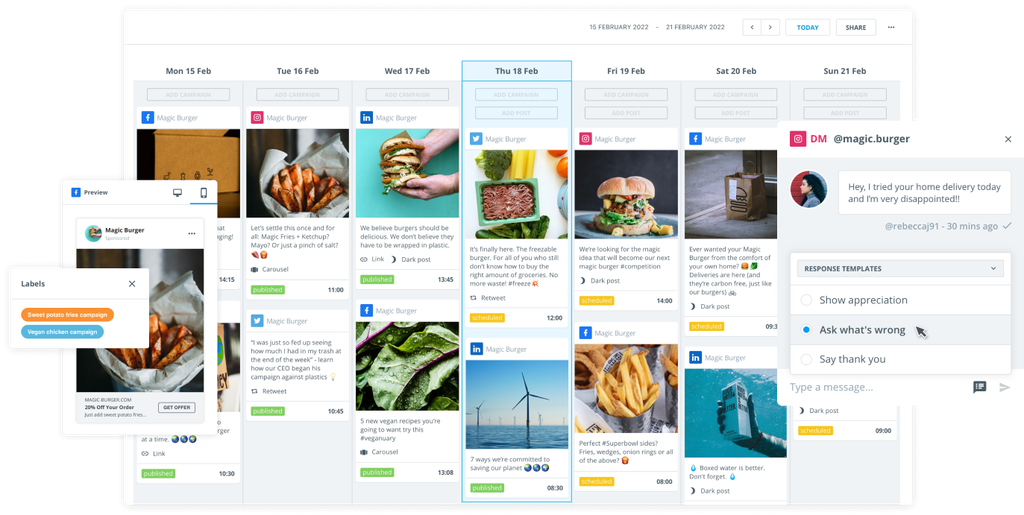
Brandwatch Social Media Management is a natural choice for businesses seeking to optimize their return on investment (ROI) from LinkedIn marketing efforts. It’s an all-in-one platform that combines LinkedIn scheduling, publishing, engagement, and analytics in one place.
As a LinkedIn Certified Marketing Partner, Brandwatch offers deep integration with LinkedIn, ensuring reliable performance and compliance. This is essential for businesses seeking to professionalize their social media output and maintain strong brand consistency.
With Brandwatch, you can develop an effective LinkedIn strategy and plan where to automate tasks.
Automation options primarily focus on engagement – and how you both communicate with audiences and organize those communication workflows.
So, you can automatically organize incoming posts, comments, replies, and direct messages (DMs). From there, you can label, assign, mark comments as read or spam, send welcome or away messages, and more – simply by establishing automated processes.
This is achieved through Brandwatch’s unified content hub, which also provides access to post planning, publishing, and reporting.
Brandwatch LinkedIn automation key features:
- Automated inbox management: Filter and categorize LinkedIn messages, and prepare automated replies. Establish automation flows for FAQs and assign messages to team members for follow-up.
- Unified content calendar: Plan, schedule, and publish LinkedIn posts (and ads) from one dashboard, with a clear calendar view of all scheduled content. Automate task assignments, add notes, and maintain brand consistency across teams.
- Automated analytics: Establish an automatic data feed to track LinkedIn performance with in-depth analytics and customizable dashboards. Automatically collect metrics for your LinkedIn Page and posts, and measure what’s working.
- Auto integration and compliance: As an official LinkedIn partner, Brandwatch ensures your automation (from scheduling to messaging) aligns with LinkedIn’s guidelines. This partnership means you get reliable features (like direct LinkedIn API access) and peace of mind that your LinkedIn account is in safe hands.
Who uses Brandwatch for LinkedIn automation?
Brandwatch’s LinkedIn automation features make it a top choice for enterprises and agencies that need robust social media management support. It’s also ideal for medium- to large-sized businesses that need a comprehensive, enterprise-grade platform to devise and execute their LinkedIn marketing strategy.
Discover how to utilize Brandwatch for your LinkedIn marketing goals by booking a demo with our experts.
2. Agorapulse
Agorapulse is a social media management tool that supports LinkedIn scheduling, engagement, and analytics.
You can automate LinkedIn publishing, including scheduling first comments and carousel posts. There are also several automation features available in its shared inbox to make community management easier.
Agorapulse LinkedIn automation features:
- Publishing: Schedule and publish LinkedIn posts (including images, documents, or videos) in advance and use automated features to save time when scheduling in bulk.
- AI writing assistant: Use built-in artificial intelligence (AI) to write LinkedIn post copy semi-automatically.
- LinkedIn inbox: Consolidate your LinkedIn comments and messages into a single inbox and establish automatic responses and filters.
Who uses Agorapulse for LinkedIn automation?
Teams and agencies that want a base level of automation features alongside content approval workflows and reporting options may consider Agorapulse for the job.
3. SocialPilot
SocialPilot is a LinkedIn automation tool that offers a scheduling solution for the platform (and others), alongside analytics and reporting.
Bulk schedule up to 500 posts and automate first comments. Use an automated hashtag function to find the best or most relevant tags. SocialPilot also incorporates AI to help with content creation.
SocialPilot LinkedIn automation features:
- LinkedIn post automation: Draft LinkedIn posts and schedule them to auto-publish at the best time, then schedule the first comment as well.
- AI caption assistant: Use an AI assistant to generate captions and strategic hashtag recommendations.
- Analytics and reporting: Get automated analytics on your LinkedIn performance, including post engagement metrics and audience insights. Schedule weekly or monthly LinkedIn performance reports to be automatically emailed to stakeholders.
Who uses SocialPilot for LinkedIn automation?
Startups, small teams, and marketers who need LinkedIn scheduling with a steady level of automation may look atSocialPilot for the job.
4. LinkedIn Sales Navigator
LinkedIn Sales Navigator is an official LinkedIn tool designed for lead generation and sales prospecting.
It’s not a publishing or scheduling tool, but instead automates parts of the lead discovery and outreach process on LinkedIn.
The platform provides advanced search filters to find prospects, personalized lead and account recommendations, and real-time insights on your leads.
LinkedIn Sales Navigator LinkedIn automation features:
- Lead Search and recommendations: Sales Navigator automatically filters and surfaces the right prospects, based on your initial input and company profile. The tool then recommends which leads or LinkedIn accounts to prioritize based on factors such as their company growth or your shared connections.
- Lead and account alerts: The platform automates the process of tracking prospect activity. Get notified when a saved lead takes certain actions – for example, changing jobs, sharing news, or showing intent signals like commenting on industry topics.
- InMail: Sales Navigator provides an allotment of InMail credits and an interface to message prospects outside of your network. It also integrates with LinkedIn’s CRM features, so you can log notes and see history with each lead.
- CRM Integration: For deeper automation, Sales Navigator can sync with popular CRM systems (like Salesforce) and automatically import lead details and activity into your CRM.
Who uses LinkedIn Sales Navigator for LinkedIn automation?
Brand managers looking to start out on LinkedIn may consider the Sales Navigator a useful initial tool for automatic outreach and lead generation. Those who need a more robust management suite may then advance to third-party tools, like Brandwatch.
5. Dux-Soup
Dux-Soup is a LinkedIn automation tool focused on lead generation and outreach.
It operates as a Chrome browser extension and is designed for LinkedIn prospecting, allowing it to automatically view profiles, send connection requests, send messages, and follow up, all while mimicking human-like activity.
Dux-Soup LinkedIn automation features:
- Automated outreach: Dux-Soup can automate a variety of LinkedIn outreach tasks, including viewing profiles, sending personalized connection invitations, endorsing skills, and sending follow-up messages or InMails.
- LinkedIn drip campaigns: The tool supports multi-touch drip campaigns on LinkedIn. You can set up a sequence of actions (e.g., connect, then wait three days, then send a message) using Dux-Soup’s dashboard.
- CRM integration: Dux-Soup allows you to export LinkedIn profile data and activity, and or send new leads directly to your CRM (like Salesforce).
Who uses Dux-Soup for LinkedIn automation?
Individuals and small teams starting their LinkedIn outreach journey may consider adding Dux-Soup to their tech stack.
6. Expandi
Expandi is another automation platform built specifically for LinkedIn outreach. It runs on the cloud with a dedicated IP, allowing it to operate 24/7.
Expandi can create complex LinkedIn outreach workflows, such as incorporating multiple steps and multi-channel touches in your campaigns. It also emphasizes hyper-personalization, allowing you to use dynamic placeholders (like merging a prospect’s name or company into LinkedIn messages).
Expandi LinkedIn automation features:
- Automation workflows: Build LinkedIn outreach sequences based on prospect behavior. Chain together up to nine different actions with delays in between.
- Omni-channel outreach: Reach out beyond LinkedIn by adding email steps to your sequence. If a prospect doesn’t respond on LinkedIn, Expandi can automatically trigger an email follow-up.
- Personalization: Expandi supports placeholders and custom fields to tailor each message. You can insert a prospect’s name, company, or other details into your templates, or even use dynamic images and GIFs personalized to the recipient.
Who uses Expandi for LinkedIn automation?
Expandi is used by growth brands, agencies, and advanced users who need to automate LinkedIn outreach with high personalization.
7. Linked Helper
Linked Helper is an automation software that runs as a standalone desktop application. It is feature-rich, allowing users to automate connection requests, messaging sequences, profile visits, skill endorsements, and more.
It also includes a built-in CRM to manage leads and track your outreach campaigns.
Linked Helper LinkedIn automation features:
- Automated invitations: Linked Helper can send personalized connection invitations to your target contacts on autopilot.
- Auto message sequences: Once connected, you can automatically drip-feed follow-up messages or InMails according to rules you set.
- Built-in LinkedIn CRM: All prospects and contacts you engage via Linked Helper are automatically stored in a built-in CRM database.
- Profile visiting and endorsements: Linked Helper automates auxiliary actions like profile views and skill endorsements for your connections.
Who uses Linked Helper for LinkedIn automation?
B2B marketers and recruiters may consider adding Linked Helper to their tech stack to streamline LinkedIn prospecting.
8. Hootsuite
Hootsuite is a social media management tool that incorporates some LinkedIn automation into its wider suite.
Automate simple analytical and scheduling tasks, and use Hootsuite’s AI writer to automatically generate captions for posts. You can also create numerous automatic actions in the shared inbox, which combines your LinkedIn profile with other social media accounts.
Hootsuite LinkedIn automation features:
- Auto-scheduler: Hootsuite’s auto-scheduling feature picks the best time to publish your LinkedIn posts.
- Engagement automation: Set up custom streams (columns) to automate your LinkedIn homepage feed, view company page posts, and track hashtag mentions.
- Analytics: Generate performance reports for your LinkedIn content using semi-automated templates to help.
Who uses Hootsuite for LinkedIn automation?
Organizations that need a LinkedIn publishing solution with additional support across other social media platforms.
9. Sprout Social
Sprout is a social media management platform that offers LinkedIn automation features alongside a larger range of tools.
You can schedule with automated optimal send times, manage correspondence in a unified social inbox, and get auto-generated analytics.
Sprout LinkedIn automation features:
- Scheduling: Sprout’s scheduling tool can automatically determine optimal posting times based on your LinkedIn audience engagement patterns.
- Unified inbox: Manage your LinkedIn comments and messages alongside other social conversations in one automated inbox.
- Analytics: Sprout offers auto-generated LinkedIn analytics, from hashtag performance to audience demographics. It automatically collects data on your LinkedIn posts and page, and presents it in reports.
Who uses Sprout for LinkedIn automation?
Large teams and organizations may consider Sprout for LinkedIn automation alongside other social media management tasks.
10. Buffer
Buffer is a social media scheduler that offers some simple LinkedIn automation features for those just starting out on the platform.
You can create a queue of LinkedIn posts and let the tool handle publishing at preset times. Buffer also offers auto-generated analytics and team features.
Buffer LinkedIn automation features:
- Queuing and scheduling: Buffer uses a queue system for posting. You add your LinkedIn updates to a queue, set specific posting times (or a posting schedule), and Buffer will automatically publish posts in order.
- Multi-account support: Connect LinkedIn profiles and Company Pages (as well as other social accounts) to Buffer and manage them in one place.
- Analytics: Buffer provides a simple analytics dashboard that automatically tracks key metrics like post impressions, engagement, and follower growth on LinkedIn.
Who uses Buffer for LinkedIn automation?
Solo professionals and small teams that need straightforward LinkedIn scheduling and basic performance tracking.
11. Dripify
Dripify is a sales-focused LinkedIn automation tool designed to help sales teams and entrepreneurs generate leads and close deals. It’s a cloud-based platform and automatically executes predefined “drip” campaigns on LinkedIn.
It also has a unified inbox that centralizes your LinkedIn conversations and auto-generated analytics.
Dripify LinkedIn automation features:
- Automated drip campaigns: Create multi-step LinkedIn outreach campaigns with Dripify’s campaign builder and establish sequences of automated actions (e.g., connect, message, follow-up) with specified delays and conditions.
- Cloud-based operation: Dripify runs in the cloud and continues to execute your LinkedIn actions even if your computer is off.
- Lead management: Dripify provides a unified inbox for all your LinkedIn messages. From the dashboard, you can reply to leads, mark conversations as important, add notes, and even use templates.
Who uses Dripify for LinkedIn automation?
Sales professionals and teams looking to automate LinkedIn prospecting with a focus on conversions may consider adding Dripify to their broader social media management stack.
12. Octopus CRM
Octopus CRM is a LinkedIn automation tool designed to simplify prospecting for business owners and marketers. It offers a personal LinkedIn CRM dashboard and a suite of automation features to grow your network and engagement.
You can send bulk connection requests and LinkedIn messages, auto-endorse skills, and track stats like who accepted or responded.
Octopus LinkedIn automation features:
- Personal CRM: Octopus provides a dashboard that acts like a lightweight CRM for your LinkedIn leads.
- Automated connection invites: Auto-send personalized connection requests in bulk, with the option to target specific segments.
- Bulk Messaging and follow-ups: Automatically broadcast messages to hundreds of your 1st-degree LinkedIn connections at once. It can also automatically send a “Thank you for connecting” message to new contacts who accept your invite.
Who uses Octopus for LinkedIn automation?
Individuals and small businesses looking for a simple LinkedIn automation solution – one that covers the basics of outreach and CRM in a single package.
How to choose the right LinkedIn automation tool
The LinkedIn automation tools we’ve outlined above fall into three broad categories. There are simple LinkedIn-specific automation tools, such as Octopus and Expandi, as well as larger social media management suites like Brandwatch. There’s also LinkedIn’s in-built platform, the Sales Navigator.
With so many great tools available, how do you pick the one that fits your needs?
Here are some factors to consider when choosing a LinkedIn automation tool:
Identify your goals
First, clarify what you want to achieve on LinkedIn. Is your priority to schedule content and grow engagement, or are you focused on lead generation and sales outreach? Different tools excel at different things – for example, a social media scheduler might be best suited for content marketing, while a dedicated outreach tool might be more effective for sales prospecting.
Check key features
Make a list of your must-have features. Do you need a content calendar, analytics reports, and team collaboration? Then an all-in-one platform like Brandwatch is ideal. If you need automated connection sequences or a built-in CRM, a tool like Linked Helper may be suitable.
Budget and scale
LinkedIn automation tools range from free/basic plans to enterprise solutions. Determine your budget and consider how many LinkedIn accounts or team members you need to accommodate.
Safety and compliance
This is crucial for LinkedIn. Opt for LinkedIn automation tools that are trusted and have a good reputation for avoiding user bans. Brandwatch is a LinkedIn Certified Marketing Partner and fully compliant with the platform.
Ease of use and support
Finally, consider the learning curve. A LinkedIn automation tool should make your life easier, not more complicated. Most providers offer free trials or demos – take advantage of these to test the interface. Also, check what customer support is available (documentation, chat support, community). Good support can be a lifesaver if you encounter any issues while automating your LinkedIn tasks.
FAQ: LinkedIn automation tools
Q1: What are LinkedIn automation tools and what tasks can they automate?
A: LinkedIn automation tools are software platforms or browser extensions that streamline repetitive LinkedIn tasks. They can automate things like scheduling and publishing posts, sending connection requests and follow-up messages, viewing profiles, endorsing skills, and collecting analytics data. Essentially, these tools automate manual actions you would normally perform on LinkedIn.
Q2: Are LinkedIn automation tools safe to use? Will my account get restricted?
A: When used properly and within LinkedIn’s guidelines, reputable automation tools are generally safe. To avoid account restrictions, you should steer clear of overly aggressive automation. This means not sending hundreds of connection requests or LinkedIn messages in a single day, not scraping data in a way that violates LinkedIn’s terms, and always personalizing your outreach to avoid appearing spammy. Using a LinkedIn Certified Marketing Partner like Brandwatch Social Media Management is always a good idea.
Q3: Can LinkedIn automation tools really help generate more leads or connections?
A: Yes, when used correctly, these tools can significantly boost your LinkedIn outreach effectiveness. For instance, an automation tool can send personalized connection requests and follow-ups at scale, which can grow your network faster than manual efforts. Tools focused on lead gen often help identify potential clients and engage them with timely, tailored messages – leading to more responses and meetings. Automation tools amplify your efforts; if you have a strong message and target the right audience, they help you reach far more people, thereby increasing leads.
Q4: How do I ensure I’m using LinkedIn automation tools in an ethical and effective way?
A: Great question. Here are a few best practices: (1) Keep it personal and human. Even if a tool sends messages for you, write to them in a genuine, non-robotic way. (2) Limit your volume and don’t max out connection invites every day. Gradual growth is more sustainable and less likely to trigger LinkedIn’s defenses. (3) Monitor replies and engage. Automation isn’t a set-and-forget solution. Always monitor your LinkedIn inbox and comments, and be prepared to respond to them. (4) Stay updated on LinkedIn policies. LinkedIn’s rules can change, and what’s acceptable in 2025 might evolve.
Try LinkedIn automation software with Brandwatch today
In 2025, leveraging the best LinkedIn automation tools can be a game-changer for your marketing and lead generation efforts.
These platforms – from enterprise solutions like Brandwatch to small browser extensions – enable you to streamline content scheduling, engage your audience consistently, analyze what works, and scale up your outreach – all while saving precious hours in your workday.
Whether you’re a social media manager scheduling weekly posts or a sales rep nurturing dozens of prospects, there’s a tool (or combination of tools) that can lighten your load and boost your impact.
Want to know more? Book a demo with Brandwatch and discover how you can start automating LinkedIn tasks today.