Facebook is a core channel for marketers, but keeping up with the pace can be daunting.
Despite being one of the original social platforms, Facebook remains the industry leader – with over three billion monthly active users. That's a massive potential audience, and it's worth tapping into.
But posting consistently, coordinating with teammates, and keeping tabs on performance is hard if you’re juggling spreadsheets or hopping between multiple apps. That’s where Facebook publishing tools come in.
These tools act as centralized hubs for creating, scheduling, and managing your Facebook content, freeing up time for strategy and creativity.
This guide dives into the top Facebook publishing tools to use in 2025. Whether you’re a solo creator, a small business owner, or an enterprise social media manager, you’ll find a tool here that suits your workflow.
We’ll also explain what Facebook publishing tools actually are, why they’re essential in today’s landscape, and what features to look for. Of course, we’ll also review the best solutions available.
In this guide:
What are Facebook publishing tools?
A Facebook publishing tool will revolutionize your to-do list as well as your Facebook Page.
If you use a content management system (CMS) for your brand’s website, a Facebook posting tool is essentially the same thing, but for your social media accounts.
Instead of manually posting from Facebook every time, you can use a Facebook publishing tool to load your posts into a queue and set them to go live automatically at the date and time you choose, even if you have multiple Facebook accounts for different brands or territories.
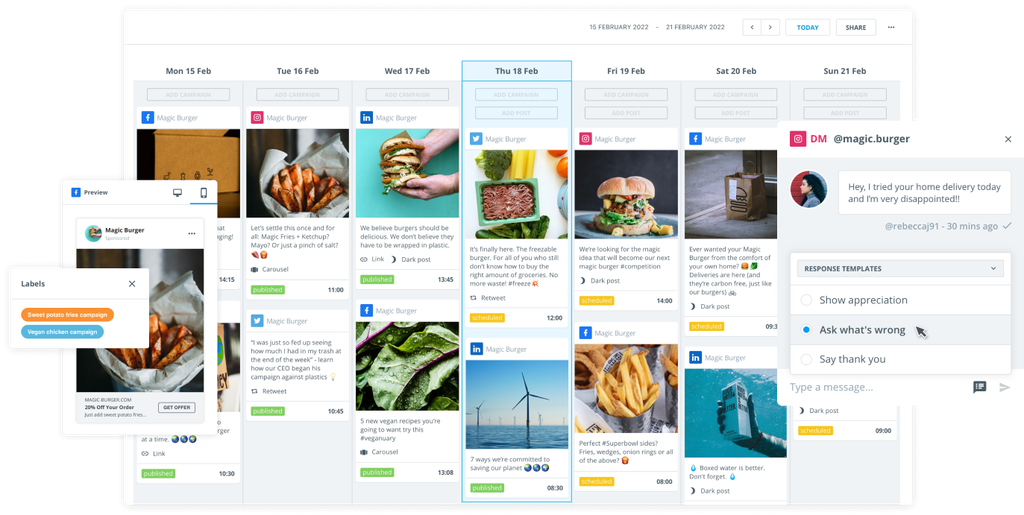
Tools like Brandwatch Social Media Management make it easier to create, schedule, and track your posts from one dashboard. They also help teams work better together by providing workflows and approval processes.
Many publishing tools have all sorts of other features, too – think media libraries, AI-assisted caption writing, analytics dashboards, and cross‑platform posting – so your entire social operation can be run from a single interface.
Why use a Facebook publishing tool?
With millions of brands competing for attention in feeds, planning engaging content and nailing a consistent posting schedule has become more important than ever.
Facebook publishing tools help with all of that, and boost your social media marketing efforts in other ways, too. Let's take a look at what they offer.
Scheduling at scale
You can map out a content calendar weeks or months in advance, making it easier to maintain consistent posting even when your team is busy or on holiday.
Batch scheduling is also good for freeing up brain space for strategy rather than scrambling for a post every day.
Centralized collaboration
Shared calendars and approval workflows enable multiple people to review, edit, and sign off on content before it goes live.
This way, you get fewer errors and a faster pace of production.
Cross‑platform efficiency
Using a publishing tool isn't just for managing Facebook publishing. Most social media content management tools have a user-friendly interface that lets you manage multiple social media accounts across various platforms.
This means you can publish to Facebook, Instagram, LinkedIn, and other networks from the same dashboard, saving time and keeping messaging aligned.
Performance insights
Built‑in analytics show which posts are getting the most engagement, which is great for refining your strategy.
Some tools also show you how your content stacks up against your rivals, otherwise known as competitor benchmarking.
AI assistance
Newer platforms can even use artificial intelligence (AI) to generate captions, suggest posting times, and throw out fresh content ideas.
AI features like this can dramatically reduce your workload when it comes to ideation and copywriting.
Key features to look for in a Facebook publishing tool
Not all tools offer the same level of service and functionality. You'll get slightly different features depending on which one you choose. Working out the features that matter most to you can help to narrow down your choices.
Content calendar and post planner
A drag‑and‑drop calendar is great for visual planners, since it will show all your scheduled posts in one view and let you rearrange them easily.
Bulk scheduling and approval workflows
It's a good idea to check for the ability to upload multiple posts at once and set multi‑step approval processes, especially if you work in a team.
Unified inbox and collaboration tools
Managing social media engagement is much easier when you can see all your comments and messages from different networks in one place.
Shared drafts, internal notes, and role-based permissions are also good for keeping everyone on the same page.
Media library and integrations
A searchable library for images, videos, and templates will mean you spend much less time hunting for assets.
Look out for integrations with Canva, Dropbox, or cloud storage to make life easier.
Analytics and performance tracking
Real‑time dashboards, post‑level metrics, and competitor benchmarking will help you understand what’s working and switch things up accordingly.
AI and automation
AI‑powered caption writers, hashtag suggestions, and send‑time optimization can give you a competitive edge.
Top Facebook publishing tools in 2025
Now let’s explore the best tools available in 2025.
1. Brandwatch
Brandwatch’s Social Media Management suite is an all‑in‑one solution for planning, publishing, and measuring your social content.
The software lets you schedule, edit, and review Facebook posts within a unified calendar.
You can manage both organic and paid campaigns, including posts, Stories, and ads, from the same interface.
You can also post on your other social media platforms via Brandwatch and streamline content management, creation, and publishing. Maintain brand and communication consistency across platforms, and source audience data from Facebook and beyond.
Brandwatch Facebook publishing benefits:
- Unified content calendar: Brandwatch provides one calendar for all your channels, making it easy to see upcoming posts and adjust timing. The built‑in content library allows you to store and repurpose assets from your own feeds or from cloud storage services like Google Drive and Dropbox.
- Scheduling capabilities: If you've got a busy few weeks coming up, you can get ahead by batch scheduling all content in advance. This means you don't have to physically hit publish on each post.
- Team collaboration and workflows: You can set permissions, assign tasks, and establish approval workflows to ensure high‑quality content. The social inbox consolidates comments and messages across networks so your team can respond efficiently.
- AI‑powered publishing: Automation features offer tips to optimize content and posting times, helping you reach your Facebook Page audience when they’re most active.
- Cross‑platform integration: Brandwatch integrates with Facebook, Instagram, X (formerly Twitter), TikTok, and other social media platforms, and provides in‑depth analytics across each site.
- Performance and benchmarking: Brandwatch's social media dashboards let you track engagement, reach, and other metrics on Facebook (and other sites). The software also offers competitor benchmarking and social share‑of‑voice analysis.
Who uses Brandwatch for Facebook publishing?
Overall, Brandwatch is ideal for teams that want robust publishing, engagement, and analytics in a single enterprise‑grade tool. Its ease of use and quick onboarding process make it a great place to begin and launch a new Facebook publishing strategy.
>> Want to find out more? Book a demo with Brandwatch and speak to one of our experts today.
2. Buffer
Buffer combines an easy‑to‑use scheduler with content creation and collaboration features. At its heart, it’s a social media poster with add-ons.
It supports Facebook, Instagram, LinkedIn, TikTok, Pinterest, X, and more. Users can auto‑publish posts on Facebook or receive reminders to post manually.
Buffer Facebook publishing benefits:
- Flexible publishing: Auto‑publish your content or choose to be notified when it’s time to post. Buffer also allows you to customize and repurpose Facebook posts for each platform.
- Content calendar and idea storage: See everything scheduled in a calendar or queue view. Store ideas until you’re ready to schedule.
Who uses Buffer for Facebook publishing?
Buffer is often used by solo creators or small teams who need a simple, straightforward scheduler.
3. Later
Originally built solely for Instagram, Later is now a full‑featured scheduling tool that can be used to publish social media posts across Facebook and other sites.
Its strength lies in visual planning.
Later Facebook publishing benefits:
- Drag‑and‑drop calendar, and grid preview: See how your feed will look to your Facebook audience and plan posts accordingly.
- Hashtag and caption assistance: Later offers basic analytics for optimal send times, built‑in hashtag suggestions, and caption templates.
Who uses Later for Facebook publishing?
Later has limited collaboration features, so it tends to be used by creators and small brands, particularly those with a strong visual identity.
4. Agorapulse
Agorapulse is known for having a single calendar from which you can schedule and auto-publish content across Facebook, Instagram, TikTok, LinkedIn, X, and more.
Agorapulse Facebook publishing benefits:
- Collaboration and approvals: Set up workflows, assign content for approval, and share notes. Shared calendars allow teammates or clients to accept, reject, or provide feedback on posts.
- Content queues and categories: Organize your editorial calendar into queues sorted by priority or topic, making it easier to see how upcoming posts fit into your strategy.
Who uses Agorapulse for Facebook publishing?
The combination of content queues, collaboration, and analytics means that Agorapulse often appeals to teams who want more control over workflows and performance.
5. Sprout Social
Sprout layers publishing, social listening, and analytics on top of a reliable Facebook scheduler. It’s geared toward large teams and agencies that need deep reporting and polished workflows.
Sprout Facebook publishing benefits:
- Smart scheduling: Schedule posts to every major network and refine timing with send‑time recommendations.
- Approval workflows: Multi-step, multi-role approvals ensure nothing goes live without proper sign-off.
Who uses Sprout for Facebook publishing?
Sprout is premium-priced and comes with a feature set that often appeals to enterprises and data‑driven social media managers.
6. SocialPilot
SocialPilot is designed for agencies and teams managing multiple accounts. It allows you to schedule up to 500 posts and publish to Facebook Stories and profiles, as well as other platforms.
SocialPilot Facebook publishing benefits:
- Bulk scheduling: Schedule hundreds of Facebook posts and stagger them across multiple accounts so your brand doesn’t publish identical messages everywhere at once.
- Evergreen content recycling: Automatically refresh high‑performing posts and recycle evergreen content.
Who uses SocialPilot for Facebook publishing?
SocialPilot is often used by brands with multiple affiliated accounts or agencies needing to coordinate high volumes of content.
7. Loomly
Loomly aims to make collaboration smooth. Its Post Builder lets you create content for Facebook and either publish it or send it to your higher-ups for approval.
Loomly Facebook publishing benefits:
- Calendar and content libraries: Organize posts within an editorial calendar and reuse media assets.
- Collaboration: Its feedback and approval processes make it suitable for marketing agencies or creators working with managers and clients.
Who uses Loomly for Facebook publishing?
Though Loomly lacks advanced analytics, its streamlined workflows can make it a choice for teams that prioritize approvals and collaboration.
8. SocialBee
SocialBee focuses on content creation and curation. A simple dashboard lets you create posts for Facebook and add visuals with integrated tools like Canva, while an AI generator writes captions for you.
SocialBee Facebook publishing benefits:
- AI caption generator: The AI writes captions that you can edit for different platforms (not just Facebook).
- Category‑based queues: Create content pools based on categories (for example, “Tips,” “Throwback Thursdays”) and let the tool post randomly based on your schedule.
Who uses SocialBee for Facebook publishing?
SocialBee is especially useful for solo marketers, coaches, and consultants who rely on evergreen or curated content and want an easy way to keep feeds active.
9. Metricool
Metricool combines publishing with real‑time analytics and competitive benchmarking. It’s aimed at marketers who want to up their Facebook marketing game, with publishing being only one part of the puzzle.
Metricool Facebook publishing benefits:
- Cross‑platform scheduling: Schedule content to all major social networks from one queue.
- Drag‑and‑drop calendar and recycling: Map campaigns, drag posts around, and automatically recycle evergreen content.
Who uses Metricool for Facebook publishing?
Metricool is built for data‑driven marketers or small teams that want analytics alongside scheduling.
10. Hootsuite
Hootsuite remains a veteran player in the social media management space. Its dashboard lets you schedule or publish posts across most networks, including Facebook, Instagram, TikTok, and LinkedIn.
Hootsuite Facebook publishing benefits:
- AI‑powered content creation: OwlyGPT suggests captions, video scripts, and hashtags to speed up content production.
- Unified inbox: Reply to comments and messages across networks from one dashboard, with saved and suggested responses.
Who uses Hootsuite for Facebook publishing?
In general, Hootsuite tends to be used by larger teams that manage numerous profiles and need advanced features.
11. Planable
Planable stands out for its real‑time collaboration features on Facebook and other sites. Built for agencies and content teams, it turns approvals into an interactive conversation.
Planable Facebook publishing benefits:
- Live feed preview: See posts exactly as they’ll appear on Facebook, Instagram, or LinkedIn, and drag-and-drop them into an interactive calendar.
- Threaded comments and version history: Anyone with access to the app can leave comments, suggest edits, and view past versions without messy email chains.
Who uses Planable for Facebook publishing?
Planable is generally used by social media managers who don't need advanced analytics or a unified inbox, or those who have access to a separate social media management tool.
How to choose the right Facebook publishing tool
The right tool for you will depend on all sorts of different factors, including your workflow, team, and goals.
In case it all seems a bit overwhelming, here's a checklist you can use to narrow down the options.
Step 1: Assess your posting routine
Are you a daily poster, or do you batch content weekly? If you need bulk scheduling, look for tools with content queues and CSV uploads.
It's also worth remembering that visual planners work better for visual brands.
Step 2: Consider team size and roles
If you're a solo creator, you might simply be looking for intuitive interfaces and mobile apps rather than just a web version.
On the other hand, social media marketers for agencies might need additional features, such as role-based permissions, multi-step approvals, and collaboration chat.
Step 3: Match the tool to your platforms
Almost all social media management tools support Facebook, but it's important to think about the other platforms you use, too.
Make sure all the networks you already use are supported, as well as any others you might start posting on in the future.
Step 4: Look beyond publishing
Good schedulers usually offer much more than just automated publishing.
Think about any added extras that might come in handy, such as advanced analytics or performance insights, unified inboxes, or AI features to aid post ideas and the content creation process.
Step 5: Check pricing models
While it's important to find a tool that fits your budget, it's also beneficial to consider how costs might change if you need to add more profiles or collaborators.
Plan for the number of channels and team members you expect to handle over the next year.
Facebook publishing tools FAQ
Before we wrap up, let's answer any remaining questions.
Are there any free Facebook publishing tools available?
Yes. Some platforms offer free plans or trials, but features can be limited. For example, Buffer provides a free tier for a limited number of social channels, and Brandwatch has a demo mode where you can test its Facebook scheduler. You can also use the native Meta Business Suite at no cost, though it lacks multi‑platform scheduling and advanced analytics.
What’s the difference between Meta’s Business Suite and third‑party tools?
Meta Business Suite lets you schedule posts and access basic analytics across Facebook and Instagram, but it lacks advanced features like AI caption suggestions, cross‑platform posting, competitor insights, bulk scheduling, and team workflows.
Third‑party tools such as Brandwatch offer those additional capabilities, saving time and providing valuable insights.
How do I schedule posts on Facebook using a post planner?
The process is similar across most platforms: sign up for your chosen tool, connect your Facebook page, create or import content, pick a date and time, and add the post to your calendar.
Tools like Brandwatch and Buffer provide drag‑and‑drop calendars or queues, and allow you to preview your Facebook posts before publishing.
Do Facebook publishing tools help with competitor analysis?
Yes, quite a few tools include competitor monitoring and benchmarking. For example, Brandwatch’s social media dashboards track share of voice and competitor performance.
Basic schedulers may only focus on publishing, so if competitor insights are important, make a point of choosing a tool with integrated analytics.
Final thoughts on using tools to boost your Facebook presence
By researching Facebook publishing tools before making your decision, you're doing important groundwork.
Choosing the right tool can truly transform your approach to social media – from planning and creation to analysis and optimization.
The good news is that Brandwatch offers a full‑featured, enterprise‑grade solution that combines publishing, engagement, and analytics. Depending on your needs, it might be worth checking out a few others, too.
Ultimately, the best tool is the one that aligns with your goals, team structure, and budget. Before you take the plunge, sign up for a product demo and explore the features that matter most to you.
Whichever tool you go for, once you have a solid Facebook publishing tool in your arsenal, everything will feel that bit easier, and you'll soon be spending less time on logistics and more time crafting brilliant content.