If you thought Instagram was an easy place to find quick engagement, think again.
With over 2 billion monthly active users, there's a vast audience out there – but ensuring your content reaches the right people is actually trickier than ever.
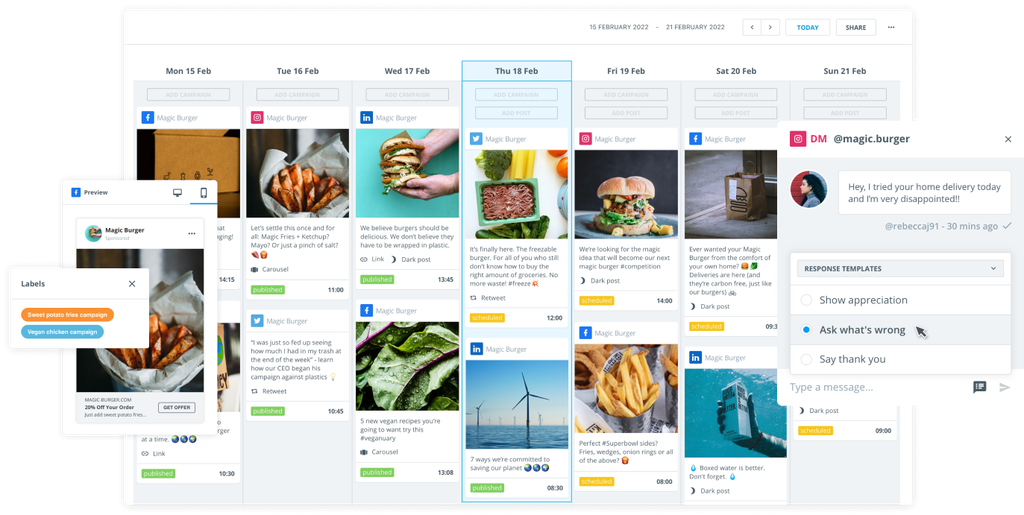
Competition among Instagram business accounts is so intense that simply sharing photos alone won’t cut it. Marketers must now juggle Reels, Instagram Stories, influencer partnerships, ads, customer conversations, and return on investment (ROI) reporting – and this is where Instagram‑specific software can help.
In this guide, we'll take a look at why tools for managing your Instagram account can make a difference. We’ll then run through 12 leading options for scheduling social media posts, analytics, community management, and influencer marketing.
By the end, you should have a clear idea of which tool best suits your needs.
In this guide:
- Brandwatch
- Later
- Agorapulse
- SocialPilot
- Hootsuite
- Sprout Social
- Buffer
- Iconosquare
- Sendible
- Planoly
- Upfluence
- Canva
Why Instagram tools matter
Posting content manually from the Instagram app may suffice for hobbyists, but businesses and professional creators typically require something more sophisticated.
Third-party tools often offer numerous features that can elevate your Instagram presence to the next level. Some focus on just one task, while others do a bit of everything. For example, there are Instagram content creation tools, publishing tools, and tools that focus on detailed analytics. Let's take a look.
Scheduling and timing
Planning tools enable you to queue posts and automatically publish them at the optimal times, based on audience behavior.
Some tools even learn when your audience is most active, and automatically post when the timing is just right – which is great for engagement!
Efficiency and unified engagement
A unified dashboard allows you to view content planning, comments, direct messages, and mentions all in one place, enabling teams to collaborate and stay on top of everything without switching tabs or accounts.
Analytics and benchmarking
Third‑party Instagram analytics tools provide richer metrics and competitor comparisons than Instagram’s native insights. You gain a much clearer idea of which content performs best and how you compare.
Influencer and campaign management
There are a few tools that will help you discover creators, manage partnerships, and track the results of your campaigns.When it comes to understanding how your influencer programs are going and tying them back to sales, this is super handy.
Many tools now also include workflow approvals, reminders to add captions and alt text, and alerts for potential copyright or policy violations. This extra layer encourages creativity while adhering to platform rules and brand guidelines.
Best Instagram tools for 2025
Now it's time to take a look at the 12 top tools for Instagram on the market right now.
1. Brandwatch
Brandwatch Social Media Management is an all‑in‑one platform that combines Instagram publishing, engagement, analytics, and even social listening in a single suite.
As an enterprise solution and official Meta Business Partner, Brandwatch’s social media management platform is packed with advanced capabilities for Instagram marketing at scale.
You can effectively run entire Instagram content and marketing campaigns from Brandwatch's dashboard.
Research your ideal audiences and listen to their views, using sentiment analysis to gain a deeper understanding of your followers. Benchmark your Instagram profiles against others and measure a wealth of data. Engage with users via Brandwatch and publish posts in the content calendar. Launch Instagram ads and conduct influencer campaigns directly within the platform.
How Brandwatch helps with Instagram:
- All‑in‑one management: With Brandwatch, you can manage your entire Instagram workflow from one platform. Edit, schedule, and auto‑publish all types of content – images, carousels, Stories, and Reels – for both Instagram and other social networks.
- Instagram ads: Take a high‑performing Instagram post and boost it as an Instagram ad campaign for extended reach, so you no longer need to hop into Meta’s tools separately. Or, create ads from scratch in Brandwatch.
- Instagram analytics dashboard: Brandwatch offers robust analytics with both real‑time and historical data. This means you can track key metrics, such as follower growth, likes, comments, shares, clicks, video views, and engagement rates for all your Instagram posts. Even better, the dashboard is highly customizable – meaning you can filter performance by campaign, content type (for example, Reels versus Stories), or audience segment to gain deeper insights. It also supports reporting on both paid and organic Instagram content, so you get a true 360-degree view of results.
- AI‑powered insights: If you make the most of Brandwatch’s machine‑learning and analytics heritage, it's easy to pinpoint trends and patterns. The tool can automatically identify your top‑performing content themes, detect emerging hashtags or topics in your niche, and even suggest optimal posting times. These data-driven insights are great for fine-tuning your Instagram strategy as you progress.
- Collaboration tools: Brandwatch is designed for teams and features robust workflow and collaboration capabilities. You can manage multiple Instagram accounts with ease, assign user roles and approval workflows for scheduled posts, and maintain a shared content calendar for visibility. Its unified social inbox brings together Instagram DMs, comments, and mentions along with other social channels, so community managers can collaborate and respond from one queue. Internal notes and assignments also facilitate easy coordination of responses or escalation of important messages to the relevant team members.
- Advanced features: As an enterprise‑grade platform, Brandwatch offers the reliability and support that large organizations need. For example, you can run competitor benchmarking and compare your Instagram performance side‑by‑side with chosen rivals to identify gaps and opportunities. With its roots in analytics, Brandwatch leverages years of social data to reveal long-term trends and sentiment shifts. This is why it's the tool of choice for many global brands.
Who uses Brandwatch for Instagram?
While Brandwatch would be a good choice for almost any business, it's especially popular among enterprises and agencies that need an ultra-reliable Instagram tool covering publishing, analytics, community management, and competitive intelligence all in one.
It's particularly well-suited to teams managing multiple brands or regions, where collaboration and high‑quality support are critical.
2. Later
Later began as an Instagram‑first scheduler and visual planner. It remains focused on Instagram while adding support for TikTok, Pinterest, and other platforms.
How Later helps with Instagram:
- Visual feed planner and auto posting: Arrange your feed visually and schedule posts, carousels, Stories, and Reels with best time suggestions.
- Linkin.bio and influencer marketplace: This tool will let you create a clickable gallery from your Instagram bio link and discover creators for collaborations.
Who uses Later for Instagram?
Brands and creators who want to improve their Instagram feed’s visual harmony, as well as small businesses seeking an integrated link‑in‑bio and influencer features.
3. Agorapulse
Agorapulse is a well‑rounded social media tool with strengths in community management and reporting. It’s popular among agencies and teams.
How Agorapulse helps with Instagram:
- Unified inbox and monitoring: Consolidate comments, messages, and ad responses in one dashboard. Track keywords to catch untagged mentions.
- Publishing calendar: Schedule Instagram posts and campaigns with a visual calendar and bulk upload feature.
Who uses Agorapulse for Instagram?
Agorapulse’s white-label reporting and team workflows make it well-suited for client work. It's also suitable for social media teams and agencies that prioritise engagement management and reporting.
4. SocialPilot
SocialPilot offers a balanced feature set for Instagram publishing and scheduling. There’s an AI assistant for caption writing and a good level of analytics to aid reporting.
How SocialPilot helps with Instagram:
- Bulk scheduling and queues: Upload posts in bulk via CSV and set up content queues that automatically recycle evergreen posts on your preferred schedule.
- Client collaboration tools: Invite clients or team members with specific permissions. Clients can approve content before it goes live, keeping everyone aligned.
Who uses SocialPilot for Instagram?
This is a tool for smaller teams and agencies that need multi‑account scheduling and basic analytics without the need for bells and whistles.
5. Hootsuite
Hootsuite is one of the longest-standing social media management tools, supporting Instagram alongside other major networks in its suite.
The software offers various features for Instagram scheduling, monitoring, analysis, and reporting.
How Hootsuite helps with Instagram:
- Cross‑platform scheduler with AI: Plan and schedule Instagram posts (images, carousels, and Reels) alongside content for Facebook, X (Twitter), LinkedIn, and more from one calendar. Get AI suggestions to streamline cross‑network campaigns.
- Monitoring streams: Create streams to follow your posts’ comments, track hashtags, and monitor competitor accounts.
Who uses Hootsuite for Instagram?
Social media teams that want a scheduler to manage multiple channels from one place. It also appeals to larger businesses looking for integrations and workflow options.
6. Sprout Social
Sprout is an enterprise‑focused social media suite that balances publishing, engagement, and analytics. It’s known for having an interface with strong reporting features.
Users can connect their Instagram profile with other social media accounts for a wider management solution.
How Sprout helps with Instagram:
- Unified publishing and library: Schedule Instagram posts, Stories, and Reels with assets organised in a shared content library across all your networks.
- Advanced reporting: Access detailed analytics on reach, engagement, and follower growth, plus competitive benchmarks and sentiment analysis via Sprout’s listening add‑on.
Who uses Sprout for Instagram?
Mid‑sized to enterprise organisations and agencies that need analytics and collaboration features for Instagram and beyond.
7. Buffer
Buffer has come a long way from its humble beginnings as a straightforward scheduler and now provides a broader social media toolkit with AI help and simple analytics.
How Buffer helps with Instagram:
- Simple scheduling queue: Add your Instagram posts to a queue and Buffer publishes them at preset times, with an interface that's clean and beginner‑friendly.
- AI caption assistant: Generate caption ideas or repurpose content for different platforms with Buffer’s built‑in AI helper.
Who uses Buffer for Instagram?
This tool is aimed at individuals, creators, and small businesses that need reliable yet uncomplicated Instagram scheduling software. It handles the basics – scheduling posts consistently, and tracking fundamental metrics – without additional features like social listening tools.
8. Iconosquare
Iconosquare is an analytics‑first platform that provides deep metrics and competitor insights for Instagram and other social networks.
How Iconosquare helps with Instagram:
- Optimal posting times: This tool analyzes historic performance and follower activity to find the best times to post – something that not all other Instagram analytics tools can manage.
- Content and competitor insights: Compare formats and hashtags to see what drives engagement and benchmark against competitors and industry averages.
Who uses Iconosquare for Instagram?
Data‑focused marketers, agencies, and brands who might already use a simple scheduler but need deeper Instagram analytics and competitor benchmarks.
9. Sendible
Sendible is geared towards agencies and businesses managing multiple clients, offering white‑label dashboards and flexible scheduling on Instagram and other sites.
How Sendible helps with Instagram:
- White‑label client dashboards: Create branded portals for each client, giving them access to their own content and analytics.
- Comprehensive scheduling: Schedule all content types, including Stories and Reels, with repeating schedules and bulk uploads.
Who uses Sendible for Instagram?
This one is generally chosen by agencies or consultants managing multiple social accounts, as it appeals to users who want multi-client workflows.
10. Planoly
Planoly is a social media planner with LinkedIn connectivity that is known for its visual planning capabilities and commerce features.
How Planoly helps with Instagram:
- Design templates: Quickly create Stories and posts with built‑in templates and light editing tools, useful for brands without graphic design resources.
- Shoplink: Turn your Instagram feed into a shoppable gallery using Planoly’s bio link tool, driving traffic to specific product pages.
Who uses Planoly for Instagram?
This tool is useful for influencers, visual brands, and small businesses focused primarily on Instagram aesthetics and commerce.
11. Upfluence
Upfluence is an influencer marketing platform specifically designed to manage campaigns at scale, from discovering creators to tracking results.
How Upfluence helps with Instagram:
- Influencer discovery: Search a database of millions of creators with filters for keywords, audience demographics, engagement rates, location, and more.
- Campaign management: Upfluence provides a workflow to handle outreach, contracts, and content tracking. Manage statuses, track progress, and collaborate internally from a single dashboard.
Who uses Upfluence for Instagram?
This is one for brands and agencies heavily invested in influencer marketing on Instagram.
12. Canva
While it's not really an Instagram management tool, Canva is really useful for creating polished Instagram visuals. Its drag‑and‑drop editor and Instagram templates help anyone produce on‑brand graphics quickly.
It also integrates with various scheduling tools so you can export your images easily and streamline your workflow.
How Canva helps with Instagram:
- Drag‑and‑drop design: Choose from thousands of Instagram post and Story templates, then customize with your brand colours, fonts, and images.
- Brand kit: Store your logos, colour palette, and fonts so designs stay consistent. This is invaluable for teams producing content across multiple channels.
Who uses Canva for Instagram?
Anyone creating content for Instagram – from small business owners to social media managers. This tool is built to create quick, professional designs without requiring advanced software.
Emerging Instagram trends
Instagram's features are evolving all the time, so it's no surprise that the software built around it is following suit.
In 2025, the biggest shift is the widespread use of artificial intelligence. Many tools now automatically suggest captions and hashtags, flag unusual engagement spikes, recommend best posting times, and even identify objects or themes in your photos to improve discovery.
AI can also power automatic closed captioning and audio analysis for Reels, making it easier to create videos that are more accessible and engaging.
Another trend is deeper integration with the broader marketing tech stack. Those behind these tools recognize that brands rarely operate solely on Instagram, so leading software has been designed to sync seamlessly with TikTok, Pinterest, Facebook, X, and LinkedIn, as well as email platforms, CRMs, and e-commerce systems (like Salesforce).
Connectivity like this means you can plan Instagram campaigns, then expand them to other channels, reuse content, track conversions, and compare performance without juggling spreadsheets or exporting data between platforms.
Finally, compliance and governance features are becoming essential. With advertising regulations and data privacy rules tightening, many tools now offer role‑based permissions, audit trails, and automated disclosures for sponsored posts. They help you manage rights for user‑generated content, label paid partnerships correctly, and stay within Instagram’s community standards – so you can breathe easier!
Choosing a tool that embraces these trends is a good idea, as it will future‑proof your strategy for whatever the next algorithm update brings.
How to choose the right Instagram tool
With numerous excellent options, selecting an Instagram tool can be overwhelming. Here are a few tips to guide your choice.
Clarify your primary needs
Do you mainly need a scheduler, deep analytics, influencer management, or an all‑in‑one suite? Make a list of must‑have features.
For example, if you run influencer campaigns, an influencer directory could be essential, whereas heavy reporting needs might point to Brandwatch or Iconosquare.
Consider team size and workflow
Solo creators often prefer simple tools as they don't need as much support. On the flipside, teams and agencies will probably need collaboration features (approval workflows, shared calendars, permission settings, etc.).
Platforms like Brandwatch, Sendible, and Agorapulse are built with multi‑user workflows in mind.
Decide between specialised vs. multi‑platform
If Instagram is your primary channel and aesthetics are important, an Instagram-focused tool like Later or Planoly may be a suitable option. However, if you manage multiple networks, an all-in-one suite (like Brandwatch) can be a game-changer when it comes to cross-channel management.
Think about budget and scalability
Free or low-cost plans might sound appealing, but it's essential to remember that they typically only cater to basic needs.
As your strategy evolves, enterprise products will provide deeper insights, scalability, and support. This is why you need to consider where your brand or agency will be in the next year or two.
Try before committing
Many tools offer free trials or demos (here’s a link to the Brandwatch demo). These are useful for getting a feel for ease of use, customer support, and whether features match your workflow. Don't be afraid to try them!
Frequently asked questions
If you have any burning questions about Instagram tools, this section is for you.
Are there any free Instagram tools?
Yes, free tools do exist. Meta’s own Creator Studio (now part of Meta Business Suite) allows basic post scheduling and access to Instagram Insights at no cost. Other tools sometimes offer limited free plans that let you schedule a small number of posts per month.
These options may suit individuals and small businesses just starting out, but they have usage caps and fewer features than paid plans.
Can I schedule Stories and Reels?
Most modern tools support scheduling Reels directly, thanks to updates to Instagram’s API.
Stories are trickier: many tools can schedule them and send you a push notification when it’s time to post, but some manual steps remain due to API restrictions.
Tools like Brandwatch, Later, and Planoly make this process easier by preparing the Story content and reminding you to publish.
Which tool is best for analytics?
If you're looking for in‑depth analytics, Brandwatch provides comprehensive analytics plus competitor benchmarks and listening. Iconosquare is also known for its granular metrics and benchmarking.
For more basic metrics, Buffer and Later include simplified dashboards suitable for solo creators and small teams.
Do Instagram tools directly increase followers and engagement?
No tool can magically generate followers.
However, they enable strategies that do grow audiences: scheduling ensures consistent posting, analytics highlight what content resonates and when to post, and unified engagement tools help you respond quickly.
Over time, these improvements can lead to higher engagement rates and follower growth.
The last word on the best Instagram analytics tools
Instagram’s popularity shows no sign of waning in 2025, and unfortunately, finding success on the platform takes much more than just good content.
With competition greater than ever, teams benefit from tools that help them plan content, engage communities, analyze performance, and stay ahead of trends.
The right software actually reduces your manual work and turns data into actionable insights, allowing marketers to focus on storytelling and strategy.
In this guide, we covered 12 of the top Instagram tools – from Brandwatch’s all‑in‑one suite to specific Instagram analytics tools like Iconosquare and design platforms like Canva. They're all slightly different, and your ideal choice will depend on factors like budget, team size, and objectives.
Stay flexible and grow with your tool
Once you land on the right tool (or combination of tools), you'll be able to streamline your workflow, gain deeper Instagram insights, and build stronger relationships with your audience.
As Instagram continues to introduce new features and refine its algorithms, keeping your toolkit up to date will help you adapt quickly and experiment with emerging formats (like AR filters or seamless shopping experiences).
The trick is to stay flexible and invest in technology that evolves with the platform, ensuring your strategy continues to yield results for years to come. Happy posting!