From new platforms and algorithms to the rise of AI, social media managers today face an ever-evolving landscape.
The right tools can make all the difference in keeping your brand’s social presence organized, engaging, and data-driven.
Without software at your disposal, it’s almost impossible to manage your social media channels effectively and unify marketing campaigns.
This guide explores the top 10 social media marketing tools for 2026, why they matter, and how to choose the best one for your needs.
Whether you’re scheduling posts, analyzing performance, or listening to online conversations, these tools help streamline your social media marketing and deliver results.
Why managers need social media marketing tools
Managing multiple social channels manually is next to impossible for a busy social media manager. Audiences are spread across multiple platforms, and each channel requires its own specialized management techniques.
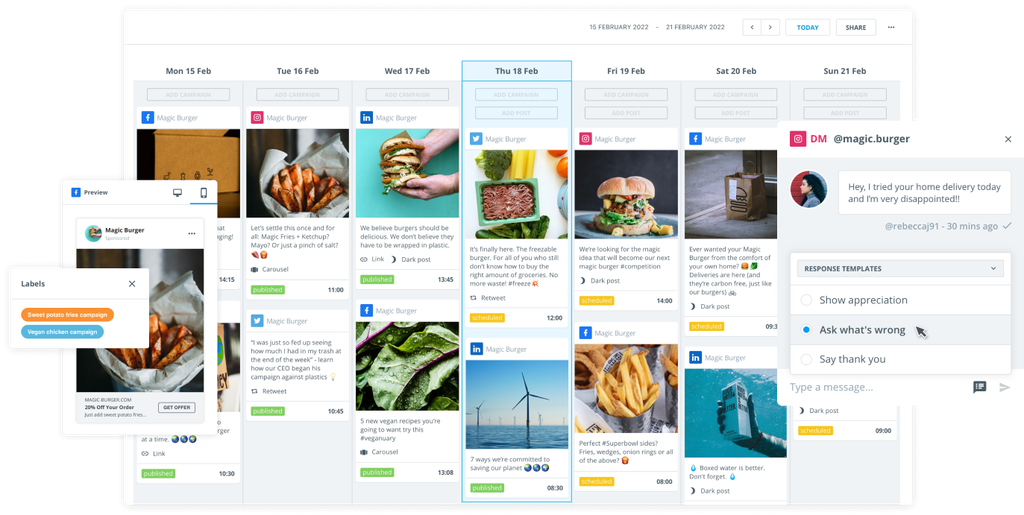
A social media marketing tool aims to bring the tasks required on each platform into one place. You can plan, schedule, publish, and monitor content from a single dashboard.
It makes life a whole lot easier and boosts efficiency while eradicating simple formatting and scheduling errors.
What the best tools for social media marketing offer
Our list of the top social media marketing tools for 2026 consists of platforms that make your work easier.
They all provide a level of integration and improved organization that simplifies the day-to-day management of various social media accounts. The very best ones also have additional features, like social listening tools and AI-led analytics.
Here are the standout provides available in most of the below social media marketing tools:
- Multi-platform support: The ability to connect to all major social media networks (Facebook, Instagram, X, LinkedIn, TikTok, Pinterest, Reddit, YouTube, etc.) so you can manage everything in one place.
- Scheduling & automation: Having a post-scheduling platform with features like queues, drag-and-drop calendars, and auto-posting at optimal times.
- Analytics & reporting: Providing detailed insights on engagement, reach, clicks, and more – with customizable reports to prove return on investment (ROI) and guide strategy.
- Social listening & monitoring: The ability to monitor brand mentions, trends, and competitors across social media and the web. The best tools also include sentiment analysis.
- Unified inbox & engagement: Boasting a single inbox for comments, direct messages, and mentions across social media platforms, enabling faster response and better customer care.
- Collaboration & workflows: Offering tools for teams such as content calendars, approval workflows, user roles, and even asset libraries, which ensure smooth collaboration and brand consistency.
- Integrations & special features: Having extras like CRM integration, AI assistants for content creation, and unique offerings like employee advocacy and influencer marketing modules.
- Cost-effectiveness: Having a pricing structure that delivers value for the feature set. Some tools offer free plans or trials, while others are premium enterprise solutions – the key is getting the features you need at a reasonable cost.
What to consider when choosing a social media marketing tool
There are plenty of top social media marketing tools to choose from, but you might need one for very specific reasons. Before choosing a tool, it’s worth considering exactly what you’ll use one for.
Having lots of features may be nice to have, but if you don’t need that software, then there’s no point paying for it.
It’s worth drawing up a blueprint of what you’ll use a marketing tool for before you get started. Here are some core things to consider.
What are your goals?
First, determine how your tool can help achieve your goals. Is it primarily for scheduling and basic analytics, or do you require advanced capabilities such as social listening, CRM integration, or team workflows?
Smaller organizations with straightforward needs may prefer a simple scheduler. Larger teams or those focused on insights might lean toward Brandwatch or other tools for their richer analytics and listening features.
What are your platforms?
Ensure the tool supports all the social networks you actively use. Most cover Facebook, Instagram, X, LinkedIn, etc., but if you heavily use Pinterest, YouTube, TikTok, or newer networks, double-check to ensure support is available. Tools like Brandwatch excel in breadth, while others, such as Later, specialize in visuals.
What’s your budget?
Tools vary from free to enterprise pricing. Set a budget and see which tool offers the best value. Consider ROI with your pricing model too. If a tool offers exactly what you need but feels expensive, work out if working with the tool can be financially generative, such as its advertising capabilities.
Can you test it?
Most platforms offer a free trial or free plan. Take advantage of these to test the user interface and features with your own workflow. A tool might be highly rated, but you’ll want to ensure it feels intuitive for you and your team. For instance, Brandwatch offers training during free trials so you can quickly get up to speed.
Does it integrate?
Think about your existing software stack. If you use certain CRMs, customer support tools, or analytics systems, choose a social media tool that integrates well. Brandwatch and Sprinklr, for example, integrate with CRM and business intelligence tools.
Are there specific features you need?
Identify any must-have features. Do you need a strong social listening component to track brand mentions? If so, consider Brandwatch or Sprinklr. Are you managing customer support via social media and need helpdesk integration or an advanced inbox, such as Brandwatch or Agorapulse? Ensure you thoroughly understand the specific features before making your selection.
Do you need to scale?
If you’re planning to scale up, choose a tool that fits your current business needs and can grow with you. If you plan to expand to additional social channels or onboard more team members, ensure the tool can accommodate this growth. It’s often easier to grow into a tool than to migrate later on.
Top 10 social media marketing tools for 2026
Now we know what the best social media marketing tools are capable of and what you might need them for, it’s time to explore the tools themselves.
1. Brandwatch: Social intelligence & management combined
Brandwatch is an ideal platform for elevating your online presence through a balanced approach to content publishing, audience engagement, and deep social listening.
Brandwatch’s Social Media Management suite is designed for marketers seeking to maximize the impact of their social media activity. Brandwatch also has tools like Audience and Engage to connect more closely with your target audience and ideal customers.
You can manage content schedules across multiple platforms with Publish and target specific audiences via ad campaigns with Advertise at your side. Use deep analytics from across the social landscape to Benchmark against your rivals, and Measure your social media campaigns as you go.
Brandwatch is designed to support managers from ideation to execution and future strategic planning.
Managers can also leverage Brandwatch Consumer Research to conduct in-depth social listening with ease. Monitor your brand across 100 million+ online sources in real-time to track trends, sentiment, and competitor mentions.
Brandwatch provides custom dashboards for analytics, where you can visualize KPIs, track campaign performance, and even benchmark against competitors’ share of voice.
Key features of Brandwatch
- Deep social listening: Real-time monitoring of brand or keyword mentions across millions of sources (social media platforms, blogs, forums, news) with sentiment analysis to gauge public opinion.
- Cross-channel publishing: Plan and schedule social media posts to all major networks, with an intuitive calendar and approval flow to coordinate large teams.
- Customizable inbox: Unified social media inbox for all social interactions, which teams can filter and customize (by network, campaign, urgency, etc.) for efficient community management.
- Analytics & reporting: Customizable dashboards to track engagement, reach, sentiment trends, customer care response times, and more – with exports for stakeholders.
- Integrations: Brandwatch has official partner integrations with different social media platforms platforms like Facebook, Instagram, TikTok, and Reddit to ensure robust data access and reliable posting.
Why use Brandwatch?
Brandwatch is an ideal tool for enterprise teams, agencies, and large organizations that need a data-driven approach to social media.
If your social strategy involves extensive brand monitoring, multi-team collaboration, and insight reporting, Brandwatch stands out.
2. Sprinklr: Unified CXM platform
Sprinklr is a unified customer experience management (CXM) platform that includes a social media management module. It offers an extensive feature set that spans social publishing, engagement, social listening, and advertising. It essentially acts as a one-stop shop for the social needs of large organizations.
Sprinklr’s listening capabilities can handle not just social networks but also millions of other sources (similar to Brandwatch), allowing enterprises to track brand mentions and customer sentiment globally.
Its AI (the Sprinklr AI engine) is applied to tasks like automatically tagging incoming messages, suggesting responses, detecting anomalies or crises in social data, and optimizing post timing.
Key features of Sprinklr
- Channel support: Sprinklr offers great channel coverage, including major social networks and often new or niche channels. If a new platform emerges (like Threads or Bluesky), Sprinklr is usually quick to support it for enterprise clients.
- Unified inbox & routing: Similar to others, Sprinklr has a unified inbox but at an enterprise scale – it can integrate with customer service workflows.
- Analytics & listening: Highly customizable analytics dashboards and real-time listening with the ability to filter by region, language, sentiment, etc.
Why use Sprinklr?
If you’re a social manager in a big company dealing with complex workflows, Sprinklr is built for that scenario.
It’s also a good choice if social media is just one part of your customer experience strategy and you want one platform to connect social data with everything else.
3. Buffer: Simple & affordable scheduling
Buffer’s simplicity makes it a good tool for small businesses, creators, and startups.
With Buffer, you can connect your major social accounts – including Facebook Pages/Groups, Instagram, X, LinkedIn, TikTok, Pinterest, YouTube, and more – and schedule social media posts for each with a few clicks. Buffer’s claim to fame is how quick and intuitive it is to line up a queue of posts.
Buffer supports newer platforms, such as Threads, Mastodon, and Bluesky, reflecting its agility in adding platforms as they emerge.
Buffer also features an AI assistant that can help generate or repurpose post text, although its implementation is fairly basic compared to some larger tools.
The interface is clean and minimal – even non-experts can start scheduling content in minutes.
Key features of Buffer
- Multi-channel scheduler: Easy scheduling and queuing for Facebook, Instagram, X, LinkedIn, TikTok, Pinterest, Google Business Profile, and more. Users get up to three channels on the free plan).
- Queue & calendar views: You can maintain a posting schedule by setting default times and simply adding content to your queue. A calendar view (with drag-and-drop) helps visualize your upcoming social media posts across all channels.
- Start Page (Link in Bio): A built-in tool to create a simple landing page for your Instagram or TikTok bio link, so you don’t need a separate service for that.
Why use Buffer?
Creators, entrepreneurs, and small to mid-sized businesses that primarily need an easy scheduling tool with basic analytics will find Buffer useful.
If you’re a social media manager or marketer with limited time or just starting out, Buffer’s user-friendly approach is a good place to start.
4. Agorapulse: Comprehensive management with a focus on inbox and reporting
Agorapulse is a social media management software solution that's popular with small and mid-sized businesses and agencies due to its well-rounded feature set.
It tends to hit a sweet spot between the simplicity of tools like Buffer and the more advanced capabilities of enterprise suites. Agorapulse offers publishing, a unified social inbox, monitoring, and analytics.
One of Agorapulse’s standout features is its Smart Social Inbox, which consolidates comments, direct messages, and ad comments from Facebook, Instagram, X, LinkedIn, YouTube, and Google My Business into a single dashboard.
It’s praised as one of the most intuitive inbox implementations, allowing you to easily see which messages are new, review and reply, assign to team members, or categorize with labels.
Key features of Agorapulse
- Unified inbox: A single inbox for all incoming social messages, comments, and reviews, with tools to categorize, assign, or bulk-manage them.
- Publishing & content queue: A drag-and-drop content calendar and flexible scheduling options. Bulk publishing via CSV upload or RSS import is a huge time-saver for posting a lot of content or recycling evergreen posts.
- Team collaboration: Supports multiple users with role-based access. It has an approval workflow for posts (one user creates, another approves) and internal comment threads on content. Also includes a shared content library for media assets.
Why use Agorapulse?
Agorapulse is ideal for teams that want a balance between ease of use and advanced functionality. Agencies like it because of the multi-client management features, and small businesses appreciate its approachable software.
If efficient inbox management and solid reports are top priorities, Agorapulse is a strong contender alongside Brandwatch.
5. Sendible: Friendly tool with white-label reporting
Sendible is a social media management platform that offers a comprehensive feature set (publishing, inbox, analytics, etc.). But what really makes Sendible shine is its emphasis on client management tools – think white-labeling, customizable reports, and separate client workspaces.
With Sendible, an agency can give clients their own login to view reports or approve posts, all on a custom domain and branded interface, which adds a professional touch.
Sendible’s analytics and reporting are customizable, and you can schedule automated email reports to clients on a regular basis. While it may not offer the in-depth analytics of Brandwatch, it excels at the basics of scheduling and managing social content.
Key features of Sendible
- Client management & white label: Ability to white-label the dashboard and reports with your agency’s branding. You can keep client social profiles and content separate in Sendible, ensuring confidentiality and organization per client.
- Publishing & bulk scheduling: A full-featured scheduler with queue categories, a content library, and bulk CSV upload for mass scheduling of posts.
- Approval workflows: You can set user roles and approval flows, such as content creator, approver, and client approver. Clients can approve or reject scheduled content easily through the platform, streamlining the feedback loop.
Why use Sendible?
Marketing teams handling multiple brands or clients will find Sendible useful. It’s also great for in-house teams that function like an agency serving different divisions or franchise locations.
6. Hootsuite: Social media management for broad coverage
Hootsuite is one of the original social media management platforms and covers scheduling, engagement, analytics, and social listening.
Hootsuite supports 35+ networks, all accessible through a single dashboard. This broad channel support is a big advantage for managers handling a presence on most social media platforms.
One standout feature is Hootsuite’s AI assistant. It’s similar to Brandwatch's Iris and can generate post ideas and captions or repurpose your top-performing content using artificial intelligence.
On the engagement side, Hootsuite offers a unified inbox for incoming messages and comments, plus the ability to assign conversations to team members – useful for customer support via social media.
Key features of Hootsuite
- Multi-platform scheduling: Manage and schedule posts across an unparalleled range of networks, all in one calendar interface.
- AI content assistant: It's AI writer helps generate captions, find post ideas, and optimize content using AI, saving time on content creation.
- Built-in design tool: Integration with Canva lets you design images and graphics within Hootsuite’s composer, streamlining your workflow for visual content.
Why use Hootsuite?
Mid-size to large businesses, agencies, and teams that need a reliable tool can benefit from Hootsuite’s offering. It’s good for organizations managing many social profiles or those needing cross-functional use (marketing, support, and sales teams all engaging on social media).
Its learning curve can be a bit higher due to the breadth of features, but it’s often a good choice for companies that require wide network support and professional features.
7. Sprout Social: Analytics and engagement for teams
Sprout Social is a social media management platform recognized for its interface and analytics and CRM features. Much like other leaders like Brandwatch, Sprout offers publishing, engagement (inbox), monitoring, and reporting.
Sprout’s Smart Inbox consolidates all your messages, mentions, and comments across networks into one feed, and you can assign tasks or messages to specific team members for follow-up.
Analytics provide pre-built reports on engagement, content performance, team response times, and competitor comparisons. You can also create custom reports.
Sprout Social is praised for being very user-friendly (even for non-technical team members) while still offering advanced capabilities under the hood.
Key features of Sprout Social
- Smart inbox: A unified inbox that collects messages and mentions from all networks in one place, with filters and tagging to stay organized and ensure timely responses.
- Social CRM integration: Builds profiles of your followers and customers (conversation history, past interactions, sentiment, etc.) so you have context when engaging and can track relationships over time.
- Collaboration tools: Supports multiple approval workflows, task assignments, and internal notes on messages.
Why use Sprout Social?
Sprout Social is ideal for mid-market and enterprise teams, as well as agencies, that value a combination of ease of use and good features.
It’s often favored by organizations that want to analyze their social data and integrate social media into their broader customer experience strategy.
8. SocialPilot: Budget-friendly scheduling for agencies & SMBs
SocialPilot offers an affordable social management tool option for those on a budget. It has a solid set of features – multi-platform publishing, a social inbox, analytics, and team collaboration – but at a lower price point than many competitors.
One of SocialPilot’s key features is its client management capabilities, similar to those of Sendible. You can group social accounts by client or project, invite clients to view content (or even create content with limited access), and generate white-label PDF reports.
It also has a Content Curation feature that suggests popular content (articles, blogs) relevant to your topics, which can be handy for filling your posting calendar with curated content.
The tool’s interface is straightforward, with a dashboard that shows all your connected accounts and upcoming scheduled posts. You can bulk schedule up to 500 posts using a CSV file, and it even allows you to repost your Facebook posts to X or perform other cross-posting tasks with minimal clicks.
Key features of SocialPilot
- Bulk scheduling & calendar: Schedule hundreds of posts in bulk using a CSV file or use the calendar to visualize and adjust your posting schedule.
- Client & team management: Manage multiple clients by grouping accounts. You can give team members or clients different levels of access (Admin, Editor, etc.) without sharing passwords.
- White-label reports: Professional reports that can be downloaded or emailed, with the option to put your agency logo on them.
Why use Social Pilot?
Freelance social media managers, small agencies, and small businesses that need to manage multiple social profiles and want maximum bang for their buck could find a match with Social Pilot.
It’s also good for beginners since the learning curve is mild and the interface is not cluttered.
Agencies that are just starting out often use SocialPilot to manage a handful of clients thanks to the multi-account support and low per-account cost. However, very large teams or those needing sophisticated features might find its limits.
9. Later: Visual scheduling
Later began as one of the top Instagram scheduling tools and has since grown into a more comprehensive social media management platform.
It still has a special emphasis on visual planning – for example, a preview of your Instagram grid to plan the look of your feed – which makes it popular for brands heavy on Instagram, Pinterest, or TikTok.
Key features in Later include a drag-and-drop calendar for scheduling posts and the ability to schedule Instagram Stories and TikToks (through reminders). Later also offers a built-in “Linkin.bio” feature to create a clickable landing page from your Instagram link in bio, driving traffic to multiple URLs.
It’s particularly known for its media library – you can store your images and videos in Later, tag and organize them, and quickly use them in posts.
Key features of Later
- Visual content planner: The interface lets you preview your Instagram feed and drag posts around to design the layout.
- Media library & editing: Upload all your photos and videos to Later’s cloud library. You can edit images (crop, add text, etc.), organize media by labels, and even search by image (using object recognition) to find that one photo you need.
- Analytics dashboard: This dashboard is particularly strong for Instagram – track metrics like follower growth, engagement rate, story views, and even Instagram Reels performance. It also has unique “Conversations” analytics that can show your top DMs if you connect Instagram messaging.
Why use Later?
Brands and creators with a heavy focus on visual content and Instagram/TikTok marketing could thrive with Later at their side. Small businesses and agencies that manage Instagram for clients also tend to favor Later for its ease of planning and its client-friendly reports.
However, if you require deep listening or a complex inbox system, Later might not cover that as fully; it’s more about content planning, publishing, and analysis.
10. Zoho Social: Integrated social tool
Zoho Social is part of the larger Zoho suite of business software (CRM, HR, Desk, etc.), and it reflects Zoho’s hallmark: providing a lot of functionality at a relatively low cost.
Zoho Social covers the basics of scheduling, monitoring, and analytics, and it also distinguishes itself by how well it integrates with Zoho CRM, allowing companies to tie social interactions to leads or customers in their database.
Zoho supports major platforms like Facebook, Instagram, X, LinkedIn, TikTok, and Google My Business. You can schedule posts, and it offers a content calendar view, too.
For agencies, Zoho Social includes client management with separate portals, similar to SocialPilot. A unique feature is that it offers a SocialShare browser plugin to quickly share content from your browser, as well as a mobile app, allowing you to manage on the go.
Key features of Zoho Social
- Zoho CRM Integration: If you use Zoho CRM, every social interaction (comment, mention, DM) can be linked to leads/contacts.
- Real-time monitoring: Create listening columns for brand mentions, keywords, competitor names, or hashtags across X and Instagram. Monitor Facebook page reviews and Google Business reviews in one dashboard.
- Integration with Zoho Desk: Social media messages can be converted into support tickets in Zoho Desk (customer service software). So if someone complains on X, you can log it and track it like a support issue, ensuring follow-up.
Why use Zoho Social?
Large businesses and agencies that already use Zoho products will likely get the most from Zoho Social. But even if not, Zoho Social is good for brands that want a steady overview of their social media management practices.
Marketers who prefer a single vendor solution (running everything from email to social through Zoho, for example) will find comfort in how Zoho’s apps work together.
Time to manage your social media better today
Social media marketing is more challenging and more exciting than ever. New platforms emerge, algorithms shift, and audience expectations keep rising.
A social media marketing tool is no longer a luxury – it’s a necessity to navigate this fast-paced environment effectively.
The 10 tools highlighted here are among the very best, each catering to different needs. From Brandwatch’s data-rich insights and Sprout Social’s collaborative analytics to Zoho Social’s all-in-one control and Buffer’s simplicity, there’s a solution out there for every type of social media manager.
The key is to find a tool that streamlines your workflow, amplifies your impact, and delivers the social media metrics that matter to your organization. Look back at our section on what to consider when choosing a social media marketing tool before making a decision.
Want to know more? Learn how to use Brandwatch with expert guidance and get social media management tips at every step. Brandwatch Social Media Management is here to support brands through their marketing journey, from launching profiles and creating content to analyzing the results.
Here’s to a more efficient and impactful social media management experience in 2026 and beyond.