Managing multiple social media accounts can feel overwhelming. Between creating content, maintaining consistency across platforms, and posting at optimal times, it's easy to let your social media strategy slip into chaos. 

That's where social media scheduling comes in. By planning and automating your posts in advance, you can maintain a consistent presence, reach your audience when they're most active, and free up time for engagement and strategic thinking. 

In this guide, we'll walk you through how to schedule social media posts effectively, from planning your content calendar to choosing the right tools for your needs. 

Why schedule social media posts?

Before diving into the how, let's look at why scheduling matters. 

Consistency is key. Regular posting keeps your brand top-of-mind and signals to algorithms that you're an active, valuable account. But posting manually at optimal times across multiple platforms is nearly impossible, especially if you're managing a global audience across time zones. 

Time efficiency. Batching content creation and scheduling posts in advance means you can dedicate focused time to creation, rather than scrambling for content ideas throughout the day. 

Strategic timing. Different platforms and audiences have different peak activity times. Scheduling lets you post when your audience is most likely to engage, even if that's 3 AM your time. 

Team collaboration. When you schedule in advance, multiple team members can contribute, review, and approve content before it goes live, ensuring quality and brand consistency. 

Better planning. A scheduled calendar gives you a bird's-eye view of your content strategy, making it easier to spot gaps, balance content types, and align with campaigns or product launches. 

Step 1: Audit your current social media presence

Before you start scheduling, take stock of where you are now. 

Which platforms are you active on? List all the social networks where you have a presence. Don't just include the ones you post to regularly—include dormant accounts that might need attention or sunsetting. 

What's working? Look at your analytics to understand which posts perform well. What content types get the most engagement? What topics resonate with your audience? 

What are your pain points? Are you posting inconsistently? Missing optimal posting times? Struggling to maintain a content mix? Identify the specific problems scheduling can solve. 

Who's involved? Map out your team structure. Who creates content? Who reviews it? Who has final approval? Understanding your workflow will help you choose the right scheduling approach. 

Step 2: Define your goals and KPIs

Your social media scheduling strategy should support clear, measurable goals. 

Set specific objectives. Are you trying to increase brand awareness? Drive website traffic? Generate leads? Boost engagement? Your goals will shape your content strategy and posting frequency. 

Establish KPIs. Define how you'll measure success. This might include metrics like engagement rate, reach, click-through rate, follower growth, or conversions. 

Align with business objectives. Your social media goals should connect to broader marketing and business goals. If your company is launching a new product, your social strategy should support that launch. 

Step 3: Understand your audience and platform dynamics

Different platforms serve different purposes and attract different audiences. 

Know where your audience is. Just because a platform exists doesn't mean you need to be on it. Focus your energy where your target audience actually spends time. 

Understand platform-specific best practices. Each network has its own culture, content formats, and optimal posting times. What works on LinkedIn won't necessarily work on TikTok. 

Research optimal posting times. While general guidelines exist, your specific audience might be most active at different times. Use your analytics to identify the best times to post on social media for your audience. 

Consider time zones. If you serve a global audience, you might need to schedule multiple posts or choose times that work across regions. 

Step 4: Choose your scheduling platforms

Scheduling across major social networks

Modern social media management tools make it possible to schedule across all major platforms from a single dashboard. With Brandwatch Publish, you can schedule posts to: 

TikTok - Plan and publish your TikTok videos in advance, ensuring you maintain consistency on the platform. Learn more about how to schedule TikTok posts

Instagram - Schedule both feed posts and Instagram Reels ahead of time. Instagram's visual nature makes planning crucial for maintaining a cohesive aesthetic. Check out our guides on how to schedule Instagram posts and how to schedule Instagram Reels

Facebook - Schedule posts easily with Publish. Read more about scheduling Facebook posts

X (formerly Twitter) - Plan your posts in advance while maintaining the platform's real-time feel. See our guide on how to schedule posts on X

LinkedIn - Schedule professional content to reach your B2B audience at optimal times. Learn the details in our LinkedIn scheduling guide

Pinterest - Plan your pins to maximize discovery and drive traffic to your website. 

Key features to look for

When choosing a scheduling tool, prioritize these capabilities: 

  • Multi-platform support - Schedule to all your favorite platforms from one place. 
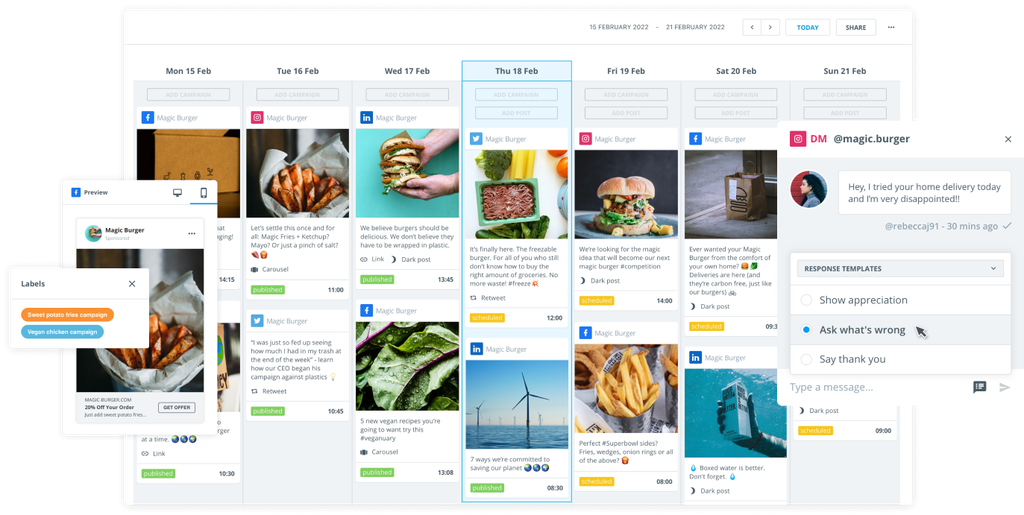
  • Content calendar view - See all scheduled posts across channels in one visual calendar. 
  • Approval workflows - Route content for review and approval before it goes live. 
  • Content library - Store approved assets, templates, and brand guidelines for easy access. 
  • Team collaboration - Assign roles, share notes, and coordinate with team members. 
  • Analytics integration - Track performance without switching between tools. 
  • Custom scheduling - Set specific times for each post or use intelligent recommendations. 
  • Bulk scheduling - Upload and schedule multiple posts at once. 

Step 5: Create your social media content calendar

Once you've set your goals and understood your audience and platforms, it's time to build your content calendar. 

Start with your content pillars. Identify 3-5 themes or topics that align with your brand and resonate with your audience. This creates structure and ensures variety in your social media content calendar

Map out campaigns and key dates. Mark important dates like product launches, holidays, industry events, and company milestones. Build content around these anchors. 

Balance content types. Mix promotional content with educational, entertaining, and engaging posts. A good rule of thumb is the 80/20 rule: 80% value-driven content, 20% promotional. 

Plan for flexibility. While scheduling creates structure, leave room for timely, reactive content that responds to trends or news. 

Integrate all your channels. Using a tool like Brandwatch Publish, connect your social networks to one calendar so you can see your complete content strategy at a glance. 

Assign roles and responsibilities. Make it clear who's creating what content, who's reviewing it, and who has final approval authority. 

Plan ahead. Aim to schedule at least 2-4 weeks in advance. This gives you buffer time for unexpected changes and reduces last-minute stress. 

Creating the calendar before you start mass-producing content gives you a holistic view, helps you spot gaps or redundancies, and ensures your strategy stays cohesive whether you're working solo or with a team. 

Step 6: Create and schedule your content

With your calendar framework in place, it's time to create and schedule content. 

Batch your content creation. Set aside dedicated time to create multiple pieces of content at once. This is more efficient than creating posts one at a time. 

Use templates and saved assets. Store frequently used graphics, captions, and hashtags in your content library to speed up the creation process. 

Write platform-specific captions. While you might use the same core message across platforms, tailor your copy to each network's tone and character limits. 

Optimize for each platform. Adjust image dimensions, video lengths, and formatting for each network's specifications. 

Include engaging elements. Add relevant hashtags, tag locations or accounts, and use platform-specific features like polls or questions. 

Schedule at optimal times. Use your research and analytics to post when your audience is most active. 

Add tracking links. Include UTM parameters in your links so you can track which social posts drive traffic and conversions. 

Preview before scheduling. Always preview how your post will look on each platform before finalizing the schedule. 

Step 7: Monitor and engage

Scheduling your posts doesn't mean you can set them and forget them. Active monitoring and engagement are crucial. 

Watch for real-time events. If breaking news or a crisis occurs, be prepared to pause or adjust scheduled content that might feel tone-deaf in context. 

Respond to comments and messages. Scheduling frees up time for engagement, which is critical for building community and relationships. 

Monitor performance. Track how your scheduled posts perform and use those insights to refine your strategy. 

Adjust as needed. If certain posting times or content types aren't working, don't be afraid to experiment and adjust your schedule. 

Step 8: Leverage advanced features

As you get comfortable with scheduling, take advantage of more sophisticated capabilities: 

Link in bio tools - Create a custom landing page that houses multiple links, perfect for Instagram where you're limited to one link in your profile. 

Content recycling - Identify evergreen content that performs well. Maybe it’s worth reposting it periodically or giving it a boost. 

Collaboration with agencies - Give external partners appropriate access levels to streamline workflows. 

Cross-posting with variations - Schedule the same core content across platforms with platform-specific adjustments. 

Step 9: Review and refine

Social media is always evolving, and your scheduling strategy should be too. 

Conduct regular audits. Monthly or quarterly, review what's working and what isn't. 

Analyze your best and worst performers. Look for patterns in your most and least successful posts. 

Test new approaches. Experiment with different posting times, content formats, or caption styles. 

Stay updated on platform changes. Social networks constantly update their algorithms and features. Stay informed and adjust accordingly. 

Gather team feedback. If you work with a team, regularly check in about what's working in your workflow and where there's friction. 

Tips for effective social media scheduling

Don't over-schedule. Having posts queued up is great, but avoid scheduling so far in advance that your content becomes stale, irrelevant, or tone deaf. 

Maintain authenticity. Scheduled posts can sometimes feel robotic. Inject personality, respond to trends, and balance scheduled content with spontaneous posts. 

Use scheduling to create breathing room. The goal of scheduling is to reduce stress and create capacity for strategy and engagement, not to remove the human element entirely. 

Coordinate across teams. If multiple departments touch social media, use shared calendars and approval workflows to prevent conflicts and ensure alignment. 

Plan for time zones. If you serve a global audience, consider scheduling duplicate posts for different time zones, or choose times that work reasonably well across regions. 

Include calls to action. Every post should have a purpose. Make it clear what you want your audience to do next. 

Store your content assets. Use a content library to keep all your approved images and videos organized and accessible. 

Build in approval processes. For larger teams or regulated industries, create review workflows to catch errors before content goes live. 

Common scheduling mistakes to avoid

Scheduling too much promotional content. Your audience will tune out if every post is a sales pitch. Focus on providing value. 

Ignoring engagement. Scheduling posts doesn't mean you can ignore your accounts. Make time for conversations. 

Not adjusting for real-time events. Always be prepared to pause or edit scheduled content if circumstances change. 

Using the same content across all platforms. Each network has its own culture and format. Tailor your content accordingly. 

Forgetting about visual quality. Just because you're scheduling doesn't mean you can skimp on design. Maintain high visual standards. 

Over-relying on automation. Balance scheduled content with real-time posts and engagement to maintain authenticity. 

Conclusion

Effective social media scheduling isn't about removing the human element from your social media presence. It's about creating systems that give you the time and space to be more strategic, more creative, and more engaged with your audience. 

By planning ahead, using the right tools, and maintaining flexibility, you can build a social media presence that's both consistent and authentic. Whether you're managing one account or dozens, scheduling helps you work smarter, not harder. 

Ready to streamline your social media workflow? Start by auditing your current approach, defining clear goals, and experimenting with a scheduling tool. With the right strategy and tools in place, you'll wonder how you ever managed without scheduling.