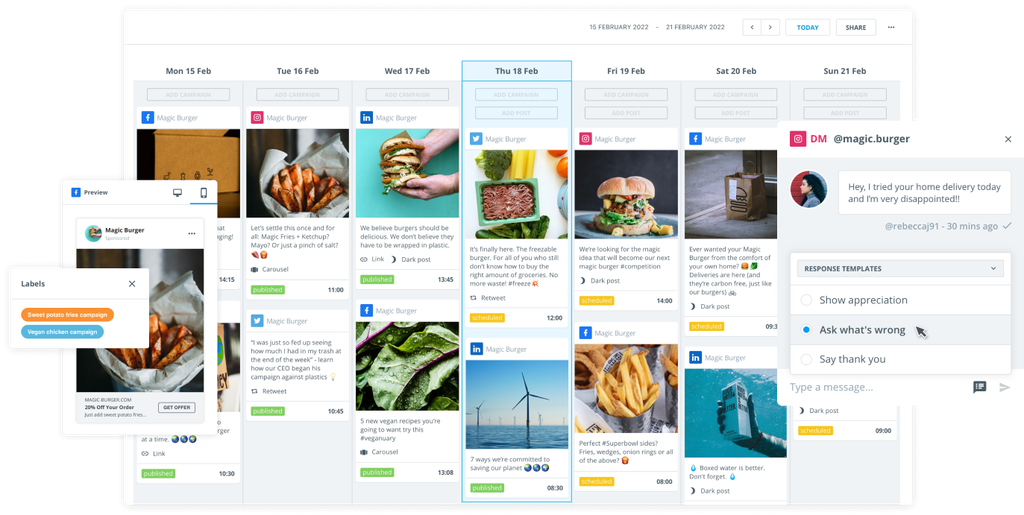
Maintaining a consistent Facebook publishing schedule is almost impossible without a tool to help guide the way.
As brands compete for audience attention, optimizing every single post – from its content through to the time it’s published – is paramount. And brands can waste innovative ideas and a lot of time and resources simply by publishing Facebook posts without planning ahead of time.
Facebook schedulers like Brandwatch Social Media Management give you back time to focus on strategy and other tasks by streamlining the posting process.
These platforms let you plan and automate your Facebook posts in advance, ensuring your content goes live at the optimal times without you needing to be online 24/7.
By using the right tool, you can save hours of work, maintain a steady posting cadence, and ultimately drive better results on Facebook.
This guide highlights 14 of the best social media scheduling tools that brands, agencies, and individual marketers can use to supercharge their Facebook efforts.
Whether you’re a small business owner looking for a simple scheduler or part of a large enterprise seeking an all-in-one social media management suite, this list will have something for you.
What are Facebook scheduling tools?
Facebook scheduling tools are software platforms that allow you to draft, schedule, and automatically publish posts to Facebook at pre-determined times.
The most basic ones allow you to upload content to a scheduler and set a time to post on a linked Facebook profile. Mid-range tools provide Facebook analytics and a few extra tools to polish your posts. And then there are social media scheduling tools that offer a large suite of management features that help brands oversee their entire social output on more than just Facebook.
How a Facebook scheduler works
Instead of logging into Facebook to post in real time, you use these tools’ dashboards or calendars to line up content.
Most scheduling tools support connecting multiple social media accounts, so you can manage Facebook Pages (and sometimes Groups or personal profiles) in one place.
Many, like Brandwatch, also integrate other major platforms like Instagram, X, LinkedIn, TikTok, Pinterest, etc., making them part of a broader social media management system.
The core idea is simple: you plan your content in advance, maintain a queue or calendar of upcoming posts, and the tool will post on your behalf at the specified times.
This ensures your Facebook page stays active and visible even when you’re not manually posting.
Modern scheduling tools often go beyond just timing your posts – they offer content libraries, AI features, team collaboration workflows, analytics, and social listening, all aimed at optimizing your Facebook strategy.
Why use Facebook scheduling tools?
Using a Facebook post scheduler can be a game-changer for your social media marketing. Here are some key benefits of utilizing scheduling tools today.
Save valuable time
Batch-scheduling your Facebook posts for the week or month is far more efficient than manually posting each day. You can dedicate a block of time to content creation, schedule it all, and free yourself from constant posting duties.
Many social media scheduling tools support bulk uploading, while AI-generated content has become a big development. The time saved can be reinvested in strategy, engagement, or other tasks.
Maximize audience engagement
Scheduling in advance lets you target the best times to post when your audience is most likely online.
Rather than being limited to working hours or guessing, you can use analytics from your tool to identify peak engagement times and schedule posts for those moments.
Most social media tools use a combination of data tracking and AI to predict the optimal time for publishing. Doing this means your posts get more eyes, more likes, and more comments.
Some tools even allow you to recycle evergreen content, ensuring important updates catch people in different time zones and preventing your feed from appearing neglected.
Maintain consistent posting
Consistency is critical for growth on Facebook as Meta’s algorithm rewards regular activity. A scheduling tool helps you stick to a steady posting cadence by queueing content ahead of time.
This way, you won’t miss posting on weekends or holidays – the tool keeps your content pipeline flowing.
Analyze and improve performance
The best Facebook scheduling tools like Brandwatch Publish don’t just post content – they also track how each post performs.
Built-in reporting and analytics features, such as Brandwatch Measure, let you review metrics like reach, impressions, clicks, shares, and engagement rate for your scheduled posts.
By analyzing this data, you can learn what content works best and refine your strategy. Over time, using a scheduler with analytics helps you create more effective Facebook content and achieve a higher return on investment (ROI) on your social media efforts.
The top Facebook scheduling tools for 2026
Now that you know the benefits of using social media scheduling tools for Facebook, it’s time to look at the best options for 2026. Artificial intelligence, advertising techniques, and audience targeting all play critical roles in large-scale Facebook Page management.
You may be looking for an enterprise-level tool to take many duties off your hands, or a simple platform to post Facebook messages at your chosen time and date.
Whatever you’re searching for, you’ll probably find the right match in our list of 14 tools below.
1. Brandwatch
We have to start with the very best, right? Brandwatch is more than just a Facebook post scheduler – it’s a complete social media management platform that equips marketing teams with everything they need to succeed on Facebook (and beyond).
Brandwatch’s Social Media Management suite includes specialized modules for publishing, engagement, analytics, social listening, and more.
It’s a one-stop solution for large and small organizations. Whether you’re managing one Facebook profile or a suite of social media accounts, you can do it all from one piece of software.
Brandwatch features
- Unified content calendar: Brandwatch Publish is a user-friendly calendar to draft, schedule, and auto-publish Facebook posts across multiple pages and other social channels (Instagram, X, LinkedIn, TikTok, etc). You can plan all your content in one place, ensuring a consistent presence. The shared content library lets you store images, videos, and post templates for easy reuse, and you can even pull inspiration from past social media posts.
- Collaboration: Brandwatch is built for teams. Collaboration workflows allow you to assign tasks and draft posts for approval before they hit the Facebook scheduler. These features make Brandwatch ideal for agencies or larger enterprises with multi-stage content review processes.
- Analytics: Scheduling is just part of the equation – Brandwatch Measure provides in-depth Facebook analytics to track how your content performs. You can monitor key metrics for your Facebook posts via customizable dashboards and generate scheduled reports, so you can easily report on your Facebook ROI.
- Social listening: Brandwatch Listen provides robust social listening capabilities to monitor conversations about your brand on Facebook and other platforms. You can track mentions and comments to gauge sentiment and feedback.
- Competitor benchmarking: Brandwatch Benchmark lets you compare your Facebook performance against competitors or industry benchmarks – a powerful way to see where you stand and how to improve.
- Ad Integration: if you have a post that’s doing exceptionally well organically, Brandwatch allows you to turn organic posts into ads with one click. Through its Advertise module, you can promote top-performing posts and manage Facebook ad campaigns alongside your organic content, all in one user interface.
Why use Brandwatch?
If you’re a mid-size to enterprise team, agency, or organization looking for an all-in-one social media management solution, then Brandwatch is the ideal choice. Use Brandwatch to oversee scheduling, content creation, analytics, community management, and social listening all on a single platform.
2. Meta Business Suite
The Meta Business Suite is Facebook’s official free scheduling tool available to anyone with a Facebook Page and/or Instagram account. It’s a straightforward option for basic scheduling and provides a strong introductory step to understanding how Facebook works.
However, it’s not a robust tool, and brands usually outgrow the Meta Business Suite or use a third-party tool in conjunction with it.
Meta Business Suite features
- Free scheduling: Users can create and schedule Facebook posts, Stories, and Instagram posts in advance at no cost.
- Simple calendar: Scheduling is done via web or the mobile app, where you get a simple calendar view of your upcoming posts.
- Built-in inbox and insights: The Meta Business Suite also includes a unified inbox for Facebook and Instagram messages/comments and provides basic page insights (reach, engagement metrics). It also ties in with Facebook Ads, so you can boost posts or create ads directly.
Who uses Meta Business Suite?
Small businesses or new marketers on a tight budget. Business Suite remains limited to Facebook/Instagram and a 30-day scheduling window.
3. SocialBee
SocialBee is a scheduling tool known for its automation and content recycling features, now enhanced with AI for content creation. It’s also integrated with other social media sites like X, Bluesky, and TikTok.
SocialBee features for Facebook
- Content categories: Organize your Facebook posts into categories (e.g., blog posts, quotes, promotions) and set each category to publish at specific times.
- Automated queueing: SocialBee automatically queues and recycles evergreen posts, keeping your Facebook page active without constant manual effort.
- Built-in AI assistant: The SocialBee AI can generate post captions or ideas based on prompts, helping you overcome writer’s block.
Who uses SocialBee?
Solopreneurs, small businesses, and content-heavy pages that need consistent posting. SocialBee’s affordable plans and continuous feature updates make it a favorite for those who want smart automation on a budget.
4. Planable
Planable is built for teams and agencies that need a content approval process. It provides a visual way to plan and approve social media posts, including Facebook content. It’s all about visual planning to make publishing a campaign easier for everyone.
Planable features for Facebook
- Visual feed planner: Planable lets you see your scheduled Facebook posts in a feed-like view, exactly as they’ll appear when live. This visual approach (alongside a traditional calendar view) makes it easy to ensure your posts look great and flow well together.
- AI caption generator: Planable offers a social media caption generator to all users (and non-users) for Facebook and other sites.
- Client/team approvals: You can invite clients or team members to review and approve posts within Planable. It supports multi-level approvals and real-time comments on each post.
Who uses Planable?
Agencies and marketing teams collaborating on content use Planable’s visual-focused platform for Facebook scheduling.
5. Sendible
Sendible is a social media management tool that offers scheduling features alongside UTM code tracking, inbox management, and white label reporting. Sendible offers a wide range of integrations, including a dedicated Facebook scheduling tool.
Sendible features for Facebook
- Smart queues: Create content queues by category (e.g., “Blog posts” or “Quotes”) and set them to post at specific times. Sendible will rotate through your queued content automatically and reuse evergreen Facebook posts.
- Bulk approval: Import posts and request bulk approval from clients or team members, rather than checking in for every individual post.
- Integrations: Sendible integrates with Canva for design, Google Analytics for URL tracking, Slack for notifications, and more.
Who uses Sendible?
Agencies and growing businesses that want a specific focus on Facebook scheduling and have other tools ready to integrate into the platform.
6. Metricool
Metricool offers content scheduling as part of a wider social media management suite. Users get access to real-time data so they can monitor Facebook campaigns as they unfold, with an AI writing assistant and quick-generated reports thrown in.
It's also possible to repurpose content across platforms like X, LinkedIn, and TikTok.
Metricool features for Facebook
- Versatile post scheduling: Metricool’s planner lets you schedule Facebook feed posts, Stories, and Reels in advance. It highlights your page’s best times to post, making it simple to maximize engagement.
- Analytics: detailed engagement analytics as well as data on impressions, follower growth, and website traffic.
- Post tips: Get advice on peak posting times and breakdowns of which content types resonate with your audience.
Who uses Metricool?
Data-driven marketers seeking a simple Facebook scheduler with insights, who may consider premium features in the long term.
7. ContentStudio
ContentStudio is a Facebook scheduling tool with wider social media management capabilities. You can schedule Stories, Reels, and carousel posts, while also reserving the first comment for additional information sharing.
There's also an AI assistant for caption and image generation, while users get access to a social inbox to handle all messaging.
ContentStudio features for Facebook
- Unified workflow: Draft and schedule Facebook posts and blog articles in one place with ContentStudio’s calendar, which allows planning multi-channel campaigns.
- Content discovery: ContentStudio has a built-in discovery engine that suggests trending articles, videos, or GIFs in your niche that you can share to Facebook with a click.
Who uses ContentStudio?
Content marketers and agencies that frequently curate industry news or run blogs alongside social media.
8. Loomly
Loomly is a social media management tool that offers Facebook scheduling as part of a wider package of features. Users can schedule posts weeks in advance and optimize their strategy as they go, armed with data.
Loomly also has a shared inbox to centralise community management and assign responses to specific teammates.
Loomly features for Facebook
- Simple content calendar: Loomly offers a clean calendar and list view for scheduling Facebook posts.
- Suggestive content: The platform provides post idea suggestions (like upcoming holidays or trending topics) to inspire your content, and a step-by-step post builder that comes with optimization tips.
- Collaboration: Designed for teams, Loomly has approval workflows, version history for post edits, and a brand asset library to store logos or templates that link with your Google Drive and Canva.
Who uses Loomly?
Small to mid-size teams and agencies use Loomly to schedule Facebook posts and gather analytics. It remains an accessible and user-friendly option.
9. Agorapulse
Agorapulse is a social media management tool that houses a social inbox and AI-powered content assistant. Its Canva plug-in means you can design and schedule Facebook posts on the platform.
Users can also optimize posts with the help of AI and create an approval workflow when collaborating with clients or other team members.
Agorapulse features for Facebook
- Category queues: Agorapulse lets you organize scheduled posts by category and set them to publish in designated time slots.
- Bulk scheduling: You can bulk upload posts or import from CSV, which is handy for planning Facebook content in large batches.
- Automated actions: Set automated instructions to hide, label, assign, and delete content when you wish.
Who uses Agorapulse?
Small and mid-size teams looking for a Facebook scheduling tool that offers a few automated options, such as an AI caption generator.
10. Iconosquare
Iconosquare keeps track of more than 100 social media metrics when users publish on Facebook, to streamline the process and maximise ROI.
It is a social media management tool that incorporates Facebook scheduling alongside a wider package that includes engagement options and cross-platform publishing.
Iconosquare features for Facebook
- User-friendly scheduling: Iconosquare provides a clear calendar to schedule Facebook posts, along with post previews to see how content will look once live.
- Multiple account management: Users can manage multiple accounts and schedule Facebook content alongside Instagram and X, streamlining cross-posting efforts.
- Large analytics bank: Get detailed metrics on your follower growth, engagement rates, and industry benchmarks to compare your page’s performance against similar pages.
Who uses Iconosquare?
Social media managers who need analytics and reporting capabilities as much as a Facebook scheduling tool.
11. Later
Later began life as an Instagram scheduler, but the platform's close relationship with Facebook (Meta owns them both) means it's relatively easy to schedule posts on Facebook too.
The content calendar features a "drag and drop" tool to streamline the process of moving content from your media library to the scheduler. There's also a data-driven auto-publish tool.
Later features for Facebook
- Visual planning: Later uses a “drag and drop” calendar for scheduling Facebook posts, making it easier for those who need a visual map of a month's worth of content.
- Media library: Access a built-in media library where you can store photos and videos, and preview all posts before they’re scheduled.
- Instagram integration: Later’s Instagram heritage means additions like Linkin.bio (to drive traffic from IG posts) and “Best Time To Post” suggestions based on engagement data. These features carry over to benefit Facebook scheduling.
Who uses Later?
Influencers, visual brands, and small businesses that are heavy on imagery use Later, which supports more platforms than just Facebook and Instagram.
12. Sprout Social
Sprout Social is a social media management platform that offers Facebook scheduling alongside team collaboration and analytics. Get 16 weeks’ worth of audience data to guide your scheduling decisions.
Sprout features for Facebook
- Publishing calendar: Users get a “drag and drop” calendar to schedule Facebook posts. It suggests optimal post times based on your audience data.
- Collaboration features: Establish multi-step approval workflows, assign tasks, and use a unified inbox to manage comments/messages.
Who uses Sprout?
Enterprises and large agencies that need a wider management tool that goes beyond Facebook scheduling and that can afford all the bells and whistles.
13. Hootsuite
Hootsuite's Facebook scheduler comes with AI-generated content ideas and a social inbox to manage your profile in one place.
You can also schedule and track Facebook ads from the platform, and get standard analytics to feed back into your reports.
Hootsuite features for Facebook
- Multi-platform scheduling: Manage multiple Facebook pages and other social accounts with a visual planner. You can preview posts and set auto-scheduling for optimal times.
- Team features: Allows for team collaboration with permission levels and approval workflows, with more access for higher-paying plans.
Who uses Hootsuite?
Enterprise-level social media teams that need scheduling as part of a wider management package.
14. Buffer
Buffer began life as an X (Twitter) scheduler but now offers Facebook scheduling alongside other social media platforms.
Users can publish content across Facebook from one calendar and lean on AI to generate fresh ideas.
Buffer features for Facebook
- Queue-based posting: Set a posting schedule and add content to your Buffer queue to automatically fill those slots.
- Multimedia support: Integrate your workflow with tools like Canva and Giphy.
Who uses Buffer?
Creators and small businesses that need wide-ranging support for Facebook scheduling without too many analytics insights.
How to choose the right Facebook scheduling tool
Now you’ve seen the top 14 tools for Facebook scheduling, take some time to consider what you might need from them.
Consider your budget
Determine how much you’re willing to spend on your Facebook campaign. Some tools (like the Meta Business Suite) are free, whereas others have monthly subscriptions that vary by features.
Pick a solution that offers good value for the features you need and that can scale with your budget as your social media efforts grow.
What’s your content volume?
Think about how many Facebook pages (and other social profiles) you manage and how frequently you post.
If you’re handling multiple pages or posting numerous times a day, look for a tool that supports bulk scheduling or queues.
Do you need team collaboration?
Consider your team size and workflow. If multiple people work on content, you’ll benefit from features such as multi-user access, role-based permissions, and approval workflows from a tool like Brandwatch.
Software designed for collaboration makes life easier when coordinating a social media team or agency-client relationship.
Analytics and reporting
Decide how important in-depth analytics are for you. Nearly all tools can report basic metrics (likes, comments, reach), but if you need robust reporting, competitor analysis, or ROI tracking, lean toward platforms known for analytics (like Iconosquare and Brandwatch).
Good analytics help you prove the value of your Facebook efforts and refine your strategy.
Publishing on other social media channels
Most marketers manage more than just Facebook. If you’re active on Instagram, X, LinkedIn, TikTok, Pinterest, Reddit, etc., choosing a scheduler that supports all (or most) of your channels in one place will save you time.
A unified tool ensures consistency across platforms and simplifies monitoring.
By weighing these factors, you can narrow down your choices and select a Facebook scheduling tool that aligns with your specific goals, team, and budget.
Facebook scheduling tools FAQ
Q: Are there free Facebook scheduling tools?
Yes – the most common free Facebook scheduling tool is the Meta Business Suite, which also publishes on Instagram. Additionally, some third-party tools offer free plans. As your needs grow, you can upgrade to a paid plan for more features and accounts.
Q: Can I schedule Facebook Stories or Reels?
Yes. Meta Business Suite (Facebook’s native tool) allows scheduling Stories, while Brandwatch provides a scheduler that supports Stories, Reels, posts, and first comments.
Q: What is the best time to schedule Facebook posts?
There’s no one-size-fits-all answer, as it depends on when your particular audience is online. Utilize the AI capabilities within a social media management tool like Brandwatch to determine your optimal publishing time.
Q: How far in advance can I schedule posts on Facebook?
Using Facebook’s native scheduler allows you to schedule social media posts up to 75 days in advance for regular content, and up to six months ahead for events. Third-party scheduling tools often extend this limit – many allow you to schedule content without a strict cutoff, so you could plan many months (or even a year) in advance.
Get your ideal social media scheduling tool for Facebook
A scheduling tool for Facebook is an essential ally for social media marketers. The right tool will save you time, keep your posting schedule consistent, and help you reach your audience when they’re most likely to engage – all without requiring you to be at your computer 24/7.
From free basic options like Meta Business Suite to sophisticated platforms like Brandwatch, there’s a scheduler to fit every need and budget.
By automating your Facebook content, you can focus more on crafting great posts and interacting with your community. The result is a more strategic and stress-free approach to Facebook marketing.
Want to discover more? Book a demo to see how Brandwatch Social Media Management can revolutionize your Facebook strategy today.