X offers brands one of the most direct roads to communicate with audiences – but it’s not as easy as posting and expecting engagement to flood in.
Like most social media platforms, brand management on X requires a significant amount of effort. From raising brand awareness to launching new products, interacting with customers, and building a community, there’s a lot of work here.
That’s why brands and marketing teams use X management tools to help streamline processes and elevate their wider social media strategies.
In 2025, many of these tools use artificial intelligence (AI) to make managing social media platforms even easier. From social listening and audience research to scheduling content and analyzing feedback, there’s nothing you can’t do with the right Twitter management tool.
This guide highlights the 12 best social media management software available today and why they can help you reach more of X’s 580-million-strong community.
Why X management tools matter in 2025
X is one of the fastest social media platforms out there. Good and bad news spreads like wildfire, which means brands need to stay on top of the conversation.
Why? Because you risk missing out on opportunities to expand your brand awareness and develop communities if you’re not properly hooked into discussions. Equally, you risk harming your brand if a crisis emerges and you’re not equipped to deal with it.
A tool like Brandwatch Social Media Management helps teams oversee every aspect of their brand performance on X and acts as an early warning system if a PR crisis is coming.
But an X (Twitter) management tool doesn’t just alert you to what’s going on. It lets you shape the conversation.
Here are the advantages of using an X management tool in 2025:
Centralised social media scheduling
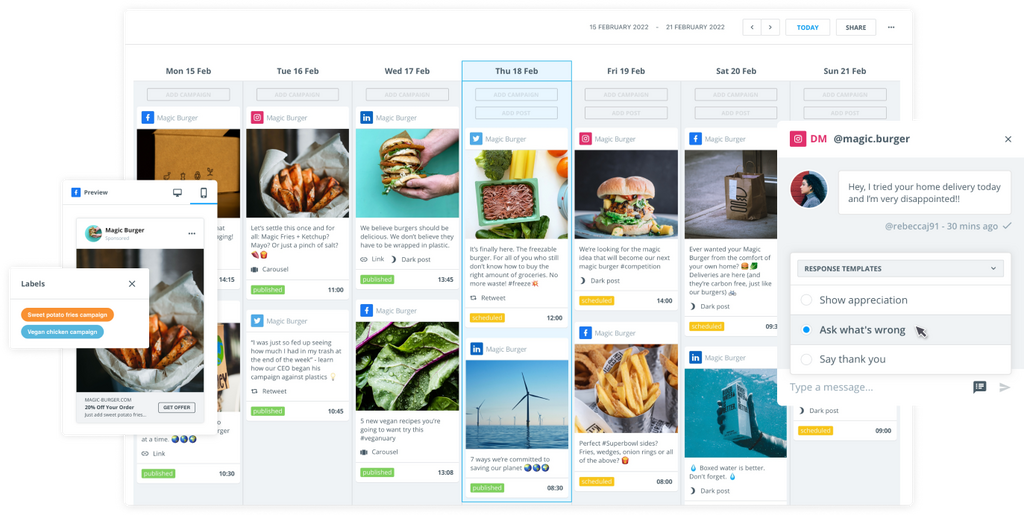
Instead of hopping between mobile apps or spreadsheets, X management tools provide a single dashboard to draft posts, queue them at optimal times, and repurpose content across networks.
Tools like Brandwatch enable you to schedule posts and videos on X and view them in a calendar.
Detailed analytics
Native X analytics show impressions and engagement, but not much more than that. The best third-party tools go much further and provide segmented analytics that allow you to filter engagement by persona and see where your followers grow or decline.
Tools with benchmarking features (like Benchmark from Brandwatch) compare your brand against competitors.
Team collaboration
Brands often treat social media platforms like X as the first point of contact with potential customers and audiences. These sites act as your shop window but need significant management to align with your brand guidelines.
That’s why X management tools permit multiple team members to work on the same platform. You can streamline approval workflows and ensure brand consistency across X, even if different people publish the content.
Social listening
Staying ahead of conversations requires listening to keywords, mentions, and hashtags. Running sentiment analysis is crucial for gauging what your audience thinks about you, your services or product, and your industry.
A tool like Brandwatch goes deeper by using AI features to benchmark your brand against competitors and measure the success of your content.
Customer care
Operating a unified social inbox alongside social listening features means you capture customer opinion and direct messages in one platform. You can then operate a successful customer care center from your software and keep a pulse on trends and common themes.
Automation
AI assistants are becoming standard across X social media tools. Users get access to Grok, so it makes sense that marketers can access AI, too! Artificial intelligence features let teams maintain a consistent posting cadence without spending hours writing every tweet from scratch.
Top X management tools in 2025
Below are 12 of the best X management tools available to marketers and PR professionals today. These tools aim to elevate your social media strategy while giving you a platform to centralize and organize all content.
1. Brandwatch
Brandwatch’s Social Media Management suite covers everything from publishing social media posts to deep social listening.
The platform is an official X partner, so it plugs directly into X’s data stream, capturing millions of posts a day to provide real‑time insights. This, coupled with access to historic trend data, makes Brandwatch an ideal tool for brand managers seeking to develop their X strategy.
You can plan and schedule posts, automatically engage with audiences, monitor conversations, and benchmark performance against competitors.
What’s more, brands can develop a personalized X influencer customer relationship management (CRM) system that aligns with other social media platforms like TikTok and Instagram.
As for what’s new in 2025 and beyond, Brandwatch integrates AI for Tweet writing ideas, content insights, and trend analysis.
Brandwatch X management features
- Complete social media management software: Do the whole lot in one place by planning, scheduling, and publishing posts across X and other platforms with Brandwatch. The software supports organic and paid content in one view and includes a digital asset library for consistent branding.
- Smart social inbox: Monitor and respond to comments, messages, and mentions across X and other platforms such as Facebook, Instagram, LinkedIn, Reddit, TikTok, and other networks. Customizable feeds, automation rules, and audience profile cards help teams prioritise high‑value conversations.
- Advanced listening: Add Brandwatch’s Consumer Research tool to SMM and tap into over 100 million data sources and historical data. Conduct deep sentiment and emotion analysis, topic discovery, and crisis detection.
- Benchmark and measure analytics: Compare your X performance against industry competitors and build customizable dashboards that report on engagement, follower growth, impressions, and other KPIs.
- Influencer identification: Discover influential voices in your niche and manage relationships across X.
Who uses Brandwatch for X management?
Brandwatch is geared toward medium and large organisations that need enterprise‑grade analytics, cross‑network management, and competitive intelligence. It’s also ideal for agencies that have to manage multiple clients. Teams that want an integrated suite for X rather than juggling multiple tasks will find Brandwatch hugely beneficial.
>> Want to know more? Request a demo and see how Brandwatch can help you
2. SocialPilot
SocialPilot offers scheduling, analytics, and reporting on X. Users can track how audiences react to posts and discover their most popular tweets. Monitor top-performing hashtags and view the latest trends to tweak your content toward your strategy.
SocialPilot X features
- Bulk scheduling and automation: Upload up to 500 posts at once via CSV and automate posting based on your calendar.
- Analytics: Generate follower analysis (demographics, location, interests) and post performance reports.
- Client management: Create separate client accounts with white‑label dashboards, share access with team members, and control approval workflows.
Who uses SocialPilot?
SocialPilot’s emphasis on bulk scheduling and client collaboration makes it an option for agencies delivering services to clients. It is less focused on deep listening but more on streamlining everyday publishing.
3. Audiense
Audiense is an intelligence platform that also works as a Twitter management tool. It offers two platforms to oversee X community management and analytics.
Rather than a full suite, it focuses on advanced insights into who your followers are and how to engage them. You can track hashtags with the Tweet Binder platform and interact with your community via Audiense Connect.
Audiense X features
- Follower research: Identify inactive, fake, or spam social media accounts and find valuable followers.
- Mass network management: CRM‑like functions enable you to tag contacts and add notes when managing your Twitter profiles.
- Audience overlap and targeting: Compare audiences across multiple X accounts and discover shared followers, making it easier to plan cross‑promotion or influencer outreach.
Who uses Audiense?
Organisations seeking to dive deeply into X audiences and network structure may consider Audiense for the job. It complements publishing‑focused tools by providing insight on who to engage and when.
4. Statusbrew
Statusbrew is a social management platform supporting posts, conversations, and analytics. It provides a calendar for X posts and some automation features. Approval workflows and an AI composer are designed to make X management a smoother process from start to finish.
Statusbrew X features
- Publishing: Schedule and automatically create posts on X. A drag‑and‑drop calendar and shareable links support collaboration and approval workflows.
- Unified inbox: Manage all organic and paid interactions from X in one inbox. Messages can be automatically routed to the appropriate team member, and AI‑powered moderation filters negative comments and translates/rephrases responses.
- Reporting: Pull industry trends and audience demography into your reports, and send them to stakeholders whenever they need them.
Who uses Statusbrew?
Brands with complex approval processes that want straightforward Twitter analytics alongside a publishing function may consider Statusbrew for the job.
5. SocialBee
SocialBee aims to support Twitter marketers with content creation and category-based scheduling tools. The AI will generate tweets using DALL-E 3 image creation, with automated hashtag creation also available. You can also track reach and audience growth.
SocialBee X features
- AI‑assisted content generation: Generate post ideas and text using AI, access design tools via Canva integration, and edit images within the platform.
- Category‑based scheduling: Organise your posts into categories and assign each category a posting schedule.
- Cross‑platform publishing: Post directly to X and expand your reach by posting on sites such as Facebook, Instagram, and LinkedIn.
Who uses SocialBee?
Small businesses and solopreneurs who focus on consistent content output may consider SocialBee for the job.
6. Sprout Social
Sprout Social is a social media management platform with a unified inbox, X analytics, AI integrations, and more. It aims to consolidate all X management responsibilities into one place, keeping your strategy on track.
Sprout X features
- Unified smart inbox: Collect all mentions, messages, and comments from X and other networks into one feed, with filters and tags for prioritisation.
- Core features: Users gain access to engagement, analytics, and publishing features that inform X strategies throughout the ideation, execution, and beyond.
- Premium solutions: Elevate your subscription to access social listening capabilities, premium analytics, and influencer marketing.
Who uses Sprout?
Large organisations seeking premium solutions with in-depth reporting, customer care, and advanced workflow features may consider Sprout alongside other social media management tools.
7. Planable
Planable positions itself as a team‑friendly social media planner. It lets you create and schedule X posts and offers a Canva integration. Its interface mimics a visual calendar, making it easy to organise posts and collaborate with colleagues and clients.
Planable X features
- Drag‑and‑drop calendar: Plan your content across multiple networks (including X) using a visual drag‑and‑drop calendar.
- Real‑time collaboration: Tag specific teammates in comments, provide clear instructions through text suggestions, and resolve comments once changes are implemented.
- Mobile app: Planable is one of a handful of social media management apps that let you create and schedule posts on the go.
Who uses Planable?
Content and design agencies, as well as in-house teams that value visual planning and structured approvals, may look at Planable for help.
8. X Pro
TweetDeck changed to X Pro in 2023, and the premium tool remains one of the fastest ways to monitor multiple timelines on X simultaneously. It is available to X Premium subscribers and is useful for individuals and teams needing to watch real‑time conversations. Users also get access to SuperGrok.
X Pro features
- Unlimited columns: X Pro’s unique column layout allows you to add as many columns as you need for various accounts and content feeds.
- Global filters: Filter out unwanted tweets, authors, or keywords across all columns to keep your dashboard relevant. For example, you can exclude tweets containing a specific hashtag.
- Post to multiple accounts: Compose a tweet and choose which of your linked X accounts will publish it. X Pro highlights the selected accounts’ profile pictures and lets you cross‑post to Facebook profiles as well.
Who uses X Pro?
Because X Pro focuses solely on X and offers real‑time monitoring, it’s used by journalists and social media managers who need to stay on top of fast‑moving conversations. Note that it requires an X Premium subscription and does not integrate with other networks.
9. Buffer
Buffer is an easy scheduling tool that offers a good range of X analytics and collaboration features. Although it’s not as powerful as a 360-degree social media management suite, it can help if you need to plan ahead.
Buffer X features
- Publish on X: Schedule content for X from one dashboard and set posting schedules based on best times.
- AI‑assisted creation: Repurpose existing posts, rewrite content in different styles, and generate new ideas using Buffer’s AI Assistant.
- Audience insights: Get demographic data about your Twitter followers and tag or recycle your best‑performing posts.
Who uses Buffer?
Individuals and small teams that want a straightforward X posting solution may consider Buffer. It combines ease of use with analytics and growing AI capabilities.
10. Tweet Hunter
Tweet Hunter focuses on optimizing your X content by analyzing what works on the platform already and replicating it. It offers a mix of AI writing tools, scheduling features, and analytics designed to help users build and monetise their audiences.
Tweet Hunter X features
- Vital tweet library: Access a three-million-strong viral tweet library and replicate what works for your Twitter profiles. AI suggests tweet ideas based on your topic and rewrites tweets you like.
- Scheduling: Schedule tweets and threads with support for emojis, GIFs, images, and video.
- Analytics dashboard: View key metrics at a glance and identify which tweets drive the most followers, engagement, and reach.
Who uses Tweet Hunter?
Content creators and marketers with a primary focus on X, and who aim to go viral, may find Tweet Hunter beneficial. Its AI features help users generate ideas quickly.
11. Hootsuite
Hootsuite is a social media management tool that uses AI to provide content ideas and operate robust analytics. You can schedule tweets, monitor what people say about your brand, and manage paid campaigns from the same platform.
Hootsuite X features
- AI‑assisted content creation: Generate captions, video scripts, and creative briefs with AI. The platform integrates with Canva and stock image libraries.
- Centralised publishing: Schedule content across X, bulk upload posts, and use the link‑in‑bio tool to drive traffic.
- Social listening: Track mentions, keywords, and trending conversations with AI suggestions for content topics.
Who uses Hootsuite?
Mid-sized businesses and enterprises seeking a more comprehensive solution may consider Hootsuite as an alternative to a mere X scheduler.
12. Fedica
Fedica has evolved from an X analytics tool into a social media management platform, but X remains a core focus. It emphasises demographic insights, cross‑platform support, and advanced scheduling.
Fedica X features
- Publishing: Schedule content for X threads, polls, and tagged media. Fedica’s scheduler lets you target different personas and optimize posts by the best time for different geographies.
- Segmented analytics: AI‑driven analytics help you amplify messages by segmenting your audience and filtering engagements.
- Social listening: Track hashtags, keywords, and post reach for demographic‑enriched analyses. Receive email alerts for brand mentions and identify leads or measure reach.
Who uses Fedica?
Marketers seeking to integrate scheduling, demographic insights, and listening capabilities in a single tool may consider Fedica.
How to choose the right X management tool
With so many options, selecting the right tool depends on your specific goals and resources. Here are some factors to consider:
- Business size and team structure: Solo creators may prefer simple tools that only offer one function, while large organisations might need the scalability and advanced governance offered by Brandwatch.
- Feature priorities: Decide what matters most. Scheduling, analytics, listening, benchmarking, and AI are all part of modern-day X management tools. If you want deep audience insights and competitor comparisons, choose an enterprise-level tool.
- Budget and ROI: Pricing varies widely. Evaluate whether paying for premium analytics or cross‑platform support will deliver measurable returns.
- Ease of use: Consider the learning curve and user interface. Resources like the Brandwatch Academy help here.
- Integrations: Check whether the tool integrates with your existing tech stack, such as a CRM, project management software, or advertising platforms. Or, your chosen tool may become your tech stack!
- Scalability: Choose a tool that can grow with your needs. If you plan to expand to other networks or add more team members, ensure the platform supports multiple social media accounts, roles, and cross‑platform analytics.
X management tools FAQs
Does X offer built‑in analytics?
Yes. X’s native analytics provide basic data on tweet impressions, engagement rates, and link clicks. You could go deeper by subscribing to X Pro (if you’re an X Premium member), but even that won’t give you a 360-degree view of your Twitter analytics performance. Indeed, native analytics are limited in scope and time range. Dedicated management tools offer deeper insights, longer data retention, and competitor benchmarking. For instance, Brandwatch’s Benchmark and Measure modules give you multi‑year performance comparisons and cross‑platform metrics.
Are there free X management tools?
Some platforms offer free plans, though they typically include limited features. Usually, the best option is to sign up for a demo and allow an expert from your chosen tool to show you the ropes.
How do I manage multiple X accounts in one tool?
Most X management platforms allow multi‑account management. X Pro supports unlimited columns and multiple profiles, letting you monitor several accounts side by side. Tweet Hunter allows you to add unlimited accounts and manage them within a single dashboard. Brandwatch goes further by enabling posting and analytics across multiple accounts from one interface.
Can I schedule threaded posts or long‑form content?
Yes. Many modern tools support thread scheduling, which is something you can’t do on the native platform.
Elevate your X (Twitter) strategy with the right tool
Success on X in 2025 requires more than posting occasional tweets and hoping they generate interest.
To build communities, track performance, and stay ahead of competitors, marketers need a management platform tailored to their goals.
Your choice of tool will depend on what you need. From basic schedulers through to all-in-one solutions, the right Twitter management tool for you is out there.
Consider your team size, budget, and strategic priorities, and give demos a go. That way, you can witness a social media management tool in action before signing up.
Still interested? See how Brandwatch can help by (you guessed it!) booking a demo with one of our experts today.