Freeing up time to focus on strategy and creative work requires support. Not everyone has it, especially when working on social media, where creating, scheduling, and posting can take hours off your working week.

This is where social media automation tools come in handy, since they can dramatically reduce the time spent managing posts across platforms.

The right software schedules your content, optimizes timing, and even analyzes results – freeing you to focus on the creative and strategic work that really matters. 

These tools are able to handle everything from basic post scheduling to advanced analytics and social listening. Options range from simple, stripped-back schedulers for small businesses to enterprise suites – such as Brandwatch Social Media Management – that boast multiple features to provide the best assistance possible. 

In this guide, we highlight 11 of the best social media automation tools currently available, covering solutions for every need and budget.

In this guide:

  1. Brandwatch
  2. Buffer
  3. Hootsuite
  4. Later
  5. SocialPilot
  6. Sprout Social
  7. Sendible
  8. MeetEdgar
  9. Agorapulse
  10. Zoho Social
  11. SocialBee

Why social media automation tools matter

Social media management has never been more challenging. 

With billions of users active on networks such as Facebook, Instagram, TikTok, and emerging platforms, brands face high stakes in maintaining a consistent presence. Trying to juggle multiple accounts manually is a recipe for burnout and missed opportunities.

This is why automation tools have become something that anyone managing multiple platforms finds hard to live without. They help you keep a steady posting schedule, stay on top of audience engagement, and track performance across channels.

It's no exaggeration that automation tools can save hours each week by automating repetitive tasks, such as queueing posts or reporting metrics. They ensure your content goes live at the best times (even when you’re offline) and that no comment or mention slips through the cracks. 

Crucially, they also provide data-driven insights: you can see what content is hitting the spot, which campaigns drive engagement, and adjust your strategy accordingly. In fact, social media automation tools are now smarter and more AI-powered than ever, meaning that you can use them to maintain a competitive edge without expanding your team.

Top 11 social media automation tools for 2026

Below is our curated list of the 11 best tools to streamline your social media management this year. 

We start with Brandwatch’s all-in-one platform, followed by ten other popular solutions on the market. For each tool, we'll examine a few key features and discuss when you might choose to use it.

1. Brandwatch

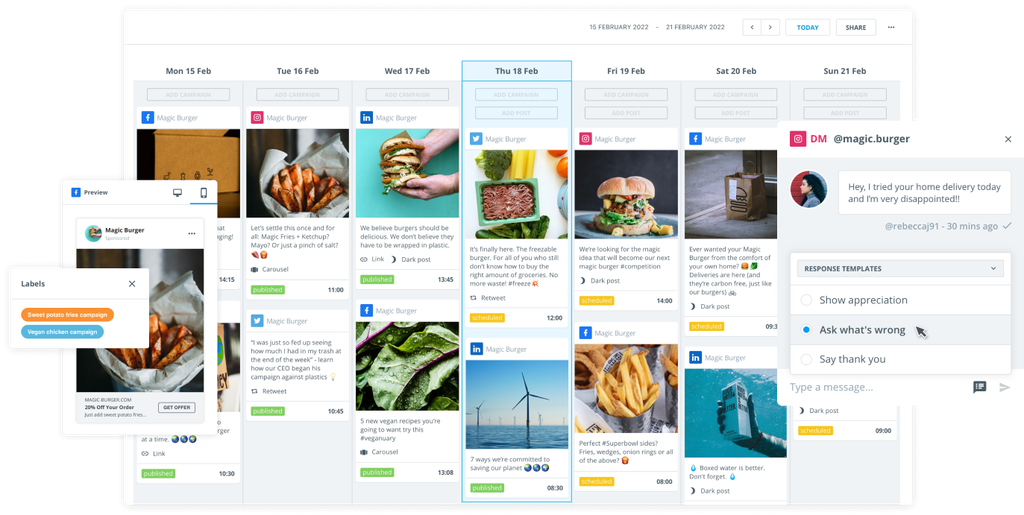
Brandwatch Social Media Management is an all-in-one platform that combines social media publishing, engagement, and deep analytics. It’s a social media automation tool that takes jobs off your hands, allowing you the time and space to focus on the bigger picture.

It's ideal if you're juggling multiple social media platforms, as it pairs day-to-day multi-channel management features with genuinely useful consumer intelligence insights.

You can use it to automatically publish paid social media campaigns, just as you would organic social media posts – keeping your social media presence active and balanced.

Brandwatch’s artificial intelligence solution, Iris, makes automation even easier by helping to draft social posts, create ads, and reply to customer messages.

Since it's an all-in-one platform, you also have access to a unified content calendar for planning posts and a cross-channel inbox to monitor and respond to messages across all major networks in one place.

Brandwatch key features

  • Integrated social listening: Built-in tools monitor over 100 million sources for brand mentions and keywords, providing automated, real-time sentiment analysis and trending topic identification to inform your strategy.
  • Advanced analytics: Brandwatch Social Media Management offers automated, customizable dashboards and reports, enabling you to track campaign performance, engagement, and return on investment (ROI) with precision. Data can be sliced and diced to match your business goals.
  • Team collaboration: Supports large teams with role-based access, content approval workflows, and project management features – ensuring everyone from marketers to customer care can collaborate efficiently within the platform.
  • Optional access to a larger software suite: Brandwatch offers a wealth of other tools alongside Social Media Management. For example, with Brandwatch Consumer Research, you can set up automatic alerts and signals to keep key stakeholders up to date when there's a change in online conversations.

>> Want to know more? Try a Brandwatch demo today and speak to an expert about how we can automate your social media presence

2. Buffer

Buffer makes social media scheduling simple and effective for individuals and small teams. It integrates with social media accounts across multiple platforms and also offers some built-in analytics.

It started as an X (Twitter) scheduler in 2010 and has grown into a multi-platform tool. Users can automate scheduling and publishing across core social media sites.

Key features

  • Multi-platform automated scheduler: Plan and publish posts to all major social networks (Facebook, Instagram, X, LinkedIn, Pinterest, TikTok, Threads, and more) through a visual calendar. You can automate posts within the calendar to maintain a steady flow.
  • Content creation assistance: An integrated AI Assistant helps generate new post ideas and rewrite content, automating the content creation process and making it easier to populate your feed.

3. Hootsuite

Hootsuite is a veteran in social media management with an enterprise-grade feature set.

It offers a unified dashboard, from which you'll be able to manage multiple social networks from one interface. Users can automate content creation and hashtag generation tasks, while the tool takes social listening tasks off the user’s workload.

Key features

  • AI-powered content tools: The platform’s OwlyWriter AI and Blue Silk AI help generate post ideas, write captions, and detect brand mentions in images and videos.
  • Social listening and analytics: Hootsuite includes integrated social listening to automatically track real-time conversations about your brand or industry. Its analytics can measure campaigns and ROI with automated, detailed reports.

4. Later

Later was originally created to facilitate Instagram scheduling, but now specializes in visual content planning across multiple social media channels. Its automation capabilities primarily aid scheduling and posting.

It's known for having a clean, calendar-centric workflow, and though it can connect with multiple social channels, it's especially geared towards those heavy on visual content (like Instagram or Pinterest).

Key features

  • Drag-and-drop planner: Later’s interface features a visual content calendar where you can easily drag and drop images or videos to schedule them. You get a preview of how your Instagram grid will look, helping maintain a consistent aesthetic.
  • Instagram marketing tools: This platform allows you to automatically schedule your first comments (to add hashtags or questions and increase engagement). It also offers a “link in bio” feature that turns your Instagram grid into a shoppable gallery for ecommerce.

5. SocialPilot

SocialPilot is a budget-friendly social media automation tool built for small businesses and agencies that need multi-user collaboration without breaking the bank. 

Although it may not offer the extended features of other platforms, it still provides the basics of content scheduling, automated publishing, and a few other key features. It’s particularly useful for automating content sharing from owned media across social sites.

Key features

  • Collaboration features: Supports multiple users with role-based access (Admin, Manager, Content Scheduler). Teams can collaborate on a shared calendar, create drafts for approval, and provide internal feedback on scheduled posts – all within the platform.
  • Content management: Provides a centralized content library to store your social media posts, images, and hashtag groups for easy reuse. The social calendar and queue management tools provide everyone with visibility into what’s scheduled, with automated processes available if desired.

6. Sprout Social

Sprout Social is a social media management platform known for its analytics and reporting features. There are plenty of automation features available, including a social chatbot for X and Facebook messages.

Sprout helps marketing teams automate data acquisition and generate reports. It also automates workflows from external business tools and apps, making it easier to complete projects.

Key features

  • In-depth analytics: Sprout offers automated reports that allow teams to drill into content performance, audience demographics, and even competitor comparisons. Reports can be tailored to specific goals or key performance indicators (KPIs).
  • Team-oriented design: Sprout supports automated workflows with features such as task assignments, an integrated social inbox for all incoming messages, and approval processes. It’s geared toward mid-size and larger companies.

7. Sendible

Sendible is social media management software designed for agencies and consultants who manage social media for multiple clients, requiring a level of automation to ease their workload.

It provides a unified dashboard where you can oversee all clients’ social profiles in one place. You can compose a post once and automatically publish it across multiple channels simultaneously, while also customizing it per platform ifneeded. Of course, you can also schedule your content to auto-post later.

Key features

  • Content planning and library: The content calendar offers a clear view of scheduled posts for all clients (which you can automate), and you can drag-and-drop to reschedule or edit. A built-in content library stores images, templates, and posts, so you can easily reuse assets.
  • Client collaboration: Client-focused features make semi-automated onboarding and reporting easier. For example, the Client Connect portal lets clients securely add their social accounts without sharing passwords. Each client can have a separate dashboard or even log in to review upcoming content.

8. MeetEdgar

MeetEdgar takes a unique approach to social media marketing automation by focusing on extending the life of your content. 

Rather than letting your posts fade after publishing once, MeetEdgar automates a continuous recycling process that reuses them to keep your social feeds active.

Key features

  • Evergreen content library: Unlike many tools that simply queue and publish social media posts, MeetEdgar saves every piece of content you add into an organized library. Then, the system will automatically reshare them over time and can even create variations of your original post, so that when the content is reshared, it looks new.
  • Set-and-forget scheduling: You define a schedule for each content category (for example, “share a blog post on Tuesdays at 3 PM” or “share a quote every weekday morning”). MeetEdgar then automatically fills those slots with content from your library.

9. Agorapulse

Agorapulse is a social media management tool known for its emphasis on social engagement and community management. Automated inbox moderation is central to how the platform works.

It enhances your social media efforts by enabling teams to stay responsive to followers and remain organized in handling large volumes of incoming messages.

Key features

  • Inbox automation: The platform’s Inbox Assistant lets you set up automated rules to tag, archive, or assign incoming messages based on keywords or criteria. It can automatically filter out spam and trolling comments. Additionally, features like saved “quick reply” templates and one-click translation of messages help your team handle common inquiries faster.
  • Team collaboration: Agorapulse includes various collaboration tools like content approval workflows (review and approve posts before they go live), an internal team chat for discussing social responses, and the ability to leave notes on conversations.

10. Zoho Social

Zoho Social is part of the larger Zoho business software ecosystem, aiming to bridge social media marketing with customer relationship management. 

If you're already using Zoho CRM, it brings social media into your sales funnel. It will allow you to automate content scheduling, track brand mentions, and access social media analytics across various platforms.

Key features

  • End-to-end social management: The tool offers scheduling and publishing to major platforms, social listening for mentions and keywords, and an organized content calendar, with automated processes available across the suite.
  • Smart scheduling and insights: The platform automatically suggests the best times to post on various social platforms based on when your audience is most active.

11. SocialBee

SocialBee is a social media automation tool that helps you maintain a consistent posting schedule through a category-based scheduling system. 

Once a post from a category is published, it can be rotated back into the queue to be posted again later (unless you set it as a one-time use). This keeps your social feeds active without constantly needing new content, and it’s done in a way that avoids back-to-back repeats.

Key features

  • Category-based scheduling: With SocialBee, you organize your content into categories (for example, promotions, blog posts, and industry news). You then create a schedule that dictates when each category should post. This provides a well-balanced mix of content types, eliminating the guesswork about what to post next.
  • Fine-tuned control: SocialBee includes useful controls, such as time zone-specific scheduling (to target audiences in different regions at the right local times) and the ability to pause or tweak entire categories of content with one click (for instance, if a particular campaign or topic is no longer relevant).

How to choose the right social media automation tool

Selecting the best social media automation platform for your needs comes down to a few key considerations. Let's take a look.

Supported platforms & scheduling

You'll need to make sure the tool supports all the social networks you use and offers the scheduling features you need (like bulk scheduling or optimal timing suggestions). 

It sounds obvious, but a good tool should allow you to plan content in advance and automate posting at the times that will reach your target audience.

Analytics & reporting

Analytics go hand-in-hand with scheduling, as they let you measure performance and understand how posting times affect reach and engagement.

That's why top social media automation tools, such as Brandwatch, provide clear dashboards and customizable reports for metrics like engagement, click-through rates, follower growth, and more. This data is crucial for refining your social strategy and proving ROI to stakeholders.

Collaboration & workflow

If you have a team, it's essential to find a tool with robust collaboration features. Multi-user support, content approval workflows, and role-based permissions mean that everyone can contribute while maintaining quality control. 

An integrated social inbox and assignment system are also valuable for teams handling community engagement or customer support via social media.

Special features

Consider any unique features that match your goals. For example, if you need fresh content ideas, software with content curation, or an AI writing tool might help. 

If social customer service is a priority, look for advanced inbox management features like automated responses and CRM integration. 

Frequently asked questions

Let's tie up some loose ends with a quick question-and-answer session.

What is a social media automation tool?

It’s a software platform that automates various social media management tasks. This can include scheduling posts in advance, curating content, monitoring brand mentions, and analyzing analytics.

By using a social media automation tool, marketers can maintain an active presence across multiple channels without having to manually post and monitor every interaction in real time.

Will using automation hurt my engagement or authenticity on social media?

Quite the opposite! When used thoughtfully, automation should improve consistency without sacrificing authenticity. 

The trick is to automate repetitive tasks (such as posting at specific times or recycling evergreen posts) while still engaging with your audience personally. Of course, make sure to monitor your automated posts and be ready to respond to comments and messages in a timely, human manner.

Most brands find that scheduling routine content in advance frees up time to engage more with followers, boosting overall engagement.

How do I know which social media automation tool is best for my business?

Start by outlining your specific needs and budget. If it's really just scheduling you're after, a very basic tool might suffice. 

Larger teams may require advanced features such as multi-user collaboration, in-depth analytics, or integrations with CRM systems. Research the tools that match your requirements – for example, some tools are praised for their customer support or particular strengths (like visual planning or listening capabilities). 

The best choice is the one that fits seamlessly into your workflow and helps you achieve your social media goals more efficiently.

Time to start automating

Social media moves at breakneck speed, but the right automation tools help you keep up while saving valuable time. Our carefully curated list will give you a few options to think about. 

When choosing a tool, consider what your organization values most – whether it's ease of use, specific features, or integration with other systems. 

The right social media automation tool will enable you to maintain a strong, consistent presence online and gather insights to continually improve your strategy, all while freeing you from the daily grind of manual posting.

Brandwatch Social Media Management has automation seamlessly integrated throughout the suite, making it the perfect companion for teams looking to simplify their work and leverage the benefits of AI.

Book a Brandwatch demo today and see where automation can take you. Here’s to working smarter (not harder) on social media in 2026!