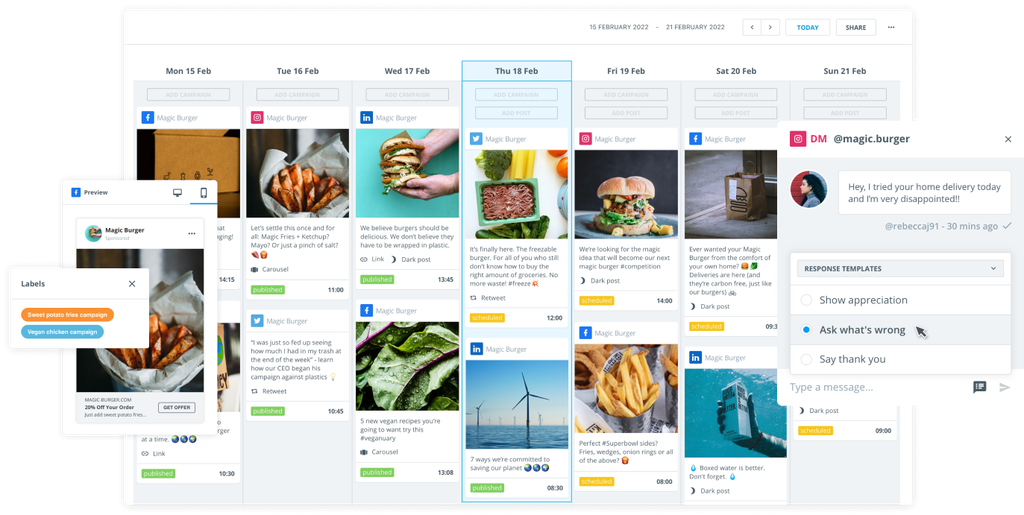
Ask any social media manager what their biggest challenge is, and plenty will say juggling multiple social media accounts.

With billions of users across multiple social networks, the stakes for brands and the need for audience engagement have never been higher. Maintaining a presence on all of these platforms is no easy task.

Are you trying to manage all these channels without the right tools? That’s burnout waiting to happen.

That's why marketers rely on social media management tools to save hours each week, maintain a steady posting schedule, and accurately track performance metrics.

But with so many platforms out there, how do you choose the right one for your needs? To make things easier, we’ve identified 12 of the best social media management tools – including Brandwatch, of course – that can help you save time, improve engagement, and crush your social goals.

In this guide:

Key features to look for in social media management tools

Social media management software is a must, but how do you pick the tool that’s best for your business? 

Here are the key features to consider when weighing up your options.

Scheduling & automation

Imagine having all your posts lined up for an entire month, automatically published at the times when your audience is most active. That’s what a good social media management tool should do for you.

Instead of manually posting every day, you can batch your content creation in one session, leaving you free to focus on strategy and engagement. Automating everyday tasks – such as scheduling posts, responding to common questions, or pulling performance metrics – can significantly reduce your to-do list.

Analytics & reporting

Next, look for tools with clear, customizable reports that enable you to share key metrics with your team and stakeholders. By tracking data like engagement rates, click-throughs, and audience demographics, you get insight into what’s working – and what’s not.

These analytics help you pinpoint which content drives results. For example, you might discover your video posts get far more engagement than images, prompting you to adjust your strategy accordingly. The ability to quickly visualize performance (and even benchmark against industry standards) is where the magic happens.

Content curation

Your social media management tool should help you find and share relevant content without spending hours scouring the internet. Look for platforms that pull in trending articles, industry news, or user-generated content based on your audience’s interests.

This keeps your feed fresh and engaging, positioning your brand as a trusted source of information. A built-in content library or content suggestions feature can save you time while ensuring you always have something interesting lined up.

Team collaboration

If you work with a team (or multiple teams), robust collaboration features are a must. The best tools offer role-based access, approval workflows, and even real-time messaging to eliminate the need for endless email threads or external chat apps.

For example, your graphic designer can upload visuals while your copywriter drafts posts and a manager can review and approve everything in one place. Having a single collaborative hub ensures everyone stays on the same page, and nothing falls through the cracks.

Social listening & engagement

Well-rounded social media platforms usually incorporate social listening and engagement features. These tools track brand mentions, hashtags, and keywords to give you a real-time view of how people talk about your brand.

Monitoring customer sentiment enables you to identify trends, respond to issues promptly, and engage with your audience more effectively. For instance, if your tool alerts you to a sudden spike in mentions, you can jump into the conversation – whether it’s to thank users for positive feedback or to address a brewing crisis – right away.

Top Social Media Management Tools for 2026

Now, let’s dive into our curated list of the top tools. 

Each has its own strengths while offering a mix of scheduling, analytics, and more. 

Brandwatch leads the pack, but we'll also look at some other options on the market.

1. Brandwatch

Brandwatch Social Media Management provides you with everything, from a cross-channel inbox across social media platforms to a content calendar and extensive collaboration features.

With Brandwatch at your side, you won’t miss a moment of interaction with a customer, and you'll feel fully on top of your workload. It's easy to schedule social media posts so that your brand is always there when your audience is online.

Brandwatch’s unified solution means you can plan campaigns, publish posts, and respond to your audience all within the same platform, breaking down the barriers between analysis and execution.

You can even incorporate Brandwatch Consumer Research into your workflow and weave audience and industry insights into your social media strategy.

Reasons to choose this tool

The Brandwatch suite enables you to delve deeply into consumer behavior and preferences by analyzing vast amounts of online conversations and data. In fact, the built-in social listening feature Listen lets you monitor your brand across 100 million+ sources.

The analytics are also pretty unbeatable, with customizable dashboards and flexible reporting options that allow you to tailor insights to your specific needs – enabling you to track your social media campaigns with precision and ease.

Finally, Social Media Management pairs extremely well with the rest of the Brandwatch suite, giving you enhanced consumer intelligence, AI-driven sentiment analysis, and tools to identify and manage relationships with influencers.

If you manage multiple clients and need a solution with access to social media listening, you'll find all the features with this tool.

2. Zoho Social

Zoho Social is a versatile social media management software that enables businesses to schedule posts, monitor multiple channels, and engage with audiences. Like the other tools on our list, it can integrate seamlessly with various social media accounts.

A big advantage of Zoho Social is its tight integration with the broader Zoho ecosystem. If you’re already using Zoho CRM or Zoho Desk, Zoho Social can connect your social media efforts with your sales or support teams so that leads or customer queries from social don’t fall through the cracks. 

Reasons to choose this tool:

With a handy browser share extension, you can share content directly from your browser to your social accounts on the fly without switching platforms.

Beyond that, it also connects with Zoho’s CRM and helpdesk tools so you can align social media interactions with sales and customer support pipelines.

Finally, there's a drag-and-drop content calendar for scheduling and visualizing your social posts across days and weeks.

3. Databox

Databox is a popular business analytics platform that centralizes performance data from over 100 sources – including social networks, Google Analytics, HubSpot, and CRM tools. While not a traditional social media scheduler, Databox is incredibly useful for marketers who want to track all their KPIs in one place.

With an intuitive drag-and-drop dashboard builder, you can design custom dashboards highlighting the metrics that matter most to you – whether that’s social engagement, website traffic, or return on investment (ROI). 

Real-time monitoring keeps you informed about sudden spikes or dips, and you can set up automated reports to share updates with stakeholders on a schedule. Databox also offers goal-tracking and benchmarking features, making it easier to measure your performance against industry standards or past results.

Reasons to choose this tool:

With Databox, you can set specific goals (for example, reach X website visits or Y social engagements) and get notified on progress or anomalies – so you know when you’re nearing targets or when something needs attention.

You can also build your own custom dashboards highlighting the metrics and KPIs you care about most, with no coding required.

As a bonus, it supports integration with over 100 tools, allowing truly centralized tracking of all your marketing data.

4. Statusbrew

Statusbrew is a social media management platform designed to help businesses and agencies plan content, manage conversations, and analyze performance – all from one dashboard.

Like other social media management tools, it provides a unified inbox to track messages, comments, reviews, and mentions across platforms, which helps your team stay responsive and organized. 

It also gives you full control over post-scheduling, from drafting to approval workflows, and robust reporting capabilities. 

Reasons to choose this tool:

Look out for automated comment moderation, which allows you to set up over 60 customizable rules to automatically manage and hide spam or unwanted comments (across both organic and ad posts) for cleaner engagement.

There are deep analytics with highly customizable reporting to help you prove ROI and refine your strategy, plus full control over content workflows and report sharing.

Finally, there's a robust publishing calendar that supports multi-step approval workflows and even provides shareable calendar links for stakeholders.

5. Quintly

Quintly is all about the numbers – delivering deep insights through customizable dashboards and a wide array of metrics so you can fine-tune your social strategy.

It offers competitive benchmarking and has the option to create custom metrics or reports tailored to specific needs.

By pulling in data from both your profiles and competitors, Quintly ensures you always know how you stack up in your industry and where to make improvements.

Reasons to choose this tool:

Quintly is mainly known for a feature called QQL (Quintly Query Language). It's a proprietary query language that lets users develop custom metrics and reports for highly specific insights.

It allows you to export your social data in various formats (CSV, XLSX, or PDF, for example) to analyze results outside the platform or integrate with other systems.

You could use it to measure your social media performance against key competitors or industry benchmarks to identify strengths and gaps.

6. Loomly

Loomly is social media management software designed to simplify content creation and collaboration. It offers a clear, step-by-step workflow that guides you through each stage of developing social posts – from drafting text and visuals to scheduling final approvals.

Loomly’s intuitive interface even suggests posting ideas and trending topics to keep your content calendar fresh. 

Once your posts go live, Loomly provides built-in analytics to show how your content is performing, allowing you to refine future campaigns accordingly.

Reasons to choose this tool:

While you draft, Loomly gives suggestions to improve effectiveness – like optimal posting times or platform-specific best practices to maximize engagement.

It also offers a centralized library to store your reusable assets (images, templates, post drafts), streamlining the content creation process.

Finally, there's a clear approval process (draft, approve, publish) that maintains consistency and helps avoid mistakes or unauthorized posts.

7. Buffer

Buffer is a straightforward social media management tool well-known for its ease of use in scheduling posts across platforms like Facebook, X, LinkedIn, and Instagram. 

It has a clean, no-frills interface that allows you to queue up content and publish it at optimal times, helping you maintain a consistent posting cadence with minimal effort.

This social media scheduling tool may not have all the bells and whistles of some enterprise tools, but it covers the essentials. Buffer also offers basic analytics on engagement and an overview content calendar.

Reasons to choose this tool:

Buffer is known for its simple, user-friendly interface that’s very suitable for beginners or individuals.

It's got a few handy but limited features, like a browser extension so that you can share content from anywhere on the web.

There's also a hashtag manager that allows you to save groups of hashtags to reuse in your posts and an AI assistant to generate post ideas, repurpose old content, or even auto-write captions with Buffer’s built-in AI tools for content creation inspiration.

8. Hootsuite

This widely recognized social media management software offers various tools for scheduling, monitoring, and analyzing social performance.

With this tool, you'll get real-time monitoring of your feeds, mentions, keywords, and direct messages. This allows you to engage promptly and keep track of what people are saying about your brand. Like similar platforms, Hootsuite also provides a publishing dashboard where you can plan and queue up posts across multiple profiles through a unified calendar view.

Reasons to choose this tool:

With this tool, you can set up a content library – a central repository for pre-approved brand assets and templates – ensuring consistent messaging across all campaigns.

You'll also gain access to built-in analytics that measure social media metrics and the ROI of your social campaigns, linking engagement metrics to web traffic, conversions, and revenue.

As you'd expect, it also supports multiple social platforms and numerous accounts from a single interface – which definitely makes life easier.

9. Sprout Social

Sprout Social is another all-in-one social media management platform designed to streamline publishing, monitoring, and in-depth analytics. 

It's got a Smart Inbox, which consolidates messages, comments, and mentions from all your connected accounts into a single, organized view.

Analytics and reporting are in there, too, while users get access to social listening tools to track brand mentions, competitor activities, and trending topics so you can optimize your content strategy on the fly.

Reasons to choose this tool:

Sprout offers a range of analytics and reporting features that provide deep insights into content performance. 

Meanwhile, the Smart Inbox provides quick and centralized message management across multiple social media profiles.

With advanced social listening tools, you'll also gain an understanding of audience sentiment and trends.

10. SocialBee

SocialBee is a social media management platform that places a strong emphasis on content categorization and evergreen scheduling. 

It has a slightly different approach in that it automatically recycles your evergreen posts, allowing you to maintain a steady flow of content without constantly creating new material. This helps keep your profiles active and your audience engaged with a balanced mix of content.

The platform also provides curated content suggestions to help fill your calendar with relevant third-party content, saving you time on research. And, thanks to its category-based scheduling, you can ensure a balanced mix of content (for example, you can set it to post a promotional item every Monday, a blog post every Wednesday, a quote every Friday, etc.).

Reasons to choose this tool:

Though it's based on a pretty simple idea, and you won't get much in the way of analysis, this tool will significantly reduce the time spent creating new posts. All your best content is automatically repurposed, and you can tag it by category to ensure an even mix.

There are also customizable post formats for each platform, which let you optimize hashtags, @mentions, and content for where it’s being posted (all within one workflow).

11. Agorapulse

Agorapulse is a comprehensive solution for scheduling, monitoring, and analyzing social media efforts. It's got a user-friendly dashboard that centralizes all your messages, mentions, and comments into one unified inbox, so you never miss a conversation across any of your social channels.

Beyond the inbox, Agorapulse offers detailed analytics that reveal which posts drive the most engagement, helping you refine your strategy. 

It also supports content scheduling (including for Threads and Bluesky) and features collaboration tools such as content approval and assignment. 

Reasons to choose this tool:

All your social interactions are funneled into one inbox, complete with assignment and labeling options to keep customer engagement organized.

You can even receive real-time notifications in Slack for new inbox items, post approvals required, or failed posts so your team can react quickly without constantly checking the app.

There's also an employee advocacy module to run ambassador programs, plus the ability to track CRM details for users interacting with you on social media.

Time to boost your social media strategy with the right tool

Most social media management tools each offer strong features, but choosing the wrong one can lead to clunky workflows and fragmented insights. 

To keep up with the fast-paced world of social media in 2026, you need a unified system that streamlines your work and drives tangible results.

The platforms covered above excel in various areas, from scheduling to listening and analytics. The key is to choose one that aligns with your business’s priorities and scales with you. Ideally, the right tool will save you time while providing actionable insights to continually improve your strategy.

Brandwatch, for example, combines powerful social media management capabilities with AI-driven consumer intelligence to give you a centralized, real-time view of your performance. Instead of juggling outdated workflows or making decisions on gut feel, you’ll have data-backed insights at your fingertips.

By adopting a modern, all-in-one platform like Brandwatch, you can transform how you engage with your audience and react to the market.

Don’t settle for less. Take control of your social media presence and truly harness its power – whether that’s by supercharging your current toolkit or by embracing a new platform that can elevate your entire strategy. 

With the right tool in hand, you’re not just managing social media, you’re mastering it.