How to Schedule Social Media Posts Effectively
By Sabrina DorronsoroNov 27
Your field guide to navigating the social media wilderness - powered by 18M+ data points and expertise from 1,000+ marketers.
Published October 10th 2025
Simplify your social media to-do list with the help of automation.
Managing multiple social media profiles can feel like a 24/7 job.
If you’re juggling posts on Facebook, Instagram, LinkedIn, X, TikTok, and more, you know how challenging it is to keep fresh content flowing consistently.
That's why social media scheduling tools are the secret weapon for marketers and social media managers. They let you plan posts ahead of time, maintain a steady posting cadence, and free up hours to focus on strategy and engagement, rather then scrambling to post in real time.
In fact, these tools have become so vital that the social media management software market is projected to be worth $85 billion by 2030.
These days, pretty much all social media managers schedule social media posts to keep up with their growing workload and multiple accounts. With new platforms popping up all the time (hello, Threads, Bluesky, and TikTok), and algorithm changes that reward consistency, scheduling just makes life easier.
The right scheduling platform can help you publish at optimal times, keep on top of multiple social media accounts, and even coordinate team workflows. The result? More engagement, less stress, and a clearer view of your social performance.
In this article, we’ll break down the 12 best social media scheduling tools on the market right now. We’ll highlight some key features and give you tips on choosing the right scheduler for your needs. By the end, you’ll be equipped to pick a tool that saves you time and supercharges your social media strategy.
Scheduling social media posts comes with a lot of benefits.
First of all, planning content in advance lets you post consistently, even outside of 9-5 hours or across time zones. You can schedule your posts to go live at the times your audience is most active (even if that’s 7 am on a Sunday), keeping your brand visible and building trust around the clock.
Secondly, batching your content creation and scheduling posts saves time and reduces daily distractions. Instead of dropping everything to hit “publish” at the perfect moment, you can focus on other tasks.
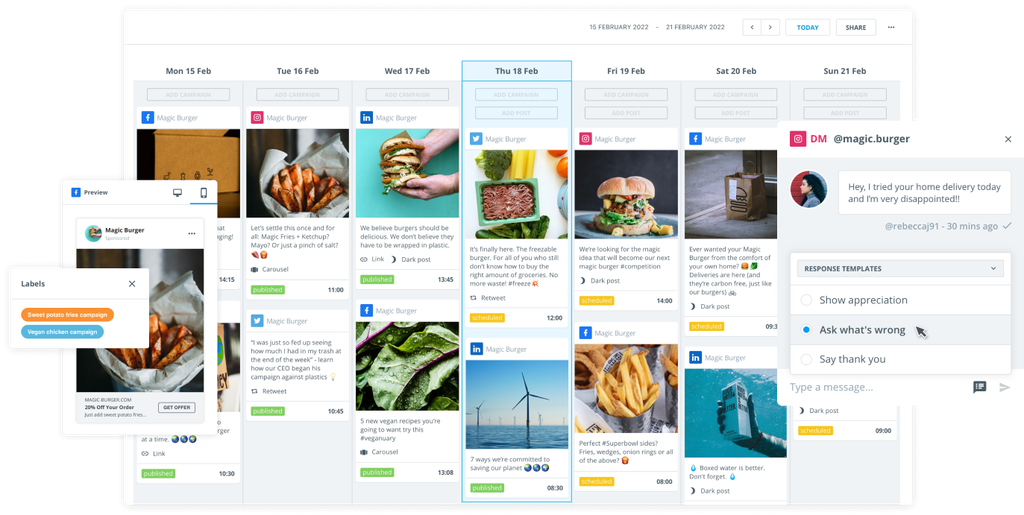
Scheduling is great for planning, too. Most scheduling tools have a content calendar that lets you see all your upcoming posts across platforms in one place, which is invaluable for planning campaigns or themes. You can ensure variety (so you don’t post three promos back-to-back) and align content with holidays, launches, or events.
Many tools also support team collaboration and approval workflows, so posts are reviewed and on-brand before going live, leading to more polished content and fewer mistakes.
And don't underestimate the power of multi-platform management. With brands managing content across Facebook, Instagram, LinkedIn, YouTube, TikTok, and more, most schedulers let you manage all channels from one dashboard. You can tailor posts to each platform yet schedule them centrally, even for new platforms like Threads.
As you shop around for a social media scheduling tool, you'll want to check that you're definitely getting the benefits we mentioned above.
Look for multi-platform support and a user-friendly content calendar (ideally with drag-and-drop functionality) to visualize and adjust your schedule.
If you're working with a team, check that your chosen tool supports multiple users with roles/permissions and offers approval workflows (so posts can be reviewed internally before publishing). A shared content library for images, videos, and templates can be really helpful, too.
Look to see how the tools you're considering use artificial intelligence (AI) – for example, to recommend posting times or hashtags, or let you preview your updated grid. If you run social ads, look for a platform that can handle paid posts alongside organic content.
Good scheduling tools also tend to provide built-in analytics or easy integrations to track metrics like likes, shares, clicks, and follower growth over time. Advanced platforms offer campaign-level reporting, audience demographics, and even competitor benchmarks.
Some advanced tools even go beyond scheduling with social listening or sentiment analysis add-ons, which help you monitor what’s being said about your brand. Beyond the basics, it's worth considering if your team might benefit from these extras, too.
Without further ado, let's dive into the most popular scheduling tools on the market.
Brandwatch Social Media Management is an all-in-one platform that combines social media scheduling, publishing, engagement, and analytics in one place.
As a leader in the social media management space, it’s trusted by enterprise teams and agencies worldwide for coordinating complex multi-channel campaigns.
It's a total powerhouse when it comes to social media, and its scheduling capabilities are second-to-none. There's a really easy-to-use and visually appealing content calendar that keeps you clear on all of your scheduled social media posts, including both organic and paid content.
It's also an official partner with the biggest social media platforms, so you don't have to worry about any issues with compatibility. Beyond that, there are clear approval workflows and even a content pool to store all of your digital assets.
Of course, since it's an all-in-one platform, there's so much more to this tool. No wonder it's consistently top-rated by users.
Medium to large businesses and agencies that need an enterprise-grade, all-in-one solution for multi-platform management, scheduling, and analytics. It’s also excellent for social media managers and teams, thanks to its outstanding collaboration features.
>> Want to learn more? Book a demo with Brandwatch today and take your brand to the next level.
Buffer is known for its simplicity and clean interface, so it appeals to individuals and small teams.
It allows you to easily schedule posts for your social media accounts and focuses on just the essentials to help you maintain a consistent presence.
If you're just starting out with social media tools and you don't mind limited features, Buffer offers simple scheduling and basic performance tracking.
Later started as an Instagram scheduling tool and has grown into a multi-platform service with a strong emphasis on visual planning.
Its drag-and-drop content calendar and media management features are perfect for Instagram, Pinterest, TikTok, and other visually heavy social media channels.
If you rely on visual storytelling on platforms like Instagram and Pinterest, Later’s user-friendly interface makes it easy to craft a beautiful, consistent feed.
CoSchedule takes a slightly different approach to social media scheduling, as it combines social posts with your broader content marketing calendar.
If you manage not only social media posts but also blog content, email campaigns, or other marketing projects, CoSchedule provides a unified calendar to organize it all.
It’s essentially a marketing project management tool with built-in social scheduling.
This tool is useful if you plan content in advance and need social media promotion to sync with those plans. However, it won't give you much in the way of advanced analytics or other social media management features.
Zoho Social is part of the Zoho ecosystem (which offers everything from CRM to email software) and is another feature-rich social media management tool.
It covers scheduling, basic monitoring, and reporting.
If you need a tool for multi-platform scheduling, basic monitoring, and linking social media efforts to CRM/sales.
Hootsuite is one of the original and most well-known social media management tools, and it remains a popular all-in-one scheduler.
It supports a wide range of networks and boasts plenty of scheduling and monitoring options, including auto-scheduling.
Reliable scheduling, broad platform support, and integration capabilities.
Sprout Social is a premium social media management platform known for its intuitive design and powerful features.
It connects with most social media platforms and combines scheduling with other features like a social inbox and rich analytics, so it's worth considering if you need more than just automated publishing.
Businesses and teams that are willing to invest in a premium tool for access to strong analytics and an integrated engagement inbox.
Sendible is a versatile social media management platform mostly used by agencies and consultants.
It supports a lot of different networks and offers extensive customization, including white-label options, making it easy to manage multiple clients or brands.
Social media agencies, consultants, and any organization managing multiple brands or clients who need a highly customizable tool with multi-account management and white-label capabilities.
Loomly markets itself as a “brand success platform,” but at its core is a social media scheduling and content planning tool.
It comes with features to aid collaborative teams, providing an easy workflow for drafting, approving, and publishing posts, along with helpful ideas to inspire content.
Those who need a simple, collaborative content calendar. It’s also useful for those who want built-in content ideas and a clear approval process.
SocialBee focuses on simple content recycling and category-based scheduling to keep your social presence active with less effort.
It’s aimed at those who want to maximize the use of evergreen content and maintain a consistent posting schedule without constant manual scheduling.
Small businesses, entrepreneurs, and content creators who have lots of evergreen content and want a “set it and forget it” scheduling solution, but don't need all the features of a social media management tool.
Tailwind is a specialized scheduler aimed at social media marketing professionals who mainly use Pinterest and Instagram.
It offers unique tools designed to boost your Pinterest strategy, many of which also support Instagram scheduling, making it a strong option if Pinterest is your primary social media platform.
Tailwind is especially useful for anyone who relies on Pinterest for traffic and wants a tool built to amplify pin performance and community sharing.
Sprinklr is an enterprise-grade social media management platform designed for large organizations and global brands.
It goes beyond scheduling into a unified system that also covers social listening, advertising, customer care, and analytics – it's a platform for managing a brand’s entire digital presence at scale.
Large enterprises with complex, multi-team social media operations that need control, integration, and scalability.
Before you sign up for your chosen tool, work through the following steps to ensure you're making the right decision.
Start by listing what matters most for your situation. Do you need a tool that’s easy for one person to use, or one that supports a team with approval workflows? Are analytics and reporting a top priority, or are you mainly focused on scheduling and publishing efficiency?
Knowing your must-haves (and nice-to-haves) will quickly filter out options that don’t meet your needs.
Make sure the tool supports all the networks you use (and plan to use).
If short-form video (Reels, TikToks) is a big part of your strategy, choose a tool that can schedule those formats reliably. If visuals on Instagram or Pinterest are key, look for features like a media library or grid preview.
And if you need to manage social ad campaigns as well, consider a platform that can handle paid content alongside organic posts. Tools with auto-boosting capabilities are well worth exploring.
If you’re a solopreneur or small business, you might favor simplicity and affordability.
If you’re part of a marketing team or agency, you'll probably need collaboration features – a platform like Brandwatch offers multi-user support, approvals, and robust analytics for stakeholder reporting. Enterprise organizations will need advanced control and integration.
In short, the larger and more complex your operations, the more you’ll lean toward a tool that provides oversight and scalability.
Prices range widely, so outline your budget and consider the value you get.
Sometimes, a mid-tier paid tool consolidates features that would otherwise require multiple apps (saving money and hassle).
Think about return on investment (ROI): if a tool saves you several hours a week or helps boost engagement and leads, that likely justifies the cost.
Consider how much help you might need. Some smaller tools are praised for personal customer support, while others (especially free ones) may leave you with self-serve documentation.
If you anticipate needing guidance, lean towards companies known for good support. Also, a large user community can be helpful – popular tools have lots of tutorials and forums where you can learn tips.
Newer or niche tools might have fewer third-party resources, so their own support will need to be strong to make up for it.
Test-drive your top choices with a product demo to see how it works with your actual workflow.
Schedule some posts, explore the interface, and maybe involve a teammate to test collaboration. See how intuitive it feels.
A tool only delivers value if you actually use it, so the one that you find comfortable and that ticks your feature boxes is likely the right choice.
Let's wrap up some loose ends surrounding scheduling.
No – there’s no solid evidence that third-party scheduling tools reduce your reach or engagement.
Social networks treat content the same whether it’s posted via their site or an approved third-party tool.
Many scheduling tools (like Brandwatch) are official partners of the social networks, meaning they follow all the guidelines. The key to good engagement is what you post and when, and a scheduler actually helps with the “when” by letting you target peak times. As long as you're crafting great content and tailoring it to each platform, a scheduler can actually boost your reach.
Yes, many modern scheduling tools support short-form videos and Stories, though the level of automation can vary.
For Instagram Stories, most tools let you plan and schedule the Story content. But when the time comes, you’ll get a push notification to publish it manually (since Instagram’s API limits direct auto-posting for Stories).
For Instagram Reels, since the API opened up in 2022, many platforms (like Brandwatch and Later) can auto-publish Reels for business accounts – you just schedule it like a normal post.
With TikTok, some tools can schedule videos and auto-post them at a set time, while others might prepare the post and send you a reminder to hit publish (TikTok’s API rules have been evolving).
It’s always best to double-check the tool’s current capabilities for these formats. But overall, you absolutely can plan out Stories, Reels, and TikToks in advance.
It depends on how many accounts you manage and what features you need.
Native schedulers (like the tools built into Facebook’s Meta Business Suite or X’s scheduling function) are free and work well if you’re mostly focused on one platform.
However, you have to manage each platform separately. Third-party tools let you handle everything from one dashboard and usually offer extra features – for example, combined analytics across platforms, one-click scheduling to multiple networks, content libraries, and team collaboration features.
These days, having the right scheduling tool can feel like having a reliable teammate by your side.
It won’t replace your creativity or strategy, but it will empower you to bust out a sleek social plan with much less effort. The “best” social media scheduler for you ultimately depends on your needs – whether you’re a solo creator looking to save time or a large enterprise coordinating campaigns across continents.
All the tools we’ve covered have their strengths: some excel at visual planning for Instagram and Pinterest, others offer powerful analytics and team collaboration for bigger organizations, and some automate your posting queue so you can focus on content.
The good news is that these platforms evolve with social networks. As new features roll out – from Reels to whatever comes next – top schedulers integrate them, helping you stay current without missing a beat.
By choosing a tool that fits your workflow, you’ll make life so much easier. No more scrambling for last-minute posts or juggling multiple apps – you’ll have a bird’s-eye view of your social calendar and more freedom to be strategic and creative.
Here’s to elevating your social media game – with the help of the right tool, you can build your brand, connect with your audience, and maybe even reclaim a few hours of your week.
Everything you need to discover, attract, and engage customers on social, across teams and regions.
Existing customer?Log in to access your existing Falcon products and data via the login menu on the top right of the page.New customer?You'll find the former Falcon products under 'Social Media Management' if you go to 'Our Suite' in the navigation.
Brandwatch acquired Paladin in March 2022. It's now called Influence, which is part of Brandwatch's Social Media Management solution.Want to access your Paladin account?Use the login menu at the top right corner.